How Businesses Are Actually Using AI Right Now

Artificial intelligence is showing up in everyday business operations faster than many organizations expected, and many leaders are now asking how businesses use AI in practical ways. What started as experimental tools for writing or coding is quickly becoming part of how companies analyze data, manage workflows, and support employees.

Across Texas and throughout the I-35 corridor, many businesses are already experimenting with AI in practical ways. Some teams are using it to speed up routine work. Others are connecting AI tools to internal systems to help employees find information faster or automate repetitive tasks.

The technology itself is moving quickly, but the real question for most business leaders is simpler.

Where does AI actually make sense in day-to-day operations?

How Businesses Use AI in Daily Operations

AI adoption rarely starts with a massive companywide rollout. In most organizations, it begins with small use cases where automation or analysis can save time.

Over time, those small experiments often expand into broader workflows.

Automating repetitive work
pull quote graphic "the wins come from removing routine work, not removing people.

One of the earliest ways businesses adopt AI is by automating tasks that consume hours of manual effort.

Examples include:

  • processing invoices or expense reports
  • organizing incoming support requests
  • sorting documents or emails
  • summarizing long reports or meeting notes

Instead of replacing employees, these tools often remove routine administrative work. That allows teams to focus on the parts of their job that require judgment, creativity, or customer interaction.

Many organizations find that even small automations can recover significant time across a team. 

Helping teams work faster

Another common use for AI is assisting with early-stage work.

Marketing teams may use AI tools to generate draft content ideas or summarize research. Sales teams might use it to prepare call summaries or organize customer notes. Operations teams often use AI to analyze documents or extract information from reports.

The output still requires human review and editing, but the starting point is much faster.

Rather than beginning with a blank page or a large set of raw data, employees can start with a draft that they refine and improve.

Turning data into usable insights

Many businesses collect large amounts of operational data but struggle to interpret it quickly.

AI tools are increasingly being used to analyze trends, summarize reports, and identify patterns that might otherwise go unnoticed.

For example, financial teams may use AI to analyze spending patterns or forecast cash flow scenarios. Operations teams might use it to identify trends in service requests or product performance.

The goal is not to replace decision-making, but to give leaders faster access to the information needed to make those decisions.

Supporting customer experience

AI is also beginning to play a role in how companies interact with customers.

Some organizations use AI-powered chat tools to handle common questions before a support ticket reaches a human technician. Others use AI to search internal knowledge bases and surface relevant documentation for support teams.

When implemented carefully, these tools can improve response times while still allowing employees to step in when more complex issues arise.

Connecting business systems together

One of the most powerful uses of AI happens when it connects to the systems businesses already rely on.

Customer relationship platforms, document repositories, accounting software, and internal knowledge bases often contain valuable information that employees need every day.

When AI tools can retrieve and summarize that information, employees can locate answers much faster.

For example, a team member might ask an AI assistant to summarize a customer account history from the CRM, retrieve related documents from Microsoft 365, and generate a short briefing before a meeting.

These capabilities can significantly improve productivity. They also introduce an important consideration.

Access.

Why AI Tools Need Access to Company Systems

Most AI tools become far more useful when they can interact with company data.

To retrieve documents, analyze reports, or automate workflows, the AI system must be able to connect to the applications where that information lives.

These connections are usually made through APIs or integration tools that allow software platforms to exchange data.

Once those connections exist, the AI system may be able to:

  • retrieve company documents
  • summarize internal reports
  • analyze financial or operational data
  • automate workflows across applications

This is where AI shifts from being a standalone tool to becoming part of a broader business system.

It is also where security and governance become critical.

How Applications Talk to Each Other

Behind most modern software integrations is a set of communication rules called an API, which stands for application programming interface.

An API allows one system to request information from another system in a structured way.

For example:

A CRM system may allow another application to retrieve customer records.
A document platform may allow an application to search stored files.
An accounting platform may allow another tool to retrieve invoice data.

AI platforms often rely on these connections to access the data they analyze.

Many businesses also use automation platforms that connect multiple systems together. These tools can trigger actions such as updating records, sending notifications, or creating reports when certain events occur.

When AI tools are added into this environment, they often interact with the same integrations.

This creates powerful automation opportunities, but it also means the AI system may have visibility into sensitive company information.

How AI Adoption Typically Happens Inside a Business

Most companies do not introduce artificial intelligence across the entire organization at once. Adoption usually happens gradually as teams begin experimenting with tools and discovering where the technology can save time or improve workflows.

In many organizations, AI adoption follows a pattern that looks something like this:

  1. Stage 1: Individual experimentation
    Employees begin using AI tools to summarize documents, organize research, draft content, or analyze small sets of data.
  2. Stage 2: Team productivity tools
    Departments start adopting AI features built into the platforms they already use, such as email systems, document tools, or customer relationship platforms.
  3. Stage 3: Workflow automation
    Organizations begin connecting AI tools to operational systems so they can analyze data, retrieve information, and automate repetitive tasks across multiple applications.
  4. Stage 4: Integrated business systems
    AI becomes part of broader workflows across the organization, interacting with document repositories, customer systems, financial platforms, and internal knowledge bases.
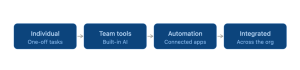
how businesses are using ai diagramAs businesses move through these stages, questions around governance, security, and access control naturally become more important. When AI systems begin interacting with company data and business applications, organizations need clear policies around how those tools are used and what information they can access.

Why AI Governance Is Becoming a Business Requirement

As AI tools become more common in the workplace, many organizations are discovering that adoption is happening faster than internal policies can keep up.

Employees are experimenting with AI to summarize documents, analyze spreadsheets, generate reports, and organize research. In many cases, these tools connect directly to business systems such as document platforms, customer relationship software, or internal knowledge bases.

That connectivity is what makes AI powerful. It is also what introduces new risks.

Without clear guidance, employees may not realize when sensitive information is being shared with an external system or when an AI tool has access to more company data than intended.

This is where governance becomes important.

AI governance does not mean blocking innovation or preventing employees from using new tools. It means creating clear guardrails around how those tools interact with company systems and business data.

Many organizations are beginning to establish policies that address questions such as:

  • Which AI tools are approved for business use
  • What types of company data can be used with those tools
  • Which systems AI applications are allowed to connect to
  • How AI-generated outputs should be reviewed before being shared externally

These policies help organizations adopt AI responsibly while still allowing teams to benefit from the technology.

For many businesses, governance also includes reviewing how identity security and access controls apply to new AI integrations.

The Reality of Shadow AI

Even in companies that have not formally adopted AI, employees are often already using it.

This is sometimes referred to as shadow AI. It happens when individuals begin experimenting with tools on their own without the organization having an official policy in place.

In many cases, the intention is positive. An employee may use an AI tool to summarize meeting notes, analyze a spreadsheet, or help organize a project plan.

The challenge is that these tools may interact with company information in ways that leadership has not evaluated yet.

For example, an employee might paste internal documents into an AI prompt to generate a summary. Another team member might connect a third-party AI tool to a cloud storage platform so it can search company files.

Without oversight, these actions can unintentionally expose sensitive information or create access paths that were never reviewed by the organization’s technology team.

Most businesses are already familiar with a similar situation from the past.

Before cloud software became widely adopted, employees often signed up for their own online tools to solve immediate problems. Over time, this created what many organizations referred to as shadow IT.

AI is creating a similar dynamic today.

Rather than trying to eliminate experimentation entirely, many organizations are choosing to address the issue through visibility and governance.

Clear policies, approved tools, and strong access controls allow employees to explore AI responsibly while still protecting company systems and data.

The Security Considerations Businesses Often Miss

When organizations adopt AI tools quickly, access controls are sometimes overlooked.

An AI platform connected to internal systems may be able to retrieve large volumes of company data depending on how permissions are configured.

That could include:

  • financial records
  • HR documents
  • internal reports
  • customer information

Most businesses would never intentionally expose this information broadly. However, poorly configured integrations or overly broad permissions can create situations where tools have more access than expected.

This is one of the reasons many organizations review identity controls and access policies when adopting new automation or AI tools.

Conditional access policies, identity security controls, and proper permission management all help ensure that systems interact with company data in a controlled way.

Supporting Businesses as AI Adoption Expands

As more companies explore AI tools and automation, technology oversight becomes increasingly important.

Hill Country Tech Guys works with businesses across Central Texas and the I-35 corridor to help evaluate how new technologies interact with existing systems.

That includes reviewing identity security, access controls, and integrations that connect business applications together.

The goal is not to slow down innovation. It is to ensure that new tools support the business without introducing unnecessary risk.

AI will continue evolving quickly. Organizations that take a thoughtful approach to how these tools connect with their systems will be better positioned to take advantage of the technology while maintaining control over their data.

If your organization is evaluating new AI tools or automation platforms, it may be worth reviewing how those systems interact with your existing infrastructure and security policies.

Hill Country Tech Guys helps businesses assess these environments and implement the controls needed to support modern cloud systems and emerging technologies.
Frequently Asked Questions

What are the most common ways businesses use AI day to day?

Most start small. Automating repetitive admin work like sorting emails or processing invoices, speeding up first drafts for marketing or sales, and pulling patterns out of operational data are the usual entry points. The consistent thread is that AI handles the routine first, then expands into larger workflows once teams see where it actually saves time.

No. In practice, the early wins come from removing routine work, not removing people. Drafting, summarizing, and sorting data get faster, which frees employees to focus on judgment, customer relationships, and the work that needs a human. The output still needs review before it goes anywhere.

AI gets far more useful when it can reach the information employees already work with, like the CRM, document storage, or accounting software. Those connections usually run through APIs, which let one system request data from another in a structured way. That access is what makes AI productive, and it’s also why permissions are worth a close look.

Shadow AI is when employees start using AI tools on their own before the company has a policy in place. The intent is usually good, someone summarizing notes or analyzing a spreadsheet to save time. The catch is that those tools may touch company information in ways leadership hasn’t reviewed yet. It mirrors the shadow IT pattern from the early cloud-software years.

A practical policy answers a handful of questions: which AI tools are approved, what company data can be used with them, which systems those tools can connect to, and how AI-generated output gets reviewed before it’s shared. The point is clear guardrails, so people can use AI without guessing about what’s allowed.

It comes down to access. Review how permissions are set so a connected tool can only reach what it should, and use controls like conditional access and identity security to keep that access scoped. Most data exposure with AI traces back to overly broad permissions rather than the tool itself.

Multi-Factor Authentication for Business: What It Is, How It Works, and How to Implement It Correctly

Credential-based compromise remains one of the most common causes of security incidents in business environments. Stolen passwords are inexpensive, widely available, and often reused across systems.

In modern organizations where cloud platforms, remote access, vendor integrations, and privileged accounts intersect, a password alone is no longer a reasonable line of defense.

Multi-Factor authentication, often referred to as MFA, is now considered a foundational security control for businesses of nearly every size. But enabling MFA is not the same as implementing it correctly. And not all MFA methods offer the same level of protection.

This guide explains what multi-factor authentication is, why it matters in business environments, how it interacts with single sign-on, what phishing-resistant MFA means, and how to implement it in a structured way that supports both operational security and regulatory defensibility.

What Is Multi-Factor Authentication

Multi-Factor authentication is a security control that requires users to verify their identity using two or more independent factors before accessing a system.

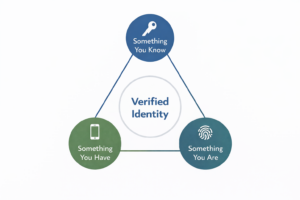
Authentication factors fall into three categories:At triangular diagram showing the three factors of multi-factor authentication (MFA): something you know, something you have, and something you are, leading to a verified identity

  • Something you know, such as a password or PIN
  • Something you have, such as a mobile device, hardware token, or security key
  • Something you are, such as a fingerprint or facial recognition

When a login requires more than one of these categories, it qualifies as multi-factor authentication.

You will also see the term 2FA, or two-factor authentication. Two-factor authentication is a subset of MFA. It uses exactly two factors. MFA can require two or more factors, depending on policy and risk profile.

For a broader breakdown of common cybersecurity terminology, see our glossary of IT terms.

In business environments, MFA is typically applied to:

  • Email systems
  • Cloud applications
  • VPN access
  • Administrative accounts
  • Remote access tools
  • Financial systems
  • HR platforms

The objective is straightforward. If a password is stolen, guessed, reused, or purchased from a breach database, the attacker cannot access the account without the second factor.

That is the theory. Implementation determines whether that theory holds up.

Why MFA Is Important for Businesses

Credential-based compromise remains the most reliable entry point into business systems. Passwords are reused, shared, and purchased on the dark web at scale.

Once they gain access, attackers pivot quickly into financial systems, payroll workflows, and sensitive data repositories.

Multi-Factor authentication dramatically reduces the success rate of these attacks. It forces an attacker to compromise more than just a password.

For businesses, the impact of not enforcing MFA can include:

  • Business email compromise and fraudulent wire transfers
  • Payroll redirection
  • Ransomware deployment
  • Data exfiltration
  • Regulatory exposure
  • Insurance underwriting complications

Many cyber insurance underwriting questionnaires now explicitly require MFA for administrative and remote access accounts.

MFA is no longer considered an optional enhancement. It is a baseline expectation.

That said, not all MFA methods provide equal protection.

Types of MFA Methods: Legacy vs Phishing-Resistant

Enabling a second factor is not the same as implementing a high-assurance identity control. The strength of MFA depends on how credentials are validated, how sessions are protected, and how authentication events are bound to devices and domains.

Legacy or Vulnerable MFA Methods

These include:

  • SMS text message codes
  • Voice call verification
  • Basic push notifications

SMS codes are convenient but offer lower assurance due to SIM swap and interception risk. 

Push notifications can be abused through what is commonly known as MFA fatigue or push bombing. An attacker repeatedly sends authentication prompts hoping the user eventually clicks approve.

Adversary-in-the-middle attacks can intercept session tokens even after MFA is completed. In these cases, an attacker tricks the user into authenticating against a malicious proxy site that captures the session.

These methods are still permitted in many environments, but they are increasingly considered lower assurance.

Stronger MFA Methods

Authenticator applications, such as Microsoft Authenticator and Google Authenticator, generate time-based codes that are more resilient than SMS.

Device-bound tokens that are cryptographically tied to a specific device also improve protection.

These methods raise the bar but do not eliminate session hijacking or adversary-in-the-middle risk.

What Is Phishing-Resistant MFA

Phishing-resistant MFA is designed to prevent credential replay and session hijacking by using cryptographic authentication bound to legitimate domains and devices.

Examples include:

  • FIDO2 security keys: hardware devices that use cryptographic authentication tied to a specific website and device
  • Hardware authentication tokens: require physical possession and cryptographic validation
  • Windows Hello for Business: device-based biometric or PIN authentication bound to enterprise identity
  • Passkeys: passwordless credentials stored on trusted devices and protected by biometric verification

As adversary-in-the-middle attacks become more common, phishing-resistant MFA is becoming the preferred standard in higher-risk environments.

When evaluating multi-factor authentication for business use, understanding this spectrum matters.

Convenience and security exist on a continuum. Leadership teams should make that tradeoff intentionally.

MFA vs SSO. What’s the Difference

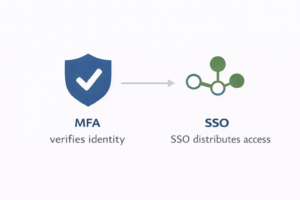
A comparison diagram showing that MFA verifies identity while SSO distributes access, using shield and network icons in blue and greenMulti-Factor authentication and single sign-on are often discussed together, but they serve different purposes.

Single sign-on, or SSO, allows a user to authenticate once and gain access to multiple systems without re-entering credentials.

MFA verifies identity using multiple factors.

SSO improves efficiency and user experience. MFA improves identity assurance.

They are not interchangeable.

An organization can implement SSO without MFA, which improves convenience but does not strengthen identity verification. An organization can also implement MFA without SSO, which increases security but may create user friction.

The most effective approach is combining the two.

When paired with single sign-on, MFA strengthens identity assurance while preserving user efficiency.

How to Implement MFA in a Business Environment

Turning on MFA for email is not the same as implementing MFA across a business.

A structured rollout includes:

  • Defining which systems require MFA
  • Identifying privileged accounts
  • Selecting approved authentication methods
  • Creating a written policy
  • Planning phased enforcement
  • Including vendor access
  • Monitoring authentication logs

Rollout should typically begin with administrative accounts and leadership, followed by broader employee enforcement.

Conditional access policies can further strengthen implementation by:

  • Restricting login by geography
  • Requiring trusted devices
  • Enforcing stronger authentication for high-risk roles

Legacy systems and service accounts require special consideration. Many service accounts cannot use interactive MFA. Leaving them unprotected creates blind spots.

For a detailed, step-by-step implementation framework, including policy structure, break-glass planning, service account handling, and monitoring guidance, download our multi-factor Authentication Implementation Framework.

MFA Compliance and Regulatory Considerations

MFA appears in multiple recognized cybersecurity frameworks, including the NIST Cybersecurity Framework.

Frameworks such as NIST and CIS include multi-factor authentication as a core control for protecting access to sensitive systems.

Regulatory environments increasingly expect documented enforcement.

The FTC Safeguards Rule, for example, requires financial institutions to implement access controls appropriate to their risk profile. While SMS-based MFA may technically meet baseline requirements, it is increasingly considered lower assurance in higher-risk environments.

Healthcare environments subject to HIPAA are similarly expected to implement reasonable and appropriate access controls. MFA is widely considered part of that expectation, especially for remote access and administrative accounts.

In Texas, the 2025 Cybersecurity Safe Harbor law, commonly referred to as SB 2610, allows certain businesses with fewer than 250 employees to limit punitive damages in the event of a breach if they can demonstrate that a recognized cybersecurity framework was implemented and documented.

The keyword is documented.

A business that enables MFA without policy documentation, logging, and review cadence may struggle to demonstrate that it has an operationalized control in place.

For Texas-based organizations, MFA should be viewed not only as a security measure but as part of a defensible cybersecurity posture.

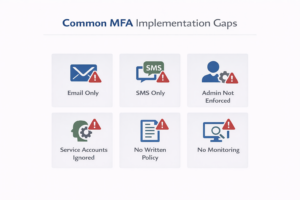
Common MFA Mistakes Businesses MakeAn infographic detailing common MFA mistakes, including relying on SMS-only authentication, ignoring service accounts, and selective MFA deployment.

  1. Protecting only email while leaving other cloud applications exposed.
  2. Allowing SMS as the sole authentication method without evaluating risk.
  3. Failing to enforce MFA for administrative accounts.
  4. Ignoring service accounts and non-interactive logins.
  5. Skipping written policy and exception governance.
  6. Failing to monitor authentication logs for anomalies such as impossible travel or repeated push denials.
  7. Treating MFA as a compliance checkbox instead of a layered control.

Each of these gaps weakens the control’s effectiveness.

Is MFA Enough on Its Own

MFA significantly reduces the risk of credential-based compromise.

It does not eliminate it.

Attackers continue to evolve. Token theft, session hijacking, endpoint compromise, and social engineering remain viable techniques.

MFA should exist alongside:

Security maturity comes from layered controls, not a single technology.

FAQs

MFA protects against unauthorized access resulting from stolen or guessed passwords. It does not protect against all forms of attack, including malware that compromises authenticated sessions.
Certain legacy MFA methods can be bypassed through adversary-in-the-middle attacks, MFA fatigue techniques, or token theft. Phishing-resistant MFA significantly reduces this risk.
Phishing-resistant MFA uses cryptographic authentication bound to a legitimate domain and device, preventing credential replay and adversary-in-the-middle interception.
SMS-based MFA may meet baseline requirements, but it is increasingly considered lower assurance. Stronger authentication methods are recommended for higher-risk environments.
HIPAA requires reasonable and appropriate access controls. While not explicitly mandated in every scenario, MFA is widely considered part of reasonable safeguards for remote and administrative access.
No. SSO improves convenience. MFA strengthens identity verification. They serve different purposes and are most effective when combined.
Implementation timelines vary depending on system complexity and user count. Many organizations can complete phased rollout within six to eight weeks when properly planned.
Phishing-resistant methods such as FIDO2 security keys and hardware-backed authentication provide the highest assurance against credential replay and adversary-in-the-middle attacks.

Recognizing MFA Fatigue Attacks and Responding Correctly

Identity is the primary attack surface for Texas businesses. As multi-factor authentication (MFA) has become the standard, attackers have shifted their focus from bypassing the tech to exhausting the human.

This tactic is known as an MFA Fatigue Attack, or “Push Bombing.”

The Psychology of the “Push Bomb”

An MFA fatigue attack is a war of attrition. Once an attacker steals a user’s credentials (often via phishing or a third-party breach), they script a system to repeatedly trigger authentication prompts on the victim’s mobile device.

The goal is to weaponize frustration. If a user receives dozens of push notifications during a busy afternoon in a Houston law office or while commuting through Austin traffic, the attacker is betting the user will eventually tap “Approve” just to make the buzzing stop.

The Reality: The prompt itself is not the start of the attack. It is the evidence that your password has already been compromised.

Anatomy of an MFA Fatigue Attack

In 2026, these attacks have become more surgical. Watch for these specific signals:

  • Rapid-fire notifications: You receive 5, 10, or 20 push requests within a single minute.

  • The “Support” Follow-up: A phone call or SMS from a spoofed number claiming to be “Texas IT Support,” instructing you to “approve the glitchy notification” to fix a system error.

  • Off-Hours Activity: Prompts appearing at 3:00 AM or during weekends when you aren’t working.

  • Contextual Mismatch: The login location in the notification shows a different city or country than where you are currently located.

The Tech Solution: Number Matching

Basic push-based MFA, where you simply tap “Approve”, is inherently vulnerable to human error. In high-growth environments like the Texas Triangle (DFW-Houston-Austin), where employees are mobile and multitasking, the risk of “blind approval” is high.

How Number Matching Fixes This: Modern identity platforms like Microsoft Entra ID have transitioned to Number Matching.

  1. When you attempt to log in, your computer screen displays a random 2-digit number.

  2. Your mobile app opens a keypad instead of an “Approve” button.

  3. You must type the number from your screen into your phone.

Why it works: An attacker cannot “bomb” you into approval because you don’t have the code, and they can’t see your screen.

The Emergency Protocol: What to Do

If you receive an unexpected MFA prompt, treat it as a confirmed security incident. Follow these three steps immediately:

  1. DENY the request: Stop the immediate unauthorized entry.

  2. REPORT to IT: Do not just ignore it. Alert your security team so they can check logs for “Impossible Travel” signals.

  3. SECURE your account: Immediately change your password. If an attacker triggered MFA, they already have your current credentials.

Leadership Guardrails

Organizations cannot rely solely on user judgment. Leadership must implement technical “bulkheads” to prevent these attacks from reaching the employee in the first place:

  • Enforce Number Matching: Transition all users away from simple “Approve/Deny” prompts immediately.

  • Implement Geo-Fencing: Use Conditional Access to block all authentication attempts originating outside the United States (or specific Texas regions) before they ever trigger a notification.

  • Risk-Based Challenges: Automatically block sign-ins that the system deems “High Risk” based on unfamiliar IP addresses or browser signatures.

  • Phishing-Resistant MFA: For high-value targets (CFOs, IT Admins), mandate FIDO2 security keys, which eliminate push notifications entirely.

Summary

MFA fatigue is a governance signal. It tells you that your perimeter has been breached and the attacker is now knocking on the final door. By moving from static MFA to Contextual Conditional Access, you remove the burden of security from the employee and place it back onto an automated policy engine.

Multi-factor authentication for business is no longer optional. It is foundational.

But foundational does not mean simplistic.

MFA is not a feature. It is an identity control.
And identity is now the primary attack surface.

The Operational Reality of AI Automation: A Guide for Texas Business Leaders

The conversation around artificial intelligence has reached a point where most leaders are tired of the hype. For teams across the I-35 corridor, from Austin to San Antonio, the focus has shifted. It’s no longer about what AI might do in the future. It’s about how to use these tools today without creating a mess in the process.

In 2026, AI automation is a practical tool for handling the manual tax of running a business. Invoices, service requests, and internal reports are increasingly moving through automated systems. This promises speed, but it also creates a new kind of responsibility.

The real challenge is the gap between having the tool and actually understanding how it touches your data. Automation often starts at the edges of a company, but it quickly winds its way into your core infrastructure. If you don’t address that gap, you end up with systems that nobody quite understands, and nobody can truly defend.

Understanding how this works is no longer just a task for the IT department. It’s an operational responsibility for anyone in leadership.

The Architecture: Understanding the AI and Automation Loop

A horizontal flowchart titled "How AI Automation Actually Works in Business Operations" that maps the journey from raw business inputs to operational outputs through separate AI (Pattern Recognition) and Automation (Execution & Control) layers, all underpinned by a foundational layer of Human Oversight and Governance.To manage these systems, you don’t need to be a developer. You just need a clear mental model of how they function. Most automation is built on two simple parts.

The AI Component: Pattern Recognition

Think of the AI component as the eyes of the system. Its only job is to look at data and find a pattern. It doesn’t understand your firm’s ethics or your hospital’s privacy priorities. It just looks at an input and makes a guess based on what it has seen before.

In a professional setting, this usually looks like:

The AI doesn’t decide what happens next. It just provides a signal.

The Automation Component: Execution and Control

The automation is the part that actually does the work. It follows a set of rules that you define. Once the AI identifies a pattern, the automation takes the handoff. It might update a record, route a task to a specific person, or trigger a notification.

One thing we see often is the assumption that AI can fix a broken process. It cannot. Automation just makes your existing workflows go faster. If a process is disorganized or poorly documented, automation will just scale those problems.

How AI Automation Shows Up Across the Texas Economy

Automation doesn’t look the same in every office. The value it brings depends entirely on how work is actually performed in your specific field.

Manufacturing: Bridging the Floor and the Office

In manufacturing environments across Central Texas, the bottleneck is often found in the paperwork rather than the machinery. AI is frequently used for inventory synchronization. Systems can monitor usage and trigger purchasing decisions automatically. It’s also used for predictive maintenance. Sensor data is analyzed to create service tickets before equipment fails. These workflows depend on accurate data. If the thresholds are set poorly, you end up with false alerts that disrupt production planning.

Legal Organizations: Protecting the Billable Hour

In legal environments, the focus is on reducing administrative overhead. AI can handle case indexing by tagging large volumes of discovery documents by date or subject. It can also speed up conflict checking. These workflows save time, but they introduce strict requirements for auditability. In a law firm, a missed conflict or an incorrect classification isn’t just a mistake. It’s an ethical and financial risk.

Healthcare and Public Sector: Accountability at Scale

For hospitals and municipal organizations, errors are public. There is no room for “black box” logic. AI can assist with redacting sensitive patient or citizen information to maintain compliance. It can also help route infrastructure requests based on urgency. In these environments, transparency matters as much as efficiency. You have to be able to explain why a decision was made.

Where Automation Introduces Operational Risk

Fear-based framing rarely helps leadership teams make better operational decisions. In practice, the risks associated with AI are rarely catastrophic failures. Instead, they tend to be subtle issues that slowly erode data quality and service reliability over time.

The Black Box Problem

Many AI systems provide an output without a clear explanation of how they reached that conclusion. In a professional environment, especially one subject to audits or regulatory oversight, this lack of transparency is a problem. If a system makes an error, you must be able to trace the decision path. Without logging and visibility into how the AI is “thinking,” your automation becomes difficult to defend.

Shadow AI and the Perimeter Gap

Shadow AI occurs when employees use unmanaged, consumer-grade tools to process company data. Usually, this happens because an employee is trying to be more efficient. They might use a free online tool to summarize a meeting transcript or a public AI to draft a client letter.

The risk here is two-fold. First, you lose control over where your data is stored. Most free tools use your inputs to train their public models, meaning your proprietary information is now part of the public domain. Second, it creates a gap in your security perimeter. As an MSP, we focus on ensuring that any AI tool used within your organization has strict data retention policies and sits behind your existing security guardrails.

What Happens When Automations Break

Failures in these systems are often quiet. You might not see an error message. Instead, a system might stop syncing data correctly, or a confidence threshold might drift over time. This leads to misclassifications that slowly degrade your data quality. Once automation becomes business-critical, it requires the same support discipline as any other infrastructure.

The Human in the Loop Requirement

Successful automation doesn’t remove humans. It changes what they do. A mature strategy includes human review for exceptions and high-risk decisions. AI handles the 80% that is repeatable. Humans handle the 20% that requires judgment. This structure preserves accountability. It ensures that the “hands” of the system never move faster than the “eyes” can verify.

The Role of Governance and Your IT Partner

This is where the role of an MSP changes. We are not here to tell you how to run your business or which workflows to choose. Our role is to provide the guardrails. Governance is about ensuring that your automation has clear boundaries.

This includes:

  • Managing identity and access controls.
  • Monitoring the health of integrations.
  • Documenting how different systems depend on each other.
  • Supporting the recovery process when a system fails.

When an automated process stops working, you need to know if the issue is the infrastructure, the data, or a change in an external system. An IT partner provides that visibility so you aren’t troubleshooting in the dark.

A Practical Implementation Roadmap

AI automation pull quoteImplementing AI should not feel like a leap of faith. It should feel like a controlled expansion of your existing capabilities. For leadership teams looking to mature their technology stack, we suggest a 90-day approach focused on observation before execution.

Phase 1: The Process Audit (Days 1 to 30)

Identify one specific area where work feels slow or prone to human error. Before looking at software, document every step of that process. Who touches the data? Where does it go next? You can’t automate a process that you can’t draw on a whiteboard. This phase is about finding the “logic” of your business.

Phase 2: The Pilot and Integration (Days 31 to 60)

Choose a low-risk, high-frequency task for your first pilot. This might be something internal, like routing IT tickets or organizing a specific set of reports. The goal here is to test the plumbing. You are looking to see how the AI interacts with your existing APIs and software. Focus on visibility during this stage. You want to see every action the system takes so you can verify its accuracy.

Phase 3: The Governance Review (Days 61 to 90)

After 60 days of data, look at the results. Compare the automated output to your manual baseline. Are you actually saving time, or is your staff spending their “saved” time double-checking and correcting the AI? This is where you decide to either scale the solution or go back to the drawing board. True maturity is knowing when a process is better left to a human.

The Bottom Line: Predictability Over Novelty

The goal of technology in a professional environment isn’t constant change. It’s predictability. Organizations across Texas rely on systems that work quietly and consistently. AI automation can contribute to that stability, but only if it’s managed with clear ownership and an eye toward operational risk.

The future of your business isn’t just about finding smarter tools. It’s about the disciplined management of the systems that those tools connect to.

FAQs

AI automation in business refers to systems that use artificial intelligence to identify patterns in data and trigger predefined workflows without manual intervention. In practice, this can include document classification, intelligent routing of service requests, compliance checks, and predictive maintenance alerts. AI identifies patterns. Automation executes based on rules.
AI automation can be used in regulated industries, but it must be implemented with governance controls. This includes audit logging, identity and access management, data retention policies, and clear documentation of how decisions are made. Without transparency and oversight, automated systems can create compliance exposure.
No. AI can't repair a disorganized workflow. Automation accelerates whatever already exists. If a process is poorly documented or inconsistently followed, automation will simply scale those issues faster.
Failures are often subtle. Data may stop syncing correctly, classification confidence levels may drift, or integrations may break silently. Once automation becomes business-critical, it requires monitoring, logging, and structured support just like any other core infrastructure system.
Yes. Most AI tools integrate with email platforms, CRMs, cloud storage systems, and internal databases. Without IT oversight, organizations risk data exposure, unmanaged integrations, and security perimeter gaps. An experienced IT partner helps ensure AI systems operate within defined guardrails.
Shadow AI refers to the use of unmanaged, consumer-grade artificial intelligence tools by employees without organizational oversight. This can expose sensitive data to public training environments and create compliance risks. Governance policies and approved AI platforms help reduce this exposure.

Business Continuity Planning for Texas Businesses

Business continuity planning is often discussed in theory. In Texas, it’s a practical operational requirement.

Organizations across Central Texas rely on technology systems that must remain available through weather events, power instability, connectivity issues, staffing disruptions, and periods of rapid growth. When those systems support healthcare delivery, financial operations, manufacturing processes, or multi-location businesses, downtime becomes more than an inconvenience. It becomes a measurable business risk.

Business continuity planning for Texas businesses requires a practical understanding of how operations, technology, and infrastructure interact under real-world conditions. It differs from disaster recovery, relies heavily on IT systems, and must account for regional realities rather than ideal assumptions.

What Is Business Continuity Planning?

Business continuity planning is the process of preparing an organization to continue critical operations during and after disruptive events.

Rather than focusing only on technology recovery, business continuity planning considers the full operational picture. That includes people, processes, facilities, vendors, and information systems staff rely on every day.

A well-designed business continuity plan helps organizations:

  • Maintain access to critical systems and data
  • Continue serving customers, patients, or clients
  • Support staff when normal workflows are disrupted
  • Reduce operational downtime and financial impact
  • Respond in a structured way rather than reacting under pressure

For Texas businesses, continuity planning has to be grounded in the realities of regional infrastructure and environmental conditions.

Business Continuity Planning vs Disaster Recovery

“Business continuity planning is about how an organization continues operating during disruption, not just how technology is restored afterward.”One of the most common questions organizations ask is whether business continuity and disaster recovery are the same thing. They’re closely related, but they serve different purposes.
Disaster recovery focuses on restoring IT systems after a disruption. This includes data recovery, system rebuilds, infrastructure restoration, and defined recovery time objectives.

Business continuity planning is broader. It addresses how the business continues operating during disruption, not just how systems are restored afterward.

In simple terms:

  • Disaster recovery focuses on how systems are restored
  • Business continuity focuses on how the organization continues operating

An organization can have backups and recovery tools in place and still struggle operationally if continuity planning hasn’t been addressed. For Texas businesses that depend heavily on IT systems, business continuity planning should guide disaster recovery decisions rather than follow them.

Why Business Continuity Planning Matters for Texas Businesses

Many continuity planning resources assume stable power, predictable weather, and consistent connectivity. Texas businesses don’t always operate under those conditions.

Weather and Environmental Disruptions

Severe storms, flooding, extreme heat, and regional weather events can disrupt access to facilities, power availability, and network connectivity. These disruptions don’t always affect every location equally, which adds complexity for multi-site organizations.

Power Reliability Challenges

Power disruptions don’t always show up as full outages. Brownouts, voltage fluctuations, and localized failures can still affect sensitive IT equipment, servers, and network infrastructure. Continuity planning should account for these partial disruptions, not just worst-case scenarios.

Connectivity and Cloud Dependency

Modern businesses rely on cloud applications, hosted phone systems, remote access tools, and SaaS platforms. All of these depend on reliable internet connectivity. A single ISP outage can impact productivity across an entire organization if redundancy hasn’t been planned.

Multi-Location Operations

Organizations operating across multiple offices, clinics, or properties face additional complexity. Continuity planning has to consider how systems interact across locations and how disruption at one site affects others.

Texas businesses benefit from continuity planning that reflects these conditions rather than assuming ideal infrastructure.

The Role of IT in Business Continuity Planning

Information technology plays a central role in modern business continuity planning. Most critical business functions rely on IT systems, even when technology isn’t the primary focus of the organization.

An effective IT business continuity plan typically addresses:

  • Access to critical applications and data
  • Network reliability, segmentation, and failover options
  • Backup strategies and recovery objectives
  • Endpoint access for remote or displaced staff
  • Security controls that remain effective during disruption

IT continuity planning should align with how the organization actually operates. Plans that assume all staff are always on-site or that systems can be restored instantly often fall apart during real events.

What Does a Business Continuity Plan Typically Include?

While every organization is different, most business continuity plans include several core components.

Critical System Identification

Not all systems carry the same operational importance. Continuity planning prioritizes systems that directly impact service delivery, revenue, compliance, or safety.

Risk Assessment and Impact Analysis

Understanding how disruptions affect operations helps organizations determine acceptable downtime and recovery priorities.

Communication Planning

Clear communication channels are critical during disruption. Plans should define how staff, leadership, vendors, and customers are informed.

Operational Workflows During Disruption

Continuity planning outlines how work continues when systems or facilities are unavailable. This may include temporary processes or alternate access methods.

IT Recovery and Support Strategy

This includes backup monitoring, recovery procedures, and support escalation paths aligned with continuity priorities.

A Practical Business Continuity Planning Process

A practical business continuity planning process starts with understanding how the organization actually functions. Most continuity plans follow a similar structure, even though the details vary by organization.

“Continuity planning is not about predicting every disruption. It is about preparing the organization to respond when disruption occurs.”1. Understand Core Operations

Identify which processes must continue for the business to function. This often reveals dependencies that aren’t immediately obvious.

2. Map Technology Dependencies

Document how systems, networks, vendors, and applications support those operations. This is where IT continuity planning becomes essential.

3. Define Recovery Expectations

Not all systems need immediate restoration. Defining acceptable downtime helps prioritize planning and resource allocation.

4. Plan for Realistic Workarounds

Continuity isn’t always about full restoration. Temporary access methods, alternate workflows, and staged recovery can keep operations moving during disruption.

5. Review and Test Periodically

Continuity plans should evolve as the organization grows, adopts new technology, or changes how it operates.

Common Business Continuity Planning Mistakes

Organizations often struggle with continuity planning not because they lack intent, but because plans don’t reflect reality.

Common challenges include:

  • Overreliance on generic templates
  • Focusing only on IT recovery without operational planning
  • Assuming stable power and connectivity
  • Failing to revisit plans as the organization grows
  • Treating continuity planning as a one-time project

Avoiding these pitfalls helps continuity plans stay usable rather than theoretical.

When Texas Businesses Should Revisit Business Continuity Planning

Business continuity planning should be revisited whenever operations change.

It may be time to reassess continuity planning if:

  • The organization has expanded or added locations
  • Core systems have moved to cloud platforms
  • Compliance requirements have increased
  • Downtime incidents are becoming more frequent
  • Staff roles or workflows have changed

Continuity planning should reflect current operations, not how the business worked in the past.

Business Continuity Planning as an Ongoing Strategy

For Texas businesses, business continuity planning isn’t about predicting every possible disruption. It’s about building operational resilience so disruptions can be managed effectively.

A thoughtful continuity strategy supports stability, protects service delivery, and gives leadership clearer visibility into operational risk.

Hill Country Tech Guys works with organizations across Central Texas to support business continuity planning and disaster recovery strategies aligned with real-world operations and infrastructure realities.

Cybersecurity Compliance for 2026: A Q4 Readiness Guide for Growing Businesses

As 2025 winds down, most companies are finalizing budgets, wrapping up projects, and planning for the year ahead. For growing organizations across Texas, one area that can’t wait until January is cybersecurity compliance.

Regulatory pressure is increasing, insurance requirements are tightening, and clients are asking tougher questions about how their vendors protect data. Compliance used to be a box you checked at renewal time. Today, it’s a continuous process that defines whether your business is secure, insurable, and trustworthy.

If 2025 was the year of catching up, 2026 is the year of proving it. And Q4 is the time to start preparing.

What Cybersecurity Compliance Means in 2026

Cybersecurity compliance refers to the policies, processes, and technical controls you put in place to meet security and privacy requirements, both legal and contractual.

That includes frameworks such as HIPAA, FTC Safeguards, NIST 800-53, and CMMC, depending on your industry and client base. Even if you’re not in a regulated sector, your cyber insurance policy likely requires documented protections and regular reviews.

The key shift going into 2026 is accountability.

Regulators, insurers, and clients are no longer satisfied with a signed policy. They expect proof that you actively maintain compliance through documented training, audits, and measurable outcomes.

In other words, compliance is no longer paperwork. It’s evidence.

Why Compliance Is Changing and Why 2026 Matters

Over the past year, new regulations have begun to shape what cybersecurity readiness means for small and midsize businesses, especially for organizations operating across Texas and in compliance-heavy industries.:

  • FTC Safeguards Rule: Now applies to many non-financial businesses that collect customer data, requiring risk assessments, encryption, and incident response plans.
  • HIPAA Modernization Efforts: Healthcare providers and partners are expected to strengthen business associate agreements and records.
  • Cyber Insurance Underwriting: Providers are tightening requirements for MFA, endpoint detection, and staff training logs.

By 2026, these expectations will not just be best practices. They will be the minimum standard for doing business securely.

Companies that wait to address compliance until they renew insurance or face an audit risk finding out too late that their processes don’t hold up.

Q4 is your window to get ahead of that curve.

The Cost of Waiting Until 2026

Graphic quote reading ‘The cost of waiting isn’t just financial — it’s credibility, time, and trust,’ from Hill Country Tech Guys’ 2026 cybersecurity compliance readiness guide, shown over a blue and gray background with a half globe made of connected network lines and dots.Most businesses don’t skip compliance because they don’t care. They skip it because they are busy. For many Texas businesses, that busyness collides with tightening insurance requirements and vendor security reviews late in the year.
But the cost of waiting is often higher than the cost of planning.

Here is what we have seen across industries:

  • Delayed contracts: Clients increasingly require proof of security measures before signing or renewing agreements.
  • Insurance denials: Missing controls, such as MFA or documentation, can result in rejected claims or higher premiums.
  • Regulatory fines: Non-compliance with FTC, HIPAA, or data privacy laws can cost thousands per incident.
  • Operational stress: Scrambling to document everything during an audit or renewal pulls teams off core work.

Planning now prevents the January scramble later and builds confidence with every vendor, insurer, and customer you work with.

How to Start Preparing in Q4 2025

You don’t need to rebuild your entire cybersecurity program this quarter, but you do need a plan.

Here are the first steps every business should take before the year ends:

1. Conduct a Compliance Gap Assessment

Start with an honest look at your policies, systems, and documentation.

  • Are all your employees completing cybersecurity training annually?
  • Do you have a written information security plan (WISP)?
  • Are backups tested and verified?
  • Can you show records of updates, permissions, and incident response testing?

2. Review Vendor and Partner Security

Compliance doesn’t stop at your network. Check who can access your systems. This includes vendors, contractors, and third-party applications. Make sure they meet your security standards.

3. Refresh Incident Response and Recovery Plans

If your incident response plan has not been tested in 12 months, schedule a tabletop exercise before year-end. These dry runs uncover process gaps long before a real event.

4. Document, Don’t Just Do

2026 will be the year of proof. Keep training logs, policy updates, and access control reviews in a central repository. Your MSP can help manage this. The more you can show your compliance story, the less you will have to explain it later.

Building Your 2026 Compliance Roadmap

Once you have identified gaps, you can build a quarterly plan that turns compliance from a project into a process.

2026 Cybersecurity Compliance Roadmap

  1. Q4 2025 · Assess

    Identify gaps, update WISP, plan budgets.

  2. Q1 2026 · Remediate

    Implement missing controls and document fixes.

  3. Q2 2026 · Verify

    Run audit simulations and collect reports.

  4. Q3 2026 · Optimize

    Review outcomes, refine training and reporting.

By the end of 2026, you should have a clear, defensible record of your security posture. Not just a stack of policies, but an ongoing practice of risk management.

This approach also makes annual insurance renewals and audits far easier because you’re never starting from scratch.

The Role of Your MSP in Compliance Readiness

Most compliance frameworks require the same foundational elements:

  • Regular patching and system updates
  • Secure backups
  • Access control and MFA
  • Endpoint protection and monitoring
  • Documentation and reporting

Your managed service provider (MSP) can serve as your technology compliance partner, not just a helpdesk.

At Hill Country Tech Guys, we integrate compliance into daily IT operations for organizations across Texas, from monitoring and maintenance to documentation and reporting.

That means:

  • You can prove what you’re already doing right.
  • You can fix gaps proactively instead of reactively.
  • You have a partner who understands both the technical and strategic sides of compliance.

Compliance isn’t about adding work. It’s about ensuring the work you’re already doing is documented, defensible, and aligned with business goals.

2026 Cybersecurity Compliance Checklist

Use this simplified interactive checklist to guide your year-end review:

2026 Cybersecurity Compliance Checklist

Tip: click to check items off. Progress is not saved after reload.

Each box you check off strengthens your defensible compliance posture and proves that your organization isn’t only aware of risk but actively managing it.

FAQs about Cybersecurity Compliance

What frameworks apply to SMB cybersecurity compliance in 2026?

Common frameworks include HIPAA for healthcare, the FTC Safeguards Rule for financial and consumer data, NIST 800-53 for general security controls, and CMMC for defense contractors. Even unregulated businesses should align with at least one framework for cyber-insurance eligibility.

Why does Q4 matter for compliance planning?

Q4 is when most companies set budgets and finalize technology plans. Starting compliance work now allows teams to remediate gaps, document controls, and enter 2026 ready for audits and insurance renewals.

How can a managed service provider help with cybersecurity compliance?

An MSP like Hill Country Tech Guys manages the technical side of compliance—patching, monitoring, MFA enforcement, and reporting—while guiding your organization through documentation and training so every control is both active and auditable.

Compliance as Confidence

The businesses that treat compliance as an annual audit exercise will always feel behind. Those who treat it as a living practice will build trust, qualify for better insurance rates, and avoid costly disruptions.

Q4 is your opportunity to shift from reactive to ready. 2026 will reward the companies that plan ahead, and your future clients, insurers, and auditors will thank you for it.

Start with a 2026 plan you can prove. Contact Hill Country Tech Guys to begin your compliance readiness review with a Texas-based team that understands your regulatory landscape. 

SD-WAN for Healthcare: Building Reliable Networks That Protect Patient Care

Why Healthcare Needs Reliable Network Uptime

For hospitals and clinics across Texas, where staffing shortages, rural coverage gaps, and aging infrastructure are common, network uptime is not optional. Losing access to electronic health records (EHRs), telehealth platforms, or imaging systems can delay treatment and impact patient safety. That’s why healthcare IT leaders are prioritizing network uptime as a core strategy.

For many healthcare organizations, the answer is SD-WAN. When combined with network redundancy and failover strategies, SD-WAN creates a smarter, more resilient infrastructure that keeps care moving even when the unexpected happens.


What Is SD-WAN?

At its core, SD-WAN is a smarter way to run your internet. It uses software to spread traffic across multiple connections, so if one has problems, your network automatically switches to the best option to keep everything running.

More technically, SD-WAN (Software-Defined Wide Area Networking) is a technology that uses software to manage and control how data travels across your network. Instead of relying on a single internet connection or a fixed hardware setup, SD-WAN allows you to use multiple connections (like fiber, broadband, and LTE) and route traffic intelligently across them.

Key points about SD-WAN:

  • It continuously monitors the health of all available connections.

  • It automatically chooses the best path for traffic in real time.

  • It gives IT teams visibility and control over network performance.

For hospitals and clinics across Texas, SD-WAN means you are no longer at the mercy of one unstable internet line. The system adapts instantly, keeping patient care applications running smoothly even if one connection has problems.


What Is Failover and Why Does It Matter in Healthcare

Failover works like a backup plan for your network. When the primary connection or device stops working, failover automatically switches to another one so everything keeps running.

In healthcare, that looks like:

  • The network reroutes traffic to a backup line the moment the main internet goes down.

  • A standby firewall takes over instantly if the primary one fails.

Hospitals and clinics rely on failover to give doctors, nurses, and staff uninterrupted access to the systems they need for patient care. This is especially critical for Texas healthcare organizations serving large geographic areas or operating multiple facilities with shared systems. No more delay in critical meds from the pharmacy or gaps patient information.


Network Redundancy in Healthcare IT

Redundancy makes failover possible. It gives your network more than one path to keep running when something breaks.

In healthcare IT, redundancy includes:

  • Running two internet service providers instead of one.

  • Keeping backup routers and firewalls ready to activate.

  • Using cloud storage so patient data stays safe if local servers fail.

When IT teams build redundancy and failover together, they turn fragile networks into reliable ones. For healthcare providers across Texas, this reliability also supports compliance requirements and reduces risk during audits and insurance reviews.


How SD-WAN Improves Healthcare IT Uptime

Traditional failover only activates when a connection goes completely offline. That still leaves room for issues like dropped calls, frozen telehealth sessions, or slow access to EHRs.

SD-WAN solutions in healthcare take it a step further. It constantly monitors the quality of network connections by tracking latency, jitter, and packet loss. It then automatically routes traffic along the best-performing path in real time.

For hospitals and clinics, this means:

  • Telehealth visits run without interruptions.

  • Imaging files transfer quickly and reliably.

  • Providers across departments have seamless access to records and applications.

SD-WAN is not just reactive. It is proactive, ensuring consistent healthcare IT uptime.


Case Study: A Rural Hospital’s Uptime Transformation

Before implementing SD-WAN, one rural Texas hospital dealt with daily internet problems that directly impacted patient care. Staff struggled to reliably access electronic health records, telehealth appointments often dropped mid-call, and even small outages created risks that slowed down treatment and frustrated patients. Leadership knew they needed to act quickly so they reached out to Hill Country Tech Guys for help.

sd-wan blog image with bigleaf statistics After deploying SD-WAN with built-in failover and redundancy, tailored for healthcare, the hospital’s experience changed completely. For the past seven years, the hospital has not experienced a single outage that disrupted patient care. Providers trust their systems to work consistently, even when one internet line slows or fails. What was once fragile and unpredictable became reliable and resilient.
The results speak for themselves:

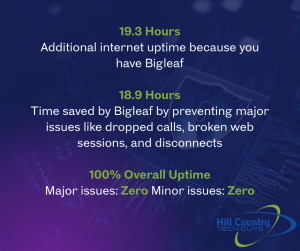
  • In August 2025, the hospital gained 19.3 additional hours of uptime.

  • SD-WAN prevented 18.9 hours of major disruptions such as dropped calls and broken web sessions.

  • The facility achieved 100% uptime for the month.

With SD-WAN, the hospital can also make changes to its internet service, like switching providers or upgrading connections, without any impact on daily operations. This flexibility gives IT staff more control and allows leadership to focus on improving patient services instead of worrying about downtime.


Why Network Uptime Is Different in Healthcare

Most businesses see downtime as lost productivity. In Texas healthcare environments, where facilities may serve rural populations or operate across wide regions, downtime carries even greater risk:

  • Missed patient records.

  • Delayed diagnoses.

  • Interrupted telehealth sessions.

  • Medication or scheduling errors.

That is why network redundancy in healthcare is not optional. It is a patient safety issue. IT leaders must design systems where uptime is nearly guaranteed, not just expected.


The Human Cost of Network Downtime in Healthcare

When healthcare networks go down, the impact reaches far beyond IT. Downtime directly affects how providers deliver care and how patients experience it.

  • Delayed treatments: If electronic health records (EHRs) are unavailable, clinicians may not have access to patient histories, lab results, or imaging when they need them.

  • Medication risks: Interruptions in pharmacy systems can delay prescriptions or cause dangerous errors.

  • Interrupted communication: Telehealth appointments and secure messaging can drop mid-session, leaving patients frustrated and providers unable to connect.

  • Patient safety concerns: Even short outages can lead to gaps in monitoring, scheduling errors, or missed updates in patient charts.

Research published in the Journal of the American Medical Informatics Association found that hospitals experience an average of 43 hours of EHR downtime per year, underscoring just how common and disruptive these events can be.

Downtime doesn’t just cost money. It costs time, trust, and in some cases, patient safety. That’s why healthcare organizations are turning to SD-WAN, redundancy, and failover strategies to ensure their systems remain available when they are needed most.


Steps to Improve Healthcare Network Uptime

If your organization is considering SD-WAN, here are key steps to build a stronger and more resilient network:

  1. Identify single points of failure. Review your current setup and find where a single outage could take down your operations.
  2. Add redundancy. Bring in backup internet connections, hardware, or cloud-based services.
  3. Test failover regularly. Run simulations so you know backups will activate when needed.
  4. Prioritize critical traffic. Ensure EHR systems and telehealth always have top priority.
  5. Monitor continuously. Use tools that give your IT team constant visibility into network health.

At Hill Country Tech Guys, we help hospitals and clinics turn this checklist into a working strategy. From design to implementation, we make sure redundancy, failover, and SD-WAN keep your systems reliable and your patient care uninterrupted.


SD-WAN for Healthcare Is About More Than IT

Network resilience comes down to two things: redundancy and failover. With SD-WAN, healthcare organizations get smarter failover strategies that deliver consistent uptime and protect patient care.

If your hospital or clinic is relying on a single internet provider or an untested backup plan, it is time to revisit your strategy. Texas healthcare organizations cannot afford network strategies that fail under pressure. Because in healthcare, downtime is not just an inconvenience. It is a risk.

📞 830-386-4234
✉️ [email protected]
🌐 hctechguys.com

SD-WAN in healthcare is a network solution that routes traffic across multiple internet connections in real time. It improves uptime and ensures critical systems like EHRs, telehealth, and imaging stay online even if one connection fails.
SD-WAN constantly monitors internet performance and moves traffic to the best available path. This prevents dropped telehealth calls, delays in accessing records, and interruptions to patient care.
SD-WAN is not a compliance requirement by itself, but it supports HIPAA, SOC 2, and NIST standards by ensuring reliable, documented access to patient data and critical systems.
Traditional failover only switches connections after a complete outage. SD-WAN detects issues like jitter or packet loss and reroutes traffic before downtime occurs, keeping systems stable and patient care uninterrupted.

Cybersecurity Terms for Small Business: A Simple Guide to IT Jargon

Why Small Businesses Need to Know Cybersecurity Terms

You don’t need to be an IT expert to protect your business. But having a basic understanding of cybersecurity terms helps you:

  • Make smarter decisions

  • Ask better questions

  • Work more effectively with your IT team or partner

When your MSP talks about things like EDR, patching, or cloud security, knowing what they mean helps you understand not just the what, but the why. And that leads to better outcomes for your business.

At Hill Country Tech Guys, we believe cybersecurity shouldn’t be confusing. If you’ve ever been overwhelmed by jargon or unsure what your IT provider was talking about, you’re not alone. That’s why we’ve created this plain-language cybersecurity glossary.


Cybersecurity Basics

  • Cybersecurity – Protecting systems, networks, and programs from digital attacks.

  • IT (Information Technology) – All technology-related infrastructure. Cybersecurity is just one part of IT.

  • MSP (Managed Service Provider) – A company (like Hill Country Tech Guys) that provides IT and cybersecurity services to businesses.

  • MFA (Multi-Factor Authentication) – A second step (like a text code or app confirmation) that secures accounts even if a password is stolen.

  • Firewall – A digital barrier that blocks unauthorized traffic.

  • Password Manager – A secure tool that stores login info (instead of sticky notes).


Cybersecurity Terms You’ll Hear at Work

  • Network – Your digital infrastructure: Wi-Fi, routers, connected devices.

  • Cloud Computing – Accessing software or data over the internet instead of local servers.

  • VPN – A secure internet connection, especially important for remote work.

  • Authentication – Proving you’re allowed to access a system or account.


Threats You Should Know

  • Phishing – Emails that trick you into sharing information.

  • Smishing – Phishing delivered by text message.

  • Ransomware – Malicious software that locks your data until a ransom is paid.

  • Spoofing – Pretending to be a trusted source to steal information.

  • Spyware – Software that secretly tracks your activity.

  • Clickjacking – Tricking you into clicking malicious links disguised as something safe.


Tools & Protection

  • Antivirus vs. MDR/EDR – Antivirus is reactive. MDR/EDR is proactive, advanced protection with human oversight.

  • Encryption – Scrambles data so only the right people can read it.

  • Patching – Updating software to fix vulnerabilities.

  • Mobile Device Management (MDM) – Keeps company phones, tablets, and laptops secure — even for remote staff.


Business & Compliance Lingo

  • Business Continuity – A plan to keep the business running during downtime.

  • SOC 2 – A compliance framework proving a provider can securely handle customer data.

  • HIPAA – Healthcare regulation that protects patient information.

  • NIST – A framework that helps companies manage and reduce cybersecurity risks.


Bonus Terms (For Extra Credit)

  • Penetration Testing – Ethical hacking to find weaknesses before criminals do.

  • Zero-Day – A newly discovered vulnerability that hasn’t been patched yet.

  • Access Control – Managing who can physically or digitally access systems.

  • Defensibility – Your ability to reduce or minimize the impact of a cyber incident.


Cybersecurity FAQs for Small Business

Q: What are the most important cybersecurity terms for small businesses to know?
A: Small businesses should understand basic terms like firewall, multi-factor authentication (MFA), phishing, ransomware, encryption, and patching. These terms cover the essentials of protecting data, accounts, and networks.

Q: Why should small business owners learn cybersecurity terms?
A: Knowing cybersecurity terms helps business owners make smarter IT decisions, ask better questions, and spot risks sooner. You don’t need to be an expert, but a little knowledge makes working with an IT partner much easier.

Q: What cybersecurity threats do small businesses face most often?
A: The most common threats include phishing emails, ransomware, weak passwords, and unpatched software. These are preventable with the right security tools and employee awareness.

Q: How can an MSP help small businesses with cybersecurity?
A: A Managed Service Provider (MSP) helps by monitoring systems, applying security updates, managing backups, and responding to threats. They simplify cybersecurity so businesses can stay secure without getting lost in technical jargon.


Knowledge Is Cyber Power

Cybersecurity doesn’t have to be overwhelming. Understanding these terms is the first step toward creating a safer, more secure workplace. You don’t need to know how to code, you just need to know enough to stay informed and make confident business decisions.

Want help securing your business without the jargon? Talk to Hill Country Tech Guys. We make IT simple, secure, and tailored to your business.

How Phishing Works and How to Avoid Taking the Bait

Phishing is a term you might have heard about, especially in discussions around online security. But what exactly is phishing, and why should you care? Phishing is a type of cybercrime where attackers try to trick you into giving away personal information like passwords, credit card numbers, or social security numbers. They often pretend to be someone you trust, like your bank or a popular website.

What is Phishing?

Phishing is essentially a scam. It’s a way for criminals to steal your sensitive information by pretending to be a trustworthy source. These scams usually come in the form of emails, messages, or even phone calls that look legitimate but are actually fake. The goal is to lure you into clicking a link, downloading an attachment, or giving away your personal information.

How Phishing Works: Step by Step

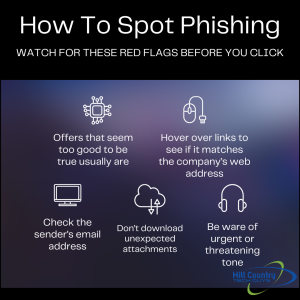
How to spot phishing in a few simple stepsPhishing attacks can be sophisticated and convincing. Here’s a step-by-step look at how they typically work:
  • The Setup: The attacker creates a fake website or email that looks just like a real one. This could be a copy of your bank’s login page or an email from a service you use, like Netflix or PayPal.
  • The Bait: The attacker sends you an email or message with a sense of urgency. It might say your account has been compromised or that you need to update your information immediately.
  • The Hook: When you click the link or open the attachment, you’re taken to the fake site or a malicious file is downloaded. The site will often ask you to log in or provide sensitive information.
  • The Catch: Once you enter your information, it’s sent directly to the attacker. They now have access to your accounts and can cause serious harm, like stealing your identity or making unauthorized transactions.

How to Spot Phishing

Phishing attempts can be tricky to spot, but there are usually some telltale signs:

Check the Sender’s Email Address

Often, phishing emails will come from addresses that look like a legitimate company but have slight differences, like a missing letter or an added number. Always double-check the sender’s email address.

Look for Poor Grammar or Spelling

Legitimate companies usually proofread their communications, so emails or messages with lots of errors can be a red flag.

Watch for Urgency and Threats

Phishing emails often try to create a sense of urgency or fear. They might say your account will be locked or that you’ll lose access to something important if you don’t act quickly.

Hover Over Links

Before clicking any link, hover your mouse over it to see where it leads. If the URL looks suspicious or doesn’t match the company’s official website, don’t click it.

What to Do If You Think It’s Phishing

If you suspect you’ve received a phishing email or message, here’s what you should do:

Do Not Click on Links or Download Attachments

This is the most important step. Avoid clicking on any links or downloading attachments from suspicious emails or messages.

Verify the Source

Contact the company directly using a phone number or email address you know is legitimate. Do not use the contact information provided in the suspicious message.

Report the Phishing Attempt

Most email services have options to report phishing. Reporting these attempts helps prevent future attacks and keeps others safe.

Change Your Passwords

If you’ve clicked on a suspicious link or provided information, change your passwords immediately. Use strong, unique passwords for each of your accounts.

Monitor Your Accounts

Keep a close eye on your bank statements, credit card accounts, and any other accounts you suspect might be affected. Look for unauthorized transactions or changes.

Why Phishing Awareness is Important

Understanding phishing and being able to recognize it is crucial in today’s digital world. Phishing attacks are becoming more common and more sophisticated, making it essential for everyone to be aware and cautious.

Protecting Your Identity

Identity theft is a serious consequence of phishing. Once criminals have your personal information, they can open accounts in your name, rack up debt, and cause long-term damage to your credit.

Ensuring Financial Security

Phishing can lead to unauthorized access to your financial accounts, resulting in stolen funds and financial loss. Being aware of phishing tactics can help you protect your money and financial information.

Consequences for Businesses When Employees Get Phished

When employees fall victim to phishing attacks, the repercussions can be significant, impacting both the individual and the organization as a whole. For Texas businesses, these incidents often collide with insurance requirements, compliance obligations, and customer trust expectations. Here are some of the key consequences businesses may face:

1. Financial Loss

Phishing attacks can lead to direct financial losses for companies, especially if sensitive banking information is compromised. Cybercriminals can gain access to company accounts, resulting in unauthorized transactions, fraud, and financial theft. Additionally, the costs associated with rectifying breaches, such as hiring cybersecurity experts and recovering lost funds, can be substantial.

2. Data Breach

A successful phishing attempt often leads to data breaches, exposing sensitive company information, employee data, and customer records. This can have serious implications, including legal consequences, regulatory fines, and damage to reputation. Companies may be required to notify affected individuals, which can further damage trust.

3. Operational Disruption

Phishing attacks can disrupt everyday business operations. If malware is introduced into the network through a phishing link, it can infect systems and require extensive downtime for remediation. This disruption can hinder productivity and lead to lost revenue.

4. Damage to Business Reputation

Trust is crucial in business, and a successful phishing attack can severely damage a company’s reputation. Clients, customers, and partners may lose confidence in a business that fails to protect its information. This loss of trust can lead to decreased customer retention and difficulty attracting new clients.

5. Increased Security Costs

In the wake of a phishing attack, businesses often need to invest heavily in improving security measures. This may include upgraded technology, enhanced security protocols, and employee training programs to prevent future incidents. While these investments are necessary for safeguarding the company, they can strain budgets.

6. Legal Liabilities

Depending on the nature of the data compromised, organizations may face legal liabilities. Clients or customers whose information has been breached could pursue legal action, resulting in costly lawsuits. Moreover, regulations like GDPR or HIPAA can impose hefty fines for failure to protect sensitive data.

7. Employee Morale

Experiencing a phishing attack can diminish employee morale. Employees may feel vulnerable if their information was compromised, leading to anxiety and decreased productivity. Furthermore, if personnel turnover increases as a result of decreased morale, companies can face additional training costs for new hires.

Real-World Example: When Phishing Gets Personal (and Costly)

Phishing isn’t just a theoretical threat, it’s something businesses have faced firsthand. Last summer, a business coaching and growth company reached out to Hill Country Tech Guys after their CEO was phished.

The attacker gained access through a convincing email and used that breach to further target the team. Just a few months later, another employee was phished. The result?

  • Financial loss
  • Wasted hours in response and damage control
  • Anxiety and stress across the entire team

For a company built on reputation and trust, the stakes were especially high. Their business depended on client confidence, and this incident threatened to erode it.

After onboarding with Hill Country Tech Guys, they implemented a standard security stack and began security awareness training. Training included simulated phishing attacks to prepare their staff for future threats. Their systems and confidence are stronger now.

Phishing Hits Close to Home: The Texas Toll Scam

phishing quotePhishing is not something that only happens to “other people” or large corporations; it’s a real threat that affects people right here in Texas.

In 2024 and 2025, Texas drivers found themselves the targets of a widespread phishing scheme that posed as TxDOT’s TxTag toll service. Victims received urgent text messages claiming they owed money for tolls, complete with a link to “pay now.” The catch? These messages were entirely fake, and the links directed unsuspecting individuals to scam websites crafted to steal sensitive personal and financial information.

This type of scam, commonly referred to as “smishing” (phishing via SMS), relies on tactics like urgency, threats of fines, and spoofed phone numbers to look legitimate. Many Texans clicked on these deceptive links before realizing they had fallen victim to a fraud.

Important Tip: TxDOT does not send text messages regarding final toll notices or outstanding balances. Any legitimate TxTag communications will come exclusively from the number 22498.

What This Teaches Us

  • Phishing can occur through text messages and phone calls, not just emails.
  • Scammers often impersonate trusted entities, including local governments and utility providers.
  • Staying informed about current phishing tactics is crucial for safeguarding your personal information, your business, and your overall peace of mind.

By being aware of these scams and their tactics, you can better protect yourself and your loved ones from falling prey to phishing attempts.

The Takeaway

Whether you’re a 10-person business or a national corporation, phishing is a threat that’s all too real. The good news? With the right tools, training, and strategy, you can reduce your risk and bounce back stronger.

At Hill Country Tech Guys, we help businesses of all sizes build real, defensible layers from technical defenses to employee awareness. Because cybersecurity isn’t just about technology, it’s about people.

Protecting Your Business from Wire Fraud Scams: A Comprehensive Guide

Wire fraud scams are a growing concern in today’s digital age, especially for businesses operating across Texas, where financial transactions, vendor payments, and remote work are part of daily operations. Sophisticated cybercriminals are using emails, phone calls, and other digital channels to steal money and sensitive information from individuals and businesses. This type of scam is becoming increasingly common and can result in significant financial losses.

What is Wire Fraud?

Wire fraud is a type of fraud that involves the use of electronic communications, such as email or phone, to trick individuals or businesses into transferring money or sensitive information to fraudulent accounts. Scammers often use social engineering techniques to create a sense of urgency or fear to convince their victims. Wire fraud scams can take many forms, from phishing emails to business email compromise (BEC) scams. BEC is where attackers impersonate executives or other high-level employees to convince employees to transfer money or sensitive information to a fraudulent account.

How to Protect Yourself from Wire Fraud

Protecting yourself from wire fraud requires being proactive and vigilant. We regularly see Central Texas businesses targeted through email, phone, and impersonation-based scams that exploit trust and urgency. Here are some tips to help you protect yourself:

  • Be wary of unsolicited emails and phone calls:
    Be cautious of unsolicited emails and phone calls, especially those requesting sensitive information or urgent action. Always verify the legitimacy of the sender or caller before providing any information or transferring money.
  • Use multi-factor authentication:
    Use multi-factor authentication whenever possible to add an extra layer of security to your online accounts. This makes it more difficult for cybercriminals to gain access to your accounts.
  • Keep software and security up to date:
    Regularly update your software and security systems to ensure they are up to date and can provide the latest protection against potential threats.
  • Educate yourself and your employees:
    Educate yourself and your employees on the latest wire fraud scams and how to spot them. This includes looking out for common red flags, such as requests for sensitive information or unusual payment requests.

How IT Teams Can Help Businesses Prevent Wire Fraud

quote about the risk of wire fraud scamsIT teams play a critical role in protecting against wire fraud. It’s essential for businesses to have a dedicated team of IT professionals who can implement robust security measures and educate employees about wire fraud prevention. Beyond technical tools, strong governance policies and compliance standards form the backbone of a company’s defense against fraud. Wire fraud isn’t just a cybersecurity issue, it’s a business risk that requires alignment across teams and systems, particularly for Texas organizations navigating compliance, insurance, and audit expectations.

Network Security

One of the primary responsibilities of IT teams is to ensure the organization’s network and infrastructure are secure. This involves implementing strong firewalls, regularly monitoring the network for any signs of unauthorized access, and ensuring that all software and hardware are up to date with the latest security patches. IT teams can also implement encryption protocols to protect sensitive data in transit and at rest.

Employee Training

IT teams can train employees to spot suspicious emails, avoid phishing scams, and protect sensitive information. This includes teaching employees how to recognize common red flags, such as requests for sensitive information or unusual payment requests. IT teams can also provide simulated phishing exercises to help employees practice identifying and reporting potential threats.

Multi-Factor Authentication (MFA)

MFA effectively prevents unauthorized access to financial systems and reduces the risk of fraudulent wire transfers. IT teams can implement MFA for all financial transactions, which requires users to provide two or more forms of identification, such as a password and a fingerprint scan, to access financial systems.

Security Audits

Regular security audits are a vital part of IT governance and risk management. These audits help organizations proactively assess and document their controls, align with compliance requirements, and address vulnerabilities before they lead to financial or reputational damage. Audits should be mapped to compliance frameworks relevant to your industry (e.g., HIPAA, PCI-DSS, or SOX).

Incident Response Planning

IT teams can work with other departments to develop an incident response plan. This plan should outline the steps employees should take if they suspect a wire fraud incident, including who to contact and what information to gather. An incident response plan isn’t just a best practice; it’s a key part of risk governance. Documenting your response protocols, defining stakeholder roles, and maintaining communication templates can reduce regulatory exposure and demonstrate diligence during audits.

Where Governance, Compliance, and Risk Overlap with Wire Fraud Prevention

Wire fraud isn’t just a technical issue; it’s a governance issue. When internal processes are weak, or there’s no formal oversight of financial approvals and user access, fraud risk skyrockets. Governance ensures that the right people have the right level of access, that approval workflows are documented and enforced, and that accountability exists at every level.

Compliance frameworks like HIPAA or SOC 2 don’t just protect data. They force organizations to mature their processes. Strong risk management means assessing not just whether you could be attacked, but what happens if you are.

Real-World Examples of Wire Fraud

wire fraud scams IT SupportWire fraud is a serious threat that has impacted individuals and businesses of all sizes. In one recent case, a small business in Texas lost over $500,000 in a BEC scam. The scammers impersonated the company’s CEO and requested that funds be transferred to a fraudulent account. The company’s employees followed the request, resulting in significant financial losses. In another case, a New York woman lost over $500,000 in a romance scam.
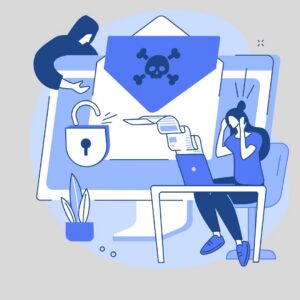
While anyone can be a victim of wire fraud, some individuals and businesses are more at risk than others. Scammers often target small businesses and individuals who conduct a lot of financial transactions online. Senior citizens and vulnerable populations, such as those who are lonely or looking for companionship, are also frequently targeted by romance scams. Additionally, those who work in finance or have access to sensitive financial information are at increased risk for BEC scams. It’s important to be aware of these potential risks and take extra precautions to protect yourself and your business.

What to Do if You Become a Victim of Wire Fraud

If you suspect that you have become a victim of wire fraud, act quickly to minimize the damage:

  1. Contact your bank or financial institution immediately: If you’ve transferred money to a fraudulent account, contact your bank or financial institution immediately. Report the fraud and try to recover the funds as quickly as possible.
  2. Contact law enforcement: Report the incident to your local law enforcement agency. File a report with the Internet Crime Complaint Center (IC3).
  3. Alert relevant parties: If sensitive information has been compromised, alert any relevant parties, such as your customers or clients, and take steps to mitigate any potential damage.

Taking Action Against Wire Fraud

The risk of wire fraud isn’t going away, but strong governance, up-to-date compliance practices, and proactive IT strategies can drastically reduce your exposure. Work with a technology partner who understands the business side of cybersecurity, and you’ll do more than block attacks; you’ll build resilience, confidence, and trust.

Stay Vigilant and Take Action

Wire fraud is a growing threat in today’s digital age and can result in significant financial losses. However, by being proactive and vigilant, individuals and businesses can take steps to protect themselves. IT teams play a critical role in preventing wire fraud by implementing robust security measures, educating employees, and developing incident response plans. If you suspect you have become a victim of wire fraud, act quickly by contacting your bank, financial institution, or law enforcement and alerting relevant parties. Don’t wait until it’s too late. Take the necessary steps to protect your company from wire fraud today.

Take Control of Your Risk Before It Becomes a Crisis

At Hill Country Tech Guys, we help Texas businesses like yours build resilient, secure IT environments that support compliance, reduce risk, and enable growth. We make your systems work for you, not against you. Let’s talk about what peace of mind looks like for your organization. 

Top 10 Cybersecurity Best Practices for Employees

In today’s digital world, cybersecurity is crucial for protecting sensitive information and keeping business operations running smoothly. Employees play a vital role in safeguarding their company’s data, especially for organizations operating across Texas, where remote work and digital collaboration are now the norm.

Cybersecurity Best Practices That Actually Work

1. Use Strong Passwords

Creating strong, unique passwords for each account is essential for preventing cyber attacks. A strong password is at least 12 characters long. It includes uppercase and lowercase letters, numbers, and special characters.

Avoid using easily guessable information like birthdays or common words. For example, instead of using “Password123,” try something like “T!m3T0W0rk$.” Additionally, consider using a password manager to generate and store complex passwords securely.

2. Enable Multi-Factor Authentication (MFA)

Multi-factor authentication (MFA) adds an extra layer of security to your sign-in process. This requires two or more verification methods to access an account. This could include something you know (password), something you have (a mobile device), or something you are (fingerprint).

Enabling MFA significantly reduces the risk of unauthorized access. For instance, even if someone guesses your password, they would still need your phone to log in. Many services, such as email providers and financial institutions, offer MFA options you can enable in your account settings.

3. Recognize Phishing Attempts

Phishing attacks are designed to trick you into providing sensitive information, such as login credentials or financial details. Be cautious of emails, messages, or websites that ask for personal information. Look for signs of phishing, such as suspicious email addresses, generic greetings, and urgent requests.

For example, an email that says “Your account will be locked unless you verify your password now!” is likely a phishing attempt. Always verify the sender’s email address and avoid clicking on suspicious links. If in doubt, contact the organization directly using a known, trusted method. These types of scams are increasingly common across Texas businesses of all sizes, making employee awareness one of the most effective defenses.

4. Keep Software Updated

Regularly updating your software, including operating systems, applications, and antivirus programs, is essential for protecting against threats. Enable automatic updates whenever possible to ensure you have the latest security patches. Outdated software can have vulnerabilities that cybercriminals exploit.

For example, an old version of your web browser might not protect you from the latest malware. Keeping your software up to date helps close security gaps and protect your devices from new threats.

5. Secure Personal Devices

cybersecurity best practices vector of a breachIf you use personal devices for work, make sure they are secure. This includes using strong passwords, enabling encryption, and installing security software. Avoid using public Wi-Fi networks for work-related activities. They are easily compromised.

For instance, if you must use public Wi-Fi, use a VPN to encrypt your connection and protect your data. Ensure that your devices lock automatically after a period of inactivity.

6. Use VPNs for Remote Work

A Virtual Private Network (VPN) encrypts your internet connection, making it more secure when accessing company resources remotely. Always use a VPN when working from home or other remote locations to protect sensitive data from potential eavesdroppers.

For example, a VPN can prevent hackers from intercepting your emails or accessing your company’s internal network. Many organizations provide VPN access to their employees. Use it whenever you are working outside the office.

7. Regularly Back Up Data

Back up your data regularly. Use cloud-based and physical backup solutions to protect your data from loss or corruption.

For instance, you can use an external hard drive for physical backups and a cloud service like Google Drive for online backups. Set up automatic backups to ensure your data is always up-to-date and secure.

8. Limit Access to Sensitive Information

Only access sensitive information when necessary and ensure that it is stored securely. Use access controls to restrict who can view or edit sensitive data. Regularly review permissions in your company to ensure they are up to date.

For example, if employees leave the company, revoke access to company systems immediately. Implement role-based access control (RBAC) so employees can only access the information they need to perform their jobs.

9. Report Suspicious Activity

If you notice any unusual activity on your accounts or devices, report it to your IT department immediately. Early detection of potential security threats can help prevent more significant issues down the line. For instance, if you receive an unexpected password reset email, report it even if you didn’t request a reset. Your IT team can investigate and take appropriate action to protect your accounts and data.

10. Participate in Cybersecurity Training

Regular cybersecurity training helps employees stay informed about the latest threats and best practices. Many Texas organizations now rely on ongoing training to reduce risk and meet insurance and compliance expectations. Participate in training sessions and stay updated on company policies. For example, training can teach you how to recognize phishing emails, use secure passwords, and protect your devices.

Putting Cybersecurity Best Practices into Action 

Many organizations offer ongoing cybersecurity training programs. These programs train employees how to spot potential threats. They also train employees on where to report threats.

By following these cybersecurity best practices, employees can help protect their company’s data and systems from cyber threats. Remember, cybersecurity is a shared responsibility, and every action counts. Stay vigilant and proactive in safeguarding your digital environment.

Concerned about the security of your company? Concerned about the security of your company? Hill Country Tech Guys supports Texas businesses with practical cybersecurity training and protection strategies. Give us a call at 830-386-4234.