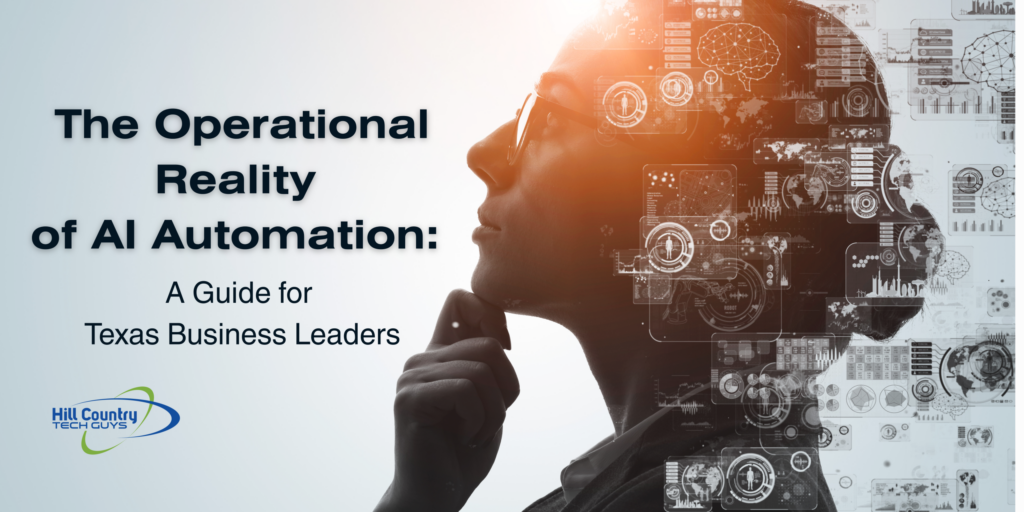
Artificial intelligence is showing up in everyday business operations faster than many organizations expected, and many leaders are now asking how businesses use AI in practical ways. What started as experimental tools for writing or coding is quickly becoming part of how companies analyze data, manage workflows, and support employees.
Across Texas and throughout the I-35 corridor, many businesses are already experimenting with AI in practical ways. Some teams are using it to speed up routine work. Others are connecting AI tools to internal systems to help employees find information faster or automate repetitive tasks.
The technology itself is moving quickly, but the real question for most business leaders is simpler.
Where does AI actually make sense in day-to-day operations?
How Businesses Use AI in Daily Operations
AI adoption rarely starts with a massive companywide rollout. In most organizations, it begins with small use cases where automation or analysis can save time.
Over time, those small experiments often expand into broader workflows.
Automating repetitive work
One of the earliest ways businesses adopt AI is by automating tasks that consume hours of manual effort.
Examples include:
- processing invoices or expense reports
- organizing incoming support requests
- sorting documents or emails
- summarizing long reports or meeting notes
Instead of replacing employees, these tools often remove routine administrative work. That allows teams to focus on the parts of their job that require judgment, creativity, or customer interaction.
Many organizations find that even small automations can recover significant time across a team.
Helping teams work faster
Another common use for AI is assisting with early-stage work.
Marketing teams may use AI tools to generate draft content ideas or summarize research. Sales teams might use it to prepare call summaries or organize customer notes. Operations teams often use AI to analyze documents or extract information from reports.
The output still requires human review and editing, but the starting point is much faster.
Rather than beginning with a blank page or a large set of raw data, employees can start with a draft that they refine and improve.
Turning data into usable insights
Many businesses collect large amounts of operational data but struggle to interpret it quickly.
AI tools are increasingly being used to analyze trends, summarize reports, and identify patterns that might otherwise go unnoticed.
For example, financial teams may use AI to analyze spending patterns or forecast cash flow scenarios. Operations teams might use it to identify trends in service requests or product performance.
The goal is not to replace decision-making, but to give leaders faster access to the information needed to make those decisions.
Supporting customer experience
AI is also beginning to play a role in how companies interact with customers.
Some organizations use AI-powered chat tools to handle common questions before a support ticket reaches a human technician. Others use AI to search internal knowledge bases and surface relevant documentation for support teams.
When implemented carefully, these tools can improve response times while still allowing employees to step in when more complex issues arise.
Connecting business systems together
One of the most powerful uses of AI happens when it connects to the systems businesses already rely on.
Customer relationship platforms, document repositories, accounting software, and internal knowledge bases often contain valuable information that employees need every day.
When AI tools can retrieve and summarize that information, employees can locate answers much faster.
For example, a team member might ask an AI assistant to summarize a customer account history from the CRM, retrieve related documents from Microsoft 365, and generate a short briefing before a meeting.
These capabilities can significantly improve productivity. They also introduce an important consideration.
Access.
Why AI Tools Need Access to Company Systems
Most AI tools become far more useful when they can interact with company data.
To retrieve documents, analyze reports, or automate workflows, the AI system must be able to connect to the applications where that information lives.
These connections are usually made through APIs or integration tools that allow software platforms to exchange data.
Once those connections exist, the AI system may be able to:
- retrieve company documents
- summarize internal reports
- analyze financial or operational data
- automate workflows across applications
This is where AI shifts from being a standalone tool to becoming part of a broader business system.
It is also where security and governance become critical.
How Applications Talk to Each Other
Behind most modern software integrations is a set of communication rules called an API, which stands for application programming interface.
An API allows one system to request information from another system in a structured way.
For example:
A CRM system may allow another application to retrieve customer records.
A document platform may allow an application to search stored files.
An accounting platform may allow another tool to retrieve invoice data.
AI platforms often rely on these connections to access the data they analyze.
Many businesses also use automation platforms that connect multiple systems together. These tools can trigger actions such as updating records, sending notifications, or creating reports when certain events occur.
When AI tools are added into this environment, they often interact with the same integrations.
This creates powerful automation opportunities, but it also means the AI system may have visibility into sensitive company information.
How AI Adoption Typically Happens Inside a Business
Most companies do not introduce artificial intelligence across the entire organization at once. Adoption usually happens gradually as teams begin experimenting with tools and discovering where the technology can save time or improve workflows.
In many organizations, AI adoption follows a pattern that looks something like this:
- Stage 1: Individual experimentation
Employees begin using AI tools to summarize documents, organize research, draft content, or analyze small sets of data. - Stage 2: Team productivity tools
Departments start adopting AI features built into the platforms they already use, such as email systems, document tools, or customer relationship platforms. - Stage 3: Workflow automation
Organizations begin connecting AI tools to operational systems so they can analyze data, retrieve information, and automate repetitive tasks across multiple applications. - Stage 4: Integrated business systems
AI becomes part of broader workflows across the organization, interacting with document repositories, customer systems, financial platforms, and internal knowledge bases.
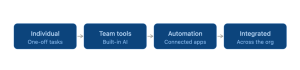 As businesses move through these stages, questions around governance, security, and access control naturally become more important. When AI systems begin interacting with company data and business applications, organizations need clear policies around how those tools are used and what information they can access.
Why AI Governance Is Becoming a Business Requirement
As AI tools become more common in the workplace, many organizations are discovering that adoption is happening faster than internal policies can keep up.
Employees are experimenting with AI to summarize documents, analyze spreadsheets, generate reports, and organize research. In many cases, these tools connect directly to business systems such as document platforms, customer relationship software, or internal knowledge bases.
That connectivity is what makes AI powerful. It is also what introduces new risks.
Without clear guidance, employees may not realize when sensitive information is being shared with an external system or when an AI tool has access to more company data than intended.
This is where governance becomes important.
AI governance does not mean blocking innovation or preventing employees from using new tools. It means creating clear guardrails around how those tools interact with company systems and business data.
Many organizations are beginning to establish policies that address questions such as:
- Which AI tools are approved for business use
- What types of company data can be used with those tools
- Which systems AI applications are allowed to connect to
- How AI-generated outputs should be reviewed before being shared externally
These policies help organizations adopt AI responsibly while still allowing teams to benefit from the technology.
For many businesses, governance also includes reviewing how identity security and access controls apply to new AI integrations.
The Reality of Shadow AI
Even in companies that have not formally adopted AI, employees are often already using it.
This is sometimes referred to as shadow AI. It happens when individuals begin experimenting with tools on their own without the organization having an official policy in place.
In many cases, the intention is positive. An employee may use an AI tool to summarize meeting notes, analyze a spreadsheet, or help organize a project plan.
The challenge is that these tools may interact with company information in ways that leadership has not evaluated yet.
For example, an employee might paste internal documents into an AI prompt to generate a summary. Another team member might connect a third-party AI tool to a cloud storage platform so it can search company files.
Without oversight, these actions can unintentionally expose sensitive information or create access paths that were never reviewed by the organization’s technology team.
Most businesses are already familiar with a similar situation from the past.
Before cloud software became widely adopted, employees often signed up for their own online tools to solve immediate problems. Over time, this created what many organizations referred to as shadow IT.
AI is creating a similar dynamic today.
Rather than trying to eliminate experimentation entirely, many organizations are choosing to address the issue through visibility and governance.
Clear policies, approved tools, and strong access controls allow employees to explore AI responsibly while still protecting company systems and data.
The Security Considerations Businesses Often Miss
When organizations adopt AI tools quickly, access controls are sometimes overlooked.
An AI platform connected to internal systems may be able to retrieve large volumes of company data depending on how permissions are configured.
That could include:
- financial records
- HR documents
- internal reports
- customer information
Most businesses would never intentionally expose this information broadly. However, poorly configured integrations or overly broad permissions can create situations where tools have more access than expected.
This is one of the reasons many organizations review identity controls and access policies when adopting new automation or AI tools.
Conditional access policies, identity security controls, and proper permission management all help ensure that systems interact with company data in a controlled way.
Supporting Businesses as AI Adoption Expands
As more companies explore AI tools and automation, technology oversight becomes increasingly important.
Hill Country Tech Guys works with businesses across Central Texas and the I-35 corridor to help evaluate how new technologies interact with existing systems.
That includes reviewing identity security, access controls, and integrations that connect business applications together.
The goal is not to slow down innovation. It is to ensure that new tools support the business without introducing unnecessary risk.
AI will continue evolving quickly. Organizations that take a thoughtful approach to how these tools connect with their systems will be better positioned to take advantage of the technology while maintaining control over their data.
If your organization is evaluating new AI tools or automation platforms, it may be worth reviewing how those systems interact with your existing infrastructure and security policies.
Hill Country Tech Guys helps businesses assess these environments and implement the controls needed to support modern cloud systems and emerging technologies.