Credential-based compromise remains one of the most common causes of security incidents in business environments. Stolen passwords are inexpensive, widely available, and often reused across systems.
In modern organizations where cloud platforms, remote access, vendor integrations, and privileged accounts intersect, a password alone is no longer a reasonable line of defense.
Multi-Factor authentication, often referred to as MFA, is now considered a foundational security control for businesses of nearly every size. But enabling MFA is not the same as implementing it correctly. And not all MFA methods offer the same level of protection.
This guide explains what multi-factor authentication is, why it matters in business environments, how it interacts with single sign-on, what phishing-resistant MFA means, and how to implement it in a structured way that supports both operational security and regulatory defensibility.
What Is Multi-Factor Authentication
Multi-Factor authentication is a security control that requires users to verify their identity using two or more independent factors before accessing a system.
Authentication factors fall into three categories: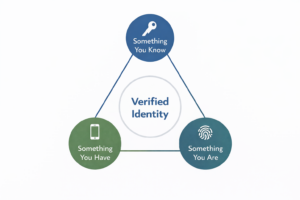
- Something you know, such as a password or PIN
- Something you have, such as a mobile device, hardware token, or security key
- Something you are, such as a fingerprint or facial recognition
When a login requires more than one of these categories, it qualifies as multi-factor authentication.
You will also see the term 2FA, or two-factor authentication. Two-factor authentication is a subset of MFA. It uses exactly two factors. MFA can require two or more factors, depending on policy and risk profile.
For a broader breakdown of common cybersecurity terminology, see our glossary of IT terms.
In business environments, MFA is typically applied to:
- Email systems
- Cloud applications
- VPN access
- Administrative accounts
- Remote access tools
- Financial systems
- HR platforms
The objective is straightforward. If a password is stolen, guessed, reused, or purchased from a breach database, the attacker cannot access the account without the second factor.
That is the theory. Implementation determines whether that theory holds up.
Why MFA Is Important for Businesses
Credential-based compromise remains the most reliable entry point into business systems. Passwords are reused, shared, and purchased on the dark web at scale.
Once they gain access, attackers pivot quickly into financial systems, payroll workflows, and sensitive data repositories.
Multi-Factor authentication dramatically reduces the success rate of these attacks. It forces an attacker to compromise more than just a password.
For businesses, the impact of not enforcing MFA can include:
- Business email compromise and fraudulent wire transfers
- Payroll redirection
- Ransomware deployment
- Data exfiltration
- Regulatory exposure
- Insurance underwriting complications
Many cyber insurance underwriting questionnaires now explicitly require MFA for administrative and remote access accounts.
MFA is no longer considered an optional enhancement. It is a baseline expectation.
That said, not all MFA methods provide equal protection.
Types of MFA Methods: Legacy vs Phishing-Resistant
Enabling a second factor is not the same as implementing a high-assurance identity control. The strength of MFA depends on how credentials are validated, how sessions are protected, and how authentication events are bound to devices and domains.
Legacy or Vulnerable MFA Methods
These include:
- SMS text message codes
- Voice call verification
- Basic push notifications
SMS codes are convenient but offer lower assurance due to SIM swap and interception risk.
Push notifications can be abused through what is commonly known as MFA fatigue or push bombing. An attacker repeatedly sends authentication prompts hoping the user eventually clicks approve.
Adversary-in-the-middle attacks can intercept session tokens even after MFA is completed. In these cases, an attacker tricks the user into authenticating against a malicious proxy site that captures the session.
These methods are still permitted in many environments, but they are increasingly considered lower assurance.
Stronger MFA Methods
Authenticator applications, such as Microsoft Authenticator and Google Authenticator, generate time-based codes that are more resilient than SMS.
Device-bound tokens that are cryptographically tied to a specific device also improve protection.
These methods raise the bar but do not eliminate session hijacking or adversary-in-the-middle risk.
What Is Phishing-Resistant MFA
Phishing-resistant MFA is designed to prevent credential replay and session hijacking by using cryptographic authentication bound to legitimate domains and devices.
Examples include:
- FIDO2 security keys: hardware devices that use cryptographic authentication tied to a specific website and device
- Hardware authentication tokens: require physical possession and cryptographic validation
- Windows Hello for Business: device-based biometric or PIN authentication bound to enterprise identity
- Passkeys: passwordless credentials stored on trusted devices and protected by biometric verification
As adversary-in-the-middle attacks become more common, phishing-resistant MFA is becoming the preferred standard in higher-risk environments.
When evaluating multi-factor authentication for business use, understanding this spectrum matters.
Convenience and security exist on a continuum. Leadership teams should make that tradeoff intentionally.
MFA vs SSO. What’s the Difference
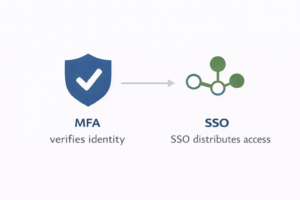 Multi-Factor authentication and single sign-on are often discussed together, but they serve different purposes.
Single sign-on, or SSO, allows a user to authenticate once and gain access to multiple systems without re-entering credentials.
MFA verifies identity using multiple factors.
SSO improves efficiency and user experience. MFA improves identity assurance.
They are not interchangeable.
An organization can implement SSO without MFA, which improves convenience but does not strengthen identity verification. An organization can also implement MFA without SSO, which increases security but may create user friction.
The most effective approach is combining the two.
When paired with single sign-on, MFA strengthens identity assurance while preserving user efficiency.
How to Implement MFA in a Business Environment
Turning on MFA for email is not the same as implementing MFA across a business.
A structured rollout includes:
- Defining which systems require MFA
- Identifying privileged accounts
- Selecting approved authentication methods
- Creating a written policy
- Planning phased enforcement
- Including vendor access
- Monitoring authentication logs
Rollout should typically begin with administrative accounts and leadership, followed by broader employee enforcement.
Conditional access policies can further strengthen implementation by:
- Restricting login by geography
- Requiring trusted devices
- Enforcing stronger authentication for high-risk roles
Legacy systems and service accounts require special consideration. Many service accounts cannot use interactive MFA. Leaving them unprotected creates blind spots.
For a detailed, step-by-step implementation framework, including policy structure, break-glass planning, service account handling, and monitoring guidance, download our multi-factor Authentication Implementation Framework.
MFA Compliance and Regulatory Considerations
MFA appears in multiple recognized cybersecurity frameworks, including the NIST Cybersecurity Framework.
Frameworks such as NIST and CIS include multi-factor authentication as a core control for protecting access to sensitive systems.
Regulatory environments increasingly expect documented enforcement.
The FTC Safeguards Rule, for example, requires financial institutions to implement access controls appropriate to their risk profile. While SMS-based MFA may technically meet baseline requirements, it is increasingly considered lower assurance in higher-risk environments.
Healthcare environments subject to HIPAA are similarly expected to implement reasonable and appropriate access controls. MFA is widely considered part of that expectation, especially for remote access and administrative accounts.
In Texas, the 2025 Cybersecurity Safe Harbor law, commonly referred to as SB 2610, allows certain businesses with fewer than 250 employees to limit punitive damages in the event of a breach if they can demonstrate that a recognized cybersecurity framework was implemented and documented.
The keyword is documented.
A business that enables MFA without policy documentation, logging, and review cadence may struggle to demonstrate that it has an operationalized control in place.
For Texas-based organizations, MFA should be viewed not only as a security measure but as part of a defensible cybersecurity posture.
Common MFA Mistakes Businesses Make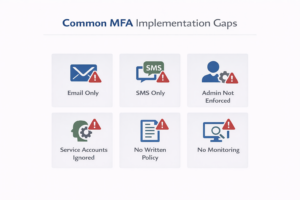
- Protecting only email while leaving other cloud applications exposed.
- Allowing SMS as the sole authentication method without evaluating risk.
- Failing to enforce MFA for administrative accounts.
- Ignoring service accounts and non-interactive logins.
- Skipping written policy and exception governance.
- Failing to monitor authentication logs for anomalies such as impossible travel or repeated push denials.
- Treating MFA as a compliance checkbox instead of a layered control.
Each of these gaps weakens the control’s effectiveness.
Is MFA Enough on Its Own
MFA significantly reduces the risk of credential-based compromise.
It does not eliminate it.
Attackers continue to evolve. Token theft, session hijacking, endpoint compromise, and social engineering remain viable techniques.
MFA should exist alongside:
- Endpoint detection and response
- Email security
- Conditional access policies
- Logging and monitoring
- Backup and recovery planning
Security maturity comes from layered controls, not a single technology.