Managed Service Providers: The Future of Small and Medium Businesses

Managed Service Providers (MSPs) have become increasingly important for small and medium businesses across Central Texas. As technology continues to evolve, businesses in areas like San Marcos, New Braunfels, Austin, and San Antonio face growing pressure to maintain reliable systems, protect sensitive data, and support modern operations without building large internal IT teams.

For many local businesses, managing IT infrastructure in-house is no longer practical. A managed service provider offers a comprehensive solution. Professional IT support, cybersecurity, and scalable technology services designed to support growth while reducing risk.

How Managed Service Providers Help Central Texas Businesses Scale and Grow

Small and medium-sized businesses throughout Central Texas often operate with lean teams and limited internal IT resources. Staying competitive requires dependable technology, but keeping up with constant changes can quickly become overwhelming. That is where a managed service provider becomes a strategic partner.

Increased Efficiency and Productivity

One of the biggest advantages of working with a managed service provider is increased efficiency and productivity. MSPs take responsibility for day-to-day IT operations that often consume time and attention across the organization.

managed service providers help provide 24/7 IT support for small and medium businessesThis includes system monitoring, software updates, hardware maintenance, and security patching. With these responsibilities handled proactively, Central Texas businesses can focus on serving customers, improving internal processes, and pursuing growth initiatives rather than reacting to IT issues.

Scalability and Flexibility

As businesses grow, their technology needs become more complex. Managed service providers offer scalable IT solutions that evolve alongside the business, whether that means supporting new hires, opening additional locations, or enabling remote and hybrid work environments.

For businesses operating along the I-35 corridor or across multiple Central Texas communities, this scalability is essential. MSPs also provide flexible service models that align technology investments with business goals and budget realities.

Expertise and Ongoing Support

Managed service providers bring specialized expertise that most small and medium businesses cannot maintain internally. With dedicated teams of IT professionals, MSPs help ensure systems remain reliable, secure, and aligned with industry best practices.

Many MSPs provide continuous monitoring and extended support coverage, offering businesses peace of mind that issues will be identified and addressed promptly. For Central Texas organizations, having access to experienced IT professionals who understand local industries adds meaningful value.

Why Choosing a Local Managed Service Provider Matters for Central Texas Businesses

Not all managed service providers operate the same way. While national and remote MSPs may offer standardized support models, many Central Texas businesses benefit significantly from working with a local managed service provider that understands the region, industries, and operational realities of the area.

Local Understanding of Business Environments

Central Texas businesses operate in a diverse and fast-growing economic environment. From healthcare practices and professional services firms to manufacturers and multi-location organizations, each business faces unique operational and technology challenges.

A local managed service provider understands these environments firsthand. This includes familiarity with regional infrastructure, common internet service providers, and the mix of urban and rural connectivity challenges found throughout Central Texas. That context allows a local MSP to design solutions that are practical, realistic, and aligned with how businesses operate day-to-day.

Faster Response and On-site Support When Needed

While many IT issues can be resolved remotely, some situations require on-site expertise. Hardware failures, network equipment issues, access control problems, and infrastructure upgrades often demand a physical presence.

A local managed service provider can respond quickly when on-site support is needed. This reduces downtime and helps prevent minor issues from escalating into major disruptions. For businesses in San Marcos, New Braunfels, Austin, San Antonio, and surrounding communities, proximity plays an important role in maintaining uptime and continuity.

Stronger Relationships and Strategic Alignment

Technology is most effective when it supports business goals rather than dictating them. Local MSPs tend to build long-term relationships with their clients, allowing for a deeper understanding of priorities, growth plans, and risk tolerance.

This relationship-driven approach enables more effective strategic planning. Instead of offering one-size-fits-all solutions, a local MSP can provide guidance tailored to the specific needs of Central Texas businesses, whether that involves scaling operations, strengthening security posture, or planning for future expansion.

Industry Experience Across Central Texas

Many Central Texas businesses operate in regulated or high-availability environments. Healthcare providers, financial firms, legal practices, and property management companies all face distinct compliance and security requirements.

A local managed service provider with experience across these industries brings valuable insight into regulatory expectations, operational pressures, and common technology challenges. This experience helps businesses make informed decisions and avoid costly missteps.

Accountability and Community Presence

Local MSPs are invested in the communities they serve. Their reputation is built on long-term trust and consistent service, not short-term contracts. This accountability often translates into higher service quality, clearer communication, and a stronger commitment to client success.

Many Central Texas organizations also value partnerships with companies that live and work in the same communities, understand the local culture, and contribute to the regional business ecosystem.

Long Term Stability and Trust

Technology decisions have lasting impacts. Choosing a managed service provider is not just a technical decision. It is a strategic one. A local MSP offers continuity, stability, and a vested interest in your long-term success.

For Central Texas businesses seeking predictable IT performance, improved security, and a partner that understands their environment, working with a local managed service provider offers clear advantages.

Strengthening Security for Central Texas Businesses
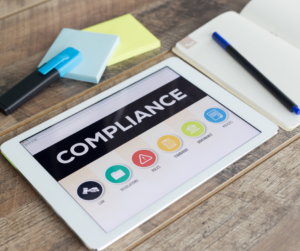
managed service providers help small and medium businesses with regulatory complianceCybersecurity is no longer a concern limited to large enterprises. Small and medium businesses throughout Texas are frequent targets due to limited internal security resources and increasing digital exposure.

A managed service provider delivers layered security solutions designed to reduce risk, improve preparedness, and support business continuity.

Proactive Threat Detection and Prevention

MSPs use advanced tools to detect and mitigate threats before they escalate. Firewalls, endpoint protection, and continuous monitoring help identify suspicious activity early. Regular vulnerability assessments allow weaknesses to be addressed before they are exploited.

24/7 Network Monitoring

Round-the-clock monitoring helps ensure unusual activity is detected and addressed quickly. This is especially important for businesses that rely on constant system availability, including healthcare practices, financial firms, and multi-location organizations throughout Central Texas.

Incident Response and Recovery

When incidents occur, managed service providers help businesses respond efficiently. Defined incident response plans, secure backups, and recovery procedures help minimize downtime and reduce operational disruption.

Employee Training and Awareness

Human error remains one of the most common contributors to security incidents. MSPs support employee education on phishing awareness, secure password practices, and responsible data handling. This training helps strengthen security across the organization.

Compliance Support for Regulated Industries

Many Central Texas businesses operate in regulated industries where compliance is critical. Managed service providers help organizations meet and maintain compliance requirements through documentation support, security controls, and ongoing oversight.

Common compliance frameworks supported by MSPs include HIPAA, PCI DSS, SOC 2, and NIST.

Real World Cybersecurity Risks Facing Small Businesses

Cyber threats impact businesses of all sizes. Ransomware attacks, phishing campaigns, and data breaches involving customer and financial information are increasingly common. These incidents can result in downtime, regulatory consequences, and long-term reputational damage.

Proactive IT management and layered security oversight significantly reduce exposure to these risks and help businesses respond more effectively when challenges arise.

A Managed Service Provider That Understands Central Texas

At Hill Country Tech Guys, we specialize in providing managed IT services for small and medium businesses throughout Central Texas. Our team supports organizations across San Marcos, New Braunfels, Austin, San Antonio, and surrounding communities.

We deliver proactive IT management, security-focused solutions, and strategic guidance designed to help businesses operate with confidence and clarity.

If you are ready to strengthen your technology foundation and reduce day-to-day IT stress, contact Hill Country Tech Guys to learn how a trusted local managed service provider can support your business.
Phishing Scams on the Rise After SVB Crash

Phishing scams have been prevalent for a while, but since the SVB crash, they’ve been on the rise. Threat actors are looking to cash in on the misfortune of and prying on the lack of awareness around cybersecurity threats and the sensitivity of the situation.

Every company, regardless of size, is a target for threat actors. We received an email from a well-known company at Hill Country Tech Guys asking us to update our account information ASAP due to the SVB crash. The message included several ways we could make payments with them directly.

The problem is our company doesn’t do business with this company. HCTG requires our employees to complete frequent phishing training and simulated phishing attacks to ensure our workforce spots potential threats quickly and responds appropriately. In this instance, that training worked precisely as intended.

Phishing is something every business should be taking very seriously right now.

Tips to spot phishing scams

Some phishing scams are apparent and easy to catch, but they’re evolving with technology and becoming a more significant threat.

  1. Always ensure you know the sender – If you get an email from someone asking you to grant access to something, update your payment information, or personal information, ensure you know the sender.
  2. Check for obvious typos and misspellings – typos and misspellings are a key indicator that you’re dealing with fraud. Yes, legitimate typos do happen in copy often. Look at company names, sender addresses, and body text. You are likely to find these within poor phishing attempts. Check the logo to ensure it’s the current company logo. If the logo looks wrong, go check the company’s website. Threat actors will search the web, download a logo, and paste it into emails to look legit. Sometimes they accidentally use an old one.
  3. Be sure the sender address is correct – threat actors often create email addresses that look very similar to the real thing. This is how they make you feel safe. Sometimes they change just one letter or character to fool you.
  4. Ask – if you get an email from Laura in HR (if you haven’t seen her Instagram, you’re missing out) asking you to update your banking information. You know that generally, banking info is updated in your employee portal or at the employee’s request. This should raise a red flag. The easiest way to verify this is to reach out directly to Laura and ask. Please note this does mean replying to the email. Walk over or pick up the phone and call to verify they truly sent you that message.

What to do if you suspect you’ve become a victim of phishing

  • phishing scam quote: "According to IBM, phishing accounted for 41% of all incidents remediated by their software in 2022. Phishing is the biggest threat currently facing cybersecurity."Report it! Most companies have a system for their employees to report suspicious emails. If your company does not have this, report the message as spam to your email provider and speak with your management team about finding a solution to keep your company safer.
  • Investigate what was compromised and the potential impact of the incident. It’s important to know quickly what was accessed or potentially stolen. If you’re accountable for any regulatory compliances, you must inform those agencies of the incident, as it is considered a breach.
  • Use your business continuity plan. BCPs are response plans for something that impacts your ability to carry out business, like natural disasters and cybersecurity incidents. Make these plans in advance. Employees should know what is expected of them during this process and how to carry out their duties.
  • Turn on MFA for everything. Multifactor authentication is another step in the login process that requires the user to prove their identity. There are different types of MFA. Some devices allow fingerprints and facial scans, some send a code to a designated phone or email, and some use an authenticator app that auto-generates codes that expire every 60 seconds.

How to train employees on phishing scams and other cyber-threats

Training employees to spot phishing scams and other cyber threats is a must. Your IT team should be able to provide you with the best solutions for cyber awareness training. Some companies provide premade training modules and assessments at a per-user cost for many companies. If you use an MSP, ask them about finding the right solution for training your workforce. Call Hill Country Tech Guys today if you need a good MSP or want to know more about phishing scams and cybersecurity training.

Securing Your Patients’ Privacy While Using Telehealth

[vc_row][vc_column][vc_column_text]Telehealth has become a buzzword in the healthcare industry, and for a good reason. With the advancement of technology, healthcare providers can now connect with patients from the comfort of their homes.

This has opened doors for those with limited access to health care. For example, individuals living in rural areas or with disabilities that make it difficult for them to travel to medical appointments can now receive care through telehealth.

With the potential to revolutionize the healthcare industry, it’s no surprise that telehealth has gained so much attention in recent years. But every coin has two sides. 

While telehealth provides convenience and flexibility for patients and practitioners, it also raises concerns about data privacy and security. [/vc_column_text][vc_column_text]

Main Security Concerns With Telehealth

One of the most significant telehealth concerns involves transmitting sensitive medical information, also referred to as protected health information (PHI), over the internet or other networks. This increases the risk of data being intercepted or accessed by unauthorized individuals. Telehealth systems are also vulnerable to cyberattacks such as malware, phishing scams, and denial-of-service attacks.

What happens when there is a patient data breach and an unauthorized person gains access to the information? Let’s take a look.

  • Loss of Trust: Patients may feel violated and lose trust in the health care provider or the telehealth system, damaging the provider’s reputation.
  • Identity Theft: Cybercriminals can use patient data for identity theft, which can have serious consequences. When personal information, such as social security numbers or financial information, is compromised, patients may face financial losses, credit issues, or other problems.
  • Misuse of Information: Unauthorized access to patient data can result in the misuse of information. For example, the information could be used to discriminate against the patient in employment or insurance decisions or to blackmail or extort the patient.

Unintentional HIPAA Violations 

The Health Insurance Portability and Accountability Act (HIPAA) provides guidelines for healthcare organizations to protect patient’s privacy and security while handling their data. The digitalization of healthcare information and services has raised many concerns about maintaining patient privacy.

Failure to comply with HIPAA regulations comes in different forms, including accidental. For example, many practitioners use various online methods of communication to connect with clients. A common oversight is providing contact forms that are not secure or HIPAA compliant. This is how many accidental HIPAA violations can occur. 

Why Telehealth Security Is Essential

Healthcare security breach statistics ring the alarm bell. From 2009 to 2022, 342 million patient records were stolen or illegally accessed. As the threat increases, so does the financial burden. The average cost of a healthcare data breach reached $10.1 million in 2022, an $870,000 increase from the previous year.

The COVID-19 pandemic has further exacerbated the situation, with an increase in telehealth usage and the prevalence of remote work. Recent Microsoft statistics provide insight into this heightened risk, revealing that 67% of IT leaders using Microsoft 365 experienced increased data breaches due to remote work.

Meanwhile, a 2021 Kaspersky telehealth survey found that 52% of telehealth providers encountered patients who refused to utilize telehealth services. This decision resulted from patients not trusting the technology to safeguard their data security and privacy.

The breach of PHI can have severe consequences for patients and healthcare providers alike. Therefore, it is crucial to prioritize data privacy and security while using telehealth services.[/vc_column_text][vc_row_inner][vc_column_inner width=”2/3″][vc_column_text]

Best Practices for Securing Your Patients’ Privacy While Using Telehealth

Here are five best practices for securing your patients’ privacy while using telehealth:

1. Use Secure Telehealth Platforms

If the telehealth platform is not secure, no matter how well-trained or careful the provider is – a data breach might find its way. The platforms should be HIPAA compliant, have end-to-end encryption, and use multi-factor authentication to prevent unauthorized access. 

Secure telehealth platforms also provide a safe and protected environment for online consultations, making it difficult for hackers to intercept the communication. Healthcare providers should also always use secure networks and avoid public Wi-Fi networks, which are more susceptible to hacking.

2. Conduct Regular Penetration Testing

Penetration testing is the practice of simulating a cyberattack on a system to identify vulnerabilities. Healthcare providers should conduct regular checkups through penetration testing tools to find potential security risks in their telehealth systems. After all, don’t we all agree that prevention is better than cure?

[/vc_column_text][/vc_column_inner][vc_column_inner width=”1/3″][vc_single_image image=”5977″ img_size=”full”][/vc_column_inner][vc_column_inner][vc_column_text]

3. Train Employees on Data Privacy and Security

Just like with any other system, employee training is a critical component of securing patients’ privacy while using telehealth services. Cybersecurity training can educate staff on how to recognize scams and threats, practice network safety, respond to data breaches, and use technology appropriately. 

Since telehealth is a fast-paced system heavily affected by technological advancements, the training should be updated regularly.

4. Use Strong Passwords

Using a weak password is equivalent to leaving your front door unlocked. A strong password can be a game-changer in preventing unauthorized access to patient data. 

The passwords should be unique and complex. Use a different password for every account and change them regularly. Two-factor authentication (2FA) should also be used where possible. 

5. Update Devices and Networks

While a strong password may keep the door locked, it doesn’t prevent anyone from climbing through a window that was left open. This same idea applies to software updates, as they offer the latest security patches. Neglecting these updates leaves the system more vulnerable to cyberattacks. [/vc_column_text][/vc_column_inner][/vc_row_inner][/vc_column][/vc_row][vc_row][vc_column][vc_column_text]

Just What the Doctor Ordered

Telehealth has revolutionized how we access healthcare services, bringing medical care to our fingertips. However, as with any technological innovation, it has brought its own set of security challenges. 

One of the most significant security concerns is the transmission of sensitive medical information over the internet, which increases the risk of unauthorized access or interception. 

Following best practices for securing your patients’ privacy while using telehealth is crucial. Patients can feel confident that their data is secure by utilizing secure telehealth platforms, penetration testing, cybersecurity training, strong passwords, and regularly updated systems.[/vc_column_text][/vc_column][/vc_row]

How to Secure Home Networks

[vc_row][vc_column][vc_column_text]Home network safety probably isn’t a top-of-the-list concern for most business leaders. If your business has any remote or hybrid employees, it should be. 2020 saw a huge surge in the number of remote workers across the country. Many ill prepared businesses are now suffering the consequences. Helping employees learn how to secure home networks is a key piece of the security puzzle.

Like many small businesses, individuals in their home carry the mindset, “I’m too small for a cyberattack.” This type of thinking contributes to the steadily rising numbers of individuals and businesses impacted by cybercrime every year. It is up to the company to ensure cybersecurity policies are in place that mitigate risks. It may also be necessary to provide your workforce with information and tips on how comply with these policies. Help your employees learn how to secure home networks so their homes aren’t a threat to your business.[/vc_column_text][/vc_column][/vc_row][vc_row][vc_column][vc_column_text]

How to Secure Home Networks

  1. Install and Use a Reputable Antivirus Software

    Every computer on the network should be utilizing an AV software. There’s an old wive’s tale, maybe an old engineer’s tale, about how Macs don’t get viruses. It’s both prolific and potentially harmful when believed. Macs require AV software built for the Mac OS. Be sure you’re providing the right software to your workforce.

  2. VPNs or Virtual Desktops Help Create a Sandbox Environment

    Working from a VPN or virtual desktop creates what is known as a sandbox environment. These are not impenetrable but they are a great security layer. Provide remote employees with one of these options and limit tool access outside of the office network to VPN or virtual desktop only.

  3. Update Software Regularly

    Those pesky Windows and Mac updates bring vital patches to operating systems which help secure vulnerabilities before threat actors penetrate the weak spots. We recommend pushing updates to employees devices during non-business hours.

  4. Don’t Use Devices Past End of Service Life

    Using devices that are no longer supported and patched by their manufacturer poses a huge risk to both business and personal data. Understanding threats facing end of life devices is vital to every company’s cybersecurity efforts.

  5. Set Up a Firewall

    Many devices come with firewalls, often they’re on out of the box. We recommend ensuring that both the network and the devices on the network have firewalls enabled. Creating multiple layers of security makes networks much harder to penetrate.

  6. Use Strong, Unique Passwords

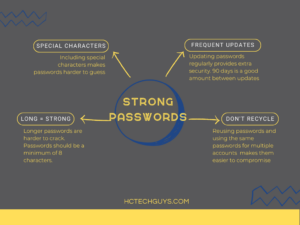
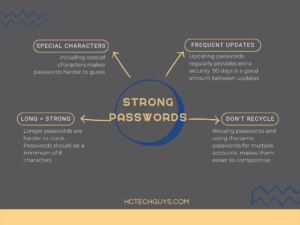
    learning how to secure a home network includes learning good password habits. Special characters, frequent updates, longer pw are stronger, don't reuse your passwordsWe talk about password hygiene a lot at Hill Country Tech Guys because it’s so important. Strong, unique, frequently updated passwords are an essential defense component for businesses and individuals alike. Passwords should not include personal details because they’re easily guessed. Ensure that your employees update passwords every 90 days and require multi-factor authentication.

  7. Secure Modems, Routers, and Their Networks

    Securing networks is a basic step that every internet service provider (ISP) both recommends and, in most cases, assists in completing. Wifi passwords should be strong and unique just like all other passwords.
    Securing modems and routers is a slightly different story. Modems and routers contain a gateway which allows access to the device by a computer. This is where users will change settings, set up network security, and maintain the interface. Ensuring the gateways are password protected creates another small layer to secure home networks. These devices often come with very generic usernames and passwords which makes them easy to gain access to. Strong, unique passwords are key!

  8. Inbox Hygiene

    Reducing the amount of spam coming to an inbox reduces the risk that an employee will click on or open something malicious. Ensure that your employees mark spam in their email clients. I.T. should set up a way to report suspicious or malicious looking messages and encourage employees to use this tool.

  9. Train Employees on Cybersecurity Best Practices and Policies

    Training your employees allows them to take an active part in defending against cyberthreats both for your business and in their personal lives. Set up regular and dynamic cybersecurity training to keep knowledge fresh.

  10. Hire a Reputable Cybersecurity Team

    Having the right people around makes all the difference. Hire a team of I.T. professionals to help you create impactful policies, train employees, and secure networks and devices. There is no governmental oversight currently on I.T. professionals or companies. Do your research, ask questions, get references. Hiring the wrong company or individual could cost you big.

[/vc_column_text][/vc_column][/vc_row][vc_row][vc_column][vc_column_text]

Convenience Should Never Take Priority Over Security

An additional item to consider for both remote and in-house employees is permissions. According to an article by The Daily Swig, cloud computing has created increased vulnerabilities for many companies.

“…improper authorization issues [rose] by 45% – largely because organizations are instituting ever-more granular permissions as they migrate to the cloud.”

Improper authorization refers to individual or organization-wide access to administrative controls. 99% of your company does not need administrative access to their computers or your network, including C level. While it may seem more practical to allow “trusted” individuals to have certain permissions, unless their job requires it, they don’t need them.[/vc_column_text][vc_column_text]The importance of working from secure environments cannot be overstated. Cybercrime is a growing threat that every company, and individual, should take seriously. Ensure you take the proper steps to educate your remote workers on how to secure a home network. Express the importance of security to staff on a regular basis, regardless of where they work. No company is completely safe from cybercrime but that doesn’t mean your company should be an easy target. Call Hill Country Tech Guys today to see how you can secure your growth.[/vc_column_text][/vc_column][/vc_row]

How to Reduce Spam: 8 Tips for a More Secure Inbox

[vc_row][vc_column][vc_column_text]Spam is an annoying feature that is deeply ingrained in electronic communication and it comes in many forms. Some are just marketing emails that aim to grab and keep your attention. Worst case, this type of spam clogs your inbox. Other types are far more nefarious aiming to gain a foothold in your system. Phishing attempts, social engineering attempts, and malicious links could be hidden in your unwanted email. Learning how to reduce spam helps keep your inbox tidy and keep your information more secure.[/vc_column_text][vc_column_text]

Why Spam Matters

Mark Jordon, Director of Cybersecurity at Hill Country Tech Guys, helps ensure that inbox hygiene is given the attention it needs, and for good reason.

“Almost 80% of all cybersecurity-related incidents are caused by someone opening or interacting with a malicious email,” Jordan said. “Threat actors know that many businesses have built the walls of their digital castle higher and stronger, and instead of assaulting the front gate they trick unsuspecting employees to open a side door by way of seemingly legitimate-looking emails.”

Jordan goes on to talk more about the potential risks associated with spam. “These emails are good. Really good. What may convincingly appear as an email from your bank, or even another person you actually know, may in truth be a ploy to trick you into opening a link or downloading an attachment which essentially gives an attacker free rein to your computer, and eventually your entire business.”

Jordon also states that using MFA and good password hygiene in tandem with training employees is an excellent defense.[/vc_column_text][vc_column_text]

How to Reduce Spam

Use the 8 tips to reduce the number of spam messages hitting your inbox:[/vc_column_text][vc_row_inner][vc_column_inner width=”2/3″][vc_column_text]

1.     Be thoughtful about giving out your email address

We live our lives online these days which means your email address is highly valuable information. Companies collect email addresses like your grandfather collected stamps, so be mindful of who you trust with your information. This also means being aware of where your email address is posted. Social media sites allow you to pick and choose what is and what is not shared publicly and with your friends and followers.

2.     Use your spam report feature

When you report a message as spam, it helps tune the algorithm to better process your mail in the future. It also helps identify potential sources of malicious intent.

3.     Check out the company’s privacy policy before submitting your email address

Most companies will have a privacy policy on their site when you sign up for their newsletters, marketing collateral, or create accounts. These policies list how user information is used and shared. If you can’t find one, you might not want to provide your information.

4.     Don’t forward chain letters

Part of learning how to reduce spam is learning not to contribute to spam. When you forward chain letters, you’re contributing to spam in the inboxes of people who have trusted you with their email addresses. Chain letters don’t just clog up your inbox. Adding senders also risks exposing other email addresses to potential spammers.

5.     Check preselected options before submitting

Often you will find that there are preselected options for marketing collateral when signing up for a “free” account. Be sure you uncheck any message types you do not want to receive. If you forget to uncheck marketing options, you should be able to unsubscribe once the messages start coming in. Check the bottom of your messages for the “unsubscribe” option.

6.     Don’t click links in emails from untrusted senders

Spotting an untrustworthy source in an email message is difficult so be sure you trust the sender before clicking that link. Often, phishing attempts will look like they come from a trusted sender. Check the sender’s address, logos, and other information in the email before you click that link. At best, clicking a link lets a user on the other end know that they have a good email address to continue to send messages to. Sometimes links are far more dangerous. By clicking a link, you could be downloading malicious software on your computer or into your company’s network.

7.     Make a free secondary account

This is the best solution to tip #1. There will be times when you must submit info to get something. Rather than filling up your regular use personal inbox or worse yet your work inbox, consider signing up for a free secondary email address used for marketing signups. Gmail offers free accounts with free (limited) cloud storage and is a trusted provider.

8.     Don’t reply to spam messages

Much like clicking the link in an email or answering a scam call, the only thing this does is confirm to the entity on the other end that they have a good working email that a live user is monitoring and responding to. You could open yourself up to additional emails and potential threats.[/vc_column_text][/vc_column_inner][vc_column_inner width=”1/3″][vc_raw_html]JTNDZGl2JTIwc3R5bGUlM0QlMjJwb3NpdGlvbiUzQSUyMHJlbGF0aXZlJTNCJTIwd2lkdGglM0ElMjAxMDAlMjUlM0IlMjBoZWlnaHQlM0ElMjAwJTNCJTIwcGFkZGluZy10b3AlM0ElMjAyNTAuMDAwMCUyNSUzQiUwQSUyMHBhZGRpbmctYm90dG9tJTNBJTIwMCUzQiUyMGJveC1zaGFkb3clM0ElMjAwJTIwMnB4JTIwOHB4JTIwMCUyMHJnYmElMjg2MyUyQzY5JTJDODElMkMwLjE2JTI5JTNCJTIwbWFyZ2luLXRvcCUzQSUyMDEuNmVtJTNCJTIwbWFyZ2luLWJvdHRvbSUzQSUyMDAuOWVtJTNCJTIwb3ZlcmZsb3clM0ElMjBoaWRkZW4lM0IlMEElMjBib3JkZXItcmFkaXVzJTNBJTIwOHB4JTNCJTIwd2lsbC1jaGFuZ2UlM0ElMjB0cmFuc2Zvcm0lM0IlMjIlM0UlMEElMjAlMjAlM0NpZnJhbWUlMjBsb2FkaW5nJTNEJTIybGF6eSUyMiUyMHN0eWxlJTNEJTIycG9zaXRpb24lM0ElMjBhYnNvbHV0ZSUzQiUyMHdpZHRoJTNBJTIwMTAwJTI1JTNCJTIwaGVpZ2h0JTNBJTIwMTAwJTI1JTNCJTIwdG9wJTNBJTIwMCUzQiUyMGxlZnQlM0ElMjAwJTNCJTIwYm9yZGVyJTNBJTIwbm9uZSUzQiUyMHBhZGRpbmclM0ElMjAwJTNCbWFyZ2luJTNBJTIwMCUzQiUyMiUwQSUyMCUyMCUyMCUyMHNyYyUzRCUyMmh0dHBzJTNBJTI2JTIzeDJGJTNCJTI2JTIzeDJGJTNCd3d3LmNhbnZhLmNvbSUyNiUyM3gyRiUzQmRlc2lnbiUyNiUyM3gyRiUzQkRBRldEbDBjRlRBJTI2JTIzeDJGJTNCdmlldyUzRmVtYmVkJTIyJTIwYWxsb3dmdWxsc2NyZWVuJTNEJTIyYWxsb3dmdWxsc2NyZWVuJTIyJTIwYWxsb3clM0QlMjJmdWxsc2NyZWVuJTIyJTNFJTBBJTIwJTIwJTNDJTJGaWZyYW1lJTNFJTBBJTNDJTJGZGl2JTNFJTBB[/vc_raw_html][/vc_column_inner][/vc_row_inner][/vc_column][/vc_row][vc_row][vc_column][vc_column_text]

Reducing Spam Reduces Risk

The number one vulnerability of any company is the end user. The more end users, the more weak spots your company has. New employees may be a target as they are unfamiliar with policies which makes them more likely to click. Training your employees on the fundamentals of cybersecurity best practices, including dealing with spam, will help make your company more secure. The earlier and more often you train, the better. If you’d like to talk to an industry leader about IT solutions tailored to your company, give us a call today.[/vc_column_text][/vc_column][/vc_row]

What You Need to Know About Microsoft End-of-Life

Every device has an end-of-life date, just like the products you buy at the supermarket. Microsoft end-of-life dates are easy to find, but it’s vital to understand what they mean for your business. Computers and servers are the biggest spends associated with Microsoft’s end-of-life. While these two systems are very different, the impact of the end of service life is very similar. Generally, a computer comes with one of two operating systems. You’ll either get a Mac running Apple’s operating systems or you’ll get a PC running Windows. Both operating systems get updates regularly.

You’re Taking on Water

We’ve all seen the pop-ups warning of impending updates. The device will give you the option to install and restart now, set a time for later, or snooze. These updates contain security patches and bug fixes for your operating system. This helps keep your device and in turn your network more secure. A security patch is rolled out when a weak point is found within a system, sort of like welding a leak on a ship. If that leak isn’t fixed it will cause problems later. When a Windows device reaches, one of Microsoft’s end-of-life dates it means the company is no longer patching those weak points.
It’s easy to look at this and go “it’s a small leak, no big deal.” Plugging the leak (think antivirus and firewall) won’t be enough. When an OS reaches the end of service life, a whole army of threat actors is waiting to find and exploit these weaknesses. Suddenly you’re cruising around in a vehicle known to have a weak spot. By not updating the OS, you’re leaving yourself and your company vulnerable to attacks.

It Can’t be that Easy

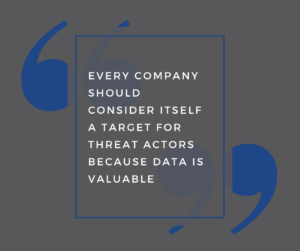
microsoft end of life end of server life quote every company should consider itself a target for threat actors because data is valuable

Once a known weak spot is found, threat actors immediately seek out as many machines still running this OS as they can. Since they already know exactly how to exploit this weakness, they make quick work of gaining access.

Servers are no different. Just like a computer, servers have both a physical housing with accompanying hardware and software that makes them function. The operation system, or software, within the server has an end-of-service life date that looms on the horizon. Currently, Microsoft server life is about five years of regular support with an additional five years of optional extended support, which can be very pricey. After this support comes to an end, your company’s out-of-date server becomes a huge target full of private data.

Remote workers present additional weaknesses to your organization too. Companies with BYOD policies should track the operating system of every device being used to access any part of the business and require those machines to be within their support life.

My Company is Too Small to be a Target

You’re wrong. There’s no sugarcoating this. You’re wrong. Every company should consider itself a target for threat actors because data is valuable. If you can’t see the value in your company’s data, it’s because you are the value. Say you have a data set that is truly lacking in value to the general public. It’s still valuable to you, making it a great ransomware target. Your data is valuable, and your company is not too small to be a target.
Outside of becoming an even bigger target than you already are, failure to update end-of-service life devices will hamper your productivity. Programs work with certain operating systems. Let’s say you buy new accounting software for your tax firm. You’ve replaced several machines recently, and the software works great on your Windows 10 machines, as it was designed to do. However, you’ve got five employees working off Windows 7. They’re struggling because the software isn’t designed for that operating system. You’ve drastically reduced the productivity of 5 of your employees. If one of their devices crashes while they’re working, you’re less likely to recover everything that was on the machine.

Microsoft End-of-Life Costs

microsoft end of life end of service life vector graphic of office lifeAs mentioned above, there is regular support and extended support. Extended support is expensive. For an EOL 2012 server, the extended support cost by year goes as follows: one year = 75% of the initial license cost, two years = 100 %, and three years = 125%. The kicker is after three years you still must purchase a new server. It makes far more sense to purchase the new server. It’s important to note EOL 2012 servers are already past extended support and should be replaced asap.
Let’s say you choose not to update, still believing your company isn’t a target. Your company suffers a cybersecurity incident. We’ll say ransomware. A threat actor has gained access to your system and had some time to do some digging around. Now, they know exactly how much cash on hand your company has. They would then attempt to ransom your data for that exact amount of money. Here’s the real kicker, they’re a criminal so you pay that money, who’s to say they return your data? How do you know they didn’t install a foothold in your system to do this again? How do you know the software they’re using will even work? It’s not like hacking software is regulated.

End of Service Life: The Bigger Picture

Another huge cost to consider is your company’s reputation. Both your customers and vendors now have to analyze the risk of doing business with you. “But we have Cybersecurity insurance.” Cybersecurity insurance doesn’t cover relationships and reputation. It also doesn’t insure your data.

Yet another cost: compliance. That’s right; your compliance depends on supported computer and server operating systems. HIPAA Journal gives detailed look at the cost of a HIPAA violation. If you’re keeping track, we’ve now spent the cost of data recovery, the downtime, and loss of productivity, the loss of trust with both vendors and clients and the fines. Don’t forget the hacker knew how much cash you had and leveraged it against you. This is a potentially business-ending incident.

Products You Need to Prepare For and Steps to Take

Microsoft has a well-established End-of-Life policy that outlines the lifecycle of its products. The policy provides businesses ample time to prepare for product retirement and migrate to newer versions or alternatives.

The Microsoft End-of-Life policy affects a wide range of products, including operating systems, servers, software applications, and cloud services. Some of the most popular products that have reached or are nearing End-of-Life include:

  • Windows 7
  • Windows Server 2008 R2
  • Microsoft Office 2010
  • Exchange Server 2010
  • SharePoint Server 2010

If your business relies on any of these products, it’s crucial to take action to ensure that your systems and data remain secure. Here are some steps you can take:

  1. Identify the products that are nearing End-of-Life or have already reached it. Microsoft provides a comprehensive list of its products and their lifecycle on its website.
  2. Develop a migration plan. This plan should include a timeline for transitioning to newer versions or alternative solutions. It’s essential to consider compatibility, training, and budget factors.
  3. Prioritize security. End-of-Life products are vulnerable to security threats and cyber attacks, as they no longer receive updates and patches. Make sure to implement robust security measures, such as firewalls, antivirus software, and intrusion detection systems.
  4. Consider the cloud. Many businesses are migrating to cloud-based solutions like Microsoft 365 to address End-of-Life concerns. Cloud solutions offer several advantages, including scalability, accessibility, and automatic updates.
  5. Get professional help. Migrating to new systems and solutions can be a complex and time-consuming process. Consider partnering with an IT provider that specializes in Microsoft products to ensure a smooth transition.

Microsoft End-of-Life is an essential consideration for any business that uses its products. By understanding the policy, identifying affected products, and taking proactive steps to migrate and secure your systems, you can avoid potential risks and ensure your business continues running smoothly. With the right planning and support, you can make the most of Microsoft’s products and services for years to come.


Cybersecurity Training for Your Workforce

Recent hacks at Uber and Rockstar games have many companies on edge, wondering about their own security. For many, the hacks have highlighted a huge vulnerability that every company has, regardless of size and industry. Human error. The number one vulnerability for any company is their employees. Let’s be clear, we’re not saying your employees are out to intentionally sabotage your company. That might actually be easier to spot and stop. Rather, we’re saying that the unintentionally bad call is easy to make. This is why ongoing cybersecurity training for your business is vital. Mark Jordan, Director of Cybersecurity at Hill Country Tech Guys echoed the need for ongoing conversations around the hack. “Time and time again, massive breaches like this one are the result not of highly sophisticated intrusion methods, but rather tricking an unsuspecting employee into simply opening the door for them.”

How Was Uber Compromised

cybersecurity training blog post quote "time and again, massive breaches like this one are the result not of highly sophisticated intrusion methods, but rather tricking an unsuspecting employee into simply opening the door for them."Most companies have 2 factor authentication or multi-factor authentication set up for access by employees to their tools. These systems create checkpoints to ensure that the person(s) attempting to gain access do in fact have permission to do so. In Uber’s case a push notification was spammed to employees repeatedly until someone finally accepted the request, granting access to the threat actor. The consequences are dire.

The solution isn’t as clear as the threat, and that’s a big problem for most companies. There’s no one thing you can do to stop threats from coming. The numbers paint a frightening picture of the current landscape of data sabotage in 2022.

According to The State of SMB Cybersecurity in 2022 from ConnectWise, “76% of SMBs in the 2022 study have been impacted by at least one cybersecurity attack, a considerable increase compared to 55% that said this in 2020.”

What Basic Steps Can You Take to Help Protect Your Company from Threats?

  1. Cybersecurity Training for Employees

    When most organizations think of cybersecurity training, they likely envision a one-time training on how to securely operate. This simply isn’t enough. According to the same report, 67% of companies don’t feel they have the in-house skills to adequately handle security issues. If a company the size of Uber, with the IT and security budget to match was so easily taken down its not far-fetched to assume it would likely be just as easy, if not far easier to compromise most small and medium businesses.

  2. 2-Factor and Multi-factor Authentication

    Yes, the hacker was able to socially engineer their way through these systems but that doesn’t mean they shouldn’t be a component of your company’s security. These systems are built to be a sort of armor for passwords. Passwords are (generally) created by the user, making them easy to figure out because people often use information they can easily recall like names, birthdates, pets, etc. Additionally, there are programs that can be run to try infinite combinations until they crack the “code.” Further authentication is just a double check. It’s like your computer, phone, or account saying “hey, just want to be sure this is really you?”

  3. Robust Passwords That are Frequently Updated

    small infographic about how strong passwords are an essential part of cybersecurity training for employeesThis seems like a no-brainer but as we stated earlier, people like to create passwords that are easy to remember, often using the same password across multiple devices and accounts. Ensuring a minimum number and the use of special characters will significantly increase the security of every password in the organization. Requiring employees to update these passwords frequently will help keep your defenses tight.

  4. Communication is Key

    If your employees don’t know what the vision is, how can they help your organization achieve it? Including your workforce in conversations around the goals and roadmaps to meeting those goals is vital to the creation of an effective security protocol. When the policy changes (and it should change and grow with your organization), employees need to be updated. Often these updates are cascaded by email but there are more effective ways to have these vital conversations. Utilize staff/ departmental meetings. Have leaders create videos explaining the updates and their significance. Invite employees to ask questions.

Ongoing Cybersecurity Training Makes a Difference

People tend of think of “hacking” as this complex system. Often, access is gained because the users are lazy. They may not even realize they’re being lazy; they’re just trying to be efficient. So are threat actors. They’re looking for the easiest in. Make your company a harder target to hit. Educate your workforce on the threats and the simple steps they can take, or in Uber’s case not take, to help keep things secure.

Make security an ongoing conversation. It shouldn’t be a one-way communication. Cybersecurity training shouldn’t be one-way communication. Make it an ongoing conversation with your workforce. Engaging your employees on any topic will lend itself to more buy-in. Security is no different.


Environmental Responsibility from a Tech Company

Hill Country Tech Guy’s Environmental Responsibility Efforts

As the world is growing and innovating, we have seen increasing environmental concerns come to the forefront. Whether it is a large corporation, small business, or a single person, there are always big and small opportunities that can be pursued to combat these ongoing sustainability issues.  

A few years ago, we attended an IT conference where the CEO of a large corporation spoke on how his innovation was driven by the Jetson’s cartoon. He had grown up watching the well-known show and loved all the technology and ideas they portrayed in the futuristic world. He chased after this ideal, until he realized they were living in outer space because the Earth was covered in smog, making earth uninhabitable. This changed his perspective on the ideal world he had created in his head, and he switched gears to innovate in a way that would save the people and the world we have.  

Our company has a similar drive for environmental issues, which was passed on by our CEO, Whit Ehrich. Whit gave us passion for our environmental responsibility and integrated them into two of our core values: Reliability and Innovation. Although this has not been a specific guided effort on our part, environmental responsibility runs through the veins of Hill Country Tech Guys and all our employees; and it is apparent through our everyday actions. The following are some of the efforts we have implemented to support a greener future. 

Green Energy: 

Five years ago, Whit purchased his first Tesla. This car, which combined green energy and innovation, sparked a love for Whit which brought him to establish that every vehicle purchased from now on would utilize green energy. We have also installed chargers at the office for any employees, or passersby that may need a quick charge. Not only do the cars themselves promote sustainability, but the company Tesla also does so through their business practices. Which is why we have put our support into their products and hope to promote others to do so as well.  

Recycling: 

Recycling computer hardware has always been a difficult spot. Due to certain data regulations, sending computers off to be recycled as that violates data privacy regulations. HCTG chose to invest in a hard drive crusher that completely destroys the hard drive so that all IT hardware could be responsibly recycled. This way computers are not sitting on shelves collecting dust, as well as staying out of another vastly full landfill and ultimately contributing to pollution of our beautiful Hill Country rivers and scenery. HCTG uses Green Guy Recycling in town to ensure that all hardware is recycled and taken away with care. We have been working with Green Guys for the past 7 years and plan to continue this effort of responsibility throughout the life of our company.  

One Computer=One Tree 

Starting in 2020, we began a campaign initiative to donate one tree for every computer purchased through us. During the pandemic, we halted briefly from fear of what the next few months might entail but have since resumed this program. We are so excited about this effort that we have continued it into 2021 and plan to carry it on for as long as possible.  


As children, we were taught it will take everyone doing small things to support this earth, and we have taken that to heart. When the possibility is there, we embrace it, and celebrate it.  


The Rise and Risk of QR Codes


The Rise and Risk of QR Codes


A Background on QR Codes

Around 2012, the concept of QR codes came about. The ability to simply create and paste a simple image on a piece of marketing, packaging, etc. brought about excitement to marketers. However, they were truly only exciting to marketers, not many people were interested in downloading an app to scan a code on their food product to be brought to a landing page about that product.


Then comes 2022, the age of no contact has brought about a huge rise in the utilization of QR codes. Whether it is to see a menu at your favorite restaurant, contactless payments, or touch-less shopping, chances are you’ve seen a QR code in the last month, if not the last week.


QR Code Publicity

There’s been a surge of viral QR code publicity stunts lately. Famously, Coinbase, a cryptocurrency trading company, sponsored a 30 second ad during the Superbowl which simply contained a floating QR code, and no other context. The result? Coinbase’s promo page received nearly 20 million visits from viewers who had no idea what website they were visiting. Similarly, drones have been used to form LED lit QR codes in the sky for everything from advertising new TV shows, to April fools jokes 

QR code April fools PrankApril fools QR codes prank in Dallas Texas


While these examples demonstrate massive viral events, you may have noticed QR codes creeping into your daily life via more innocuous means. How many restaurants lately have ditched physical menus for a QR code (often just taped to a table) linking to a digital copy? How many consumer products include a QR on the outside of the packaging? 


Convenient right?

Terrifying, actually. 

With a rise in popularity of the commercial use of QR codes, comes criminals who have increasingly begun exploiting them. The original code can be modified, re-printed, and pasted in-place where an un-suspecting victim snaps it thinking they’re opening the menu at their favorite restaurant. Instead, all sorts of nefarious things can take place before finally redirecting the original code’s actual destination. 


qr code 121521 copy


One snap, and you might be giving a criminal full access to your information, credentials, and even bank accounts. 


In time, exploitation of these codes will become a larger and larger issue, and companies will be forced to design more security guarantees around them.  


Navigating QR Codes Safely

For now, the FBI advises the following tips when scanning QR codes: 


  • Once you scan a QR code, check the URL to make sure it is the intended site and looks authentic. A malicious domain name may be similar to the intended URL but with typos or a misplaced letter. 
  • Practice caution when entering login, personal, or financial information from a site navigated to from a QR code. 
  • If scanning a physical QR code, ensure the code has not been tampered with, such as with a sticker placed on top of the original code. 
  • Do not download an app from a QR code. Use your phone’s app store for a safer download. 
  • If you receive an email stating a payment failed from a company you recently made a purchase with and the company states you can only complete the payment through a QR code, call the company to verify. Locate the company’s phone number through a trusted site rather than a number provided in the email. 
  • Do not download a QR code scanner app. This increases your risk of downloading malware onto your device. Most phones have a built-in scanner through the camera app. 
  • If you receive a QR code that you believe to be from someone you know, reach out to them through a known number or address to verify that the code is from them.
  • Avoid making payments through a site navigated to from a QR code. Instead, manually enter a known and trusted URL to complete the payment. 


The only way to truly secure against QR code abuse is to just not use them, if possible.  

Many companies use these codes as a convenient link to something readily and publicly accessible on their websites. A quick Google search of the company’s name will typically yield a website with the menu or product manual, without the fear that if you’re scanning a tampered code. 

Block and Tackle Cybersecurity

Block and Tackle Cybersecurity


If it seems like all we’re reading in the news recently is “Cyberattack this” and “ransomware that…” it’s because the new reality for businesses is a world where nobody, regardless of size, are safe from cyber threats. Gone are the days of “I’m too small to be an attractive target.” While this seems like a bleak forecast, and it is, it should be a wake-up call to become more aware of what these threats look like and how they can happen. As ransomware groups continue to grow their knowledge in selecting victims and carrying out attacks, it is important for all businesses small to large, schools and other organizations truly take cybersecurity seriously. One strategy to start when taking security seriously is Block and Tackle Cybersecurity.


No One is Immune

Many small to mid-size businesses (SMB) owners underestimate their risk to cyber threats. In a recent poll 42% of small businesses experienced a cyber-attack in 2021, with email spear-phishing attacks leading the pack for methods of compromise. Spear phishing are target attacks customized to explicitly fool a specific business, or individual. Gone are the days where attacks like these are reserved for high profile companies.


According to a Cyber Threat Report released by SonicWall, the world saw an alarming 148% uptick in ransomware attacks in 2021. These numbers are also predicted to rise in 2022. From colleges and government entities to small doctor’s offices and retail businesses… there’s no limit or filter to who ransomware groups will choose which is why more and more skilled IT cybersecurity experts are leaning on a proactive block and tackle cybersecurity strategy.


Block and tackle Cybersecurity… What is it?

“Football is two things. It’s blocking and tackling. I don’t care about formations or new offenses or tricks on defense. You block and tackle better than the team you’re playing, you win.” – Vince Lombardi


While that quote does apply to football, we can also look at it from a cybersecurity standpoint. Foundational items such as security awareness training, thorough and efficacious patching, and written security policies and paramount to creating an effective defensive line against wrong doers.


The Best Defense is Only the Beginning…

George Washington stated “…offensive operations, often times, is the surest, if not the only means of defense…” and the keys to offensive security lie in the assumption that your business is already compromised. The traditional mentality views our networks as a “fortress” of which we defend a hardened parameter; Meanwhile modern adversaries exploit us from the inside by taking advantage of untrained and unaware employees, and reactive security policies targeted at static, externally inward threats. By assuming these threat actors already operate in our networks, we move towards the zero-trust mindset of containing and mitigating breaches, moving threat management from the reactive realm to the proactive.


The current state of our technological world might make effective, proactive cybersecurity seem like a daunting task, but Hill Country Tech Guys are here to be to be both your offensive and defensive lines against malicious threat actors. We utilized bleeding edge tools, expert staff, and proven strategies to help your business build a modern, dynamic security posture.