Cybersecurity Terms for Small Business: A Simple Guide to IT Jargon

Why Small Businesses Need to Know Cybersecurity Terms

You don’t need to be an IT expert to protect your business. But having a basic understanding of cybersecurity terms helps you:

  • Make smarter decisions

  • Ask better questions

  • Work more effectively with your IT team or partner

When your MSP talks about things like EDR, patching, or cloud security, knowing what they mean helps you understand not just the what, but the why. And that leads to better outcomes for your business.

At Hill Country Tech Guys, we believe cybersecurity shouldn’t be confusing. If you’ve ever been overwhelmed by jargon or unsure what your IT provider was talking about, you’re not alone. That’s why we’ve created this plain-language cybersecurity glossary.


Cybersecurity Basics

  • Cybersecurity – Protecting systems, networks, and programs from digital attacks.

  • IT (Information Technology) – All technology-related infrastructure. Cybersecurity is just one part of IT.

  • MSP (Managed Service Provider) – A company (like Hill Country Tech Guys) that provides IT and cybersecurity services to businesses.

  • MFA (Multi-Factor Authentication) – A second step (like a text code or app confirmation) that secures accounts even if a password is stolen.

  • Firewall – A digital barrier that blocks unauthorized traffic.

  • Password Manager – A secure tool that stores login info (instead of sticky notes).


Cybersecurity Terms You’ll Hear at Work

  • Network – Your digital infrastructure: Wi-Fi, routers, connected devices.

  • Cloud Computing – Accessing software or data over the internet instead of local servers.

  • VPN – A secure internet connection, especially important for remote work.

  • Authentication – Proving you’re allowed to access a system or account.


Threats You Should Know

  • Phishing – Emails that trick you into sharing information.

  • Smishing – Phishing delivered by text message.

  • Ransomware – Malicious software that locks your data until a ransom is paid.

  • Spoofing – Pretending to be a trusted source to steal information.

  • Spyware – Software that secretly tracks your activity.

  • Clickjacking – Tricking you into clicking malicious links disguised as something safe.


Tools & Protection

  • Antivirus vs. MDR/EDR – Antivirus is reactive. MDR/EDR is proactive, advanced protection with human oversight.

  • Encryption – Scrambles data so only the right people can read it.

  • Patching – Updating software to fix vulnerabilities.

  • Mobile Device Management (MDM) – Keeps company phones, tablets, and laptops secure — even for remote staff.


Business & Compliance Lingo

  • Business Continuity – A plan to keep the business running during downtime.

  • SOC 2 – A compliance framework proving a provider can securely handle customer data.

  • HIPAA – Healthcare regulation that protects patient information.

  • NIST – A framework that helps companies manage and reduce cybersecurity risks.


Bonus Terms (For Extra Credit)

  • Penetration Testing – Ethical hacking to find weaknesses before criminals do.

  • Zero-Day – A newly discovered vulnerability that hasn’t been patched yet.

  • Access Control – Managing who can physically or digitally access systems.

  • Defensibility – Your ability to reduce or minimize the impact of a cyber incident.


Cybersecurity FAQs for Small Business

Q: What are the most important cybersecurity terms for small businesses to know?
A: Small businesses should understand basic terms like firewall, multi-factor authentication (MFA), phishing, ransomware, encryption, and patching. These terms cover the essentials of protecting data, accounts, and networks.

Q: Why should small business owners learn cybersecurity terms?
A: Knowing cybersecurity terms helps business owners make smarter IT decisions, ask better questions, and spot risks sooner. You don’t need to be an expert, but a little knowledge makes working with an IT partner much easier.

Q: What cybersecurity threats do small businesses face most often?
A: The most common threats include phishing emails, ransomware, weak passwords, and unpatched software. These are preventable with the right security tools and employee awareness.

Q: How can an MSP help small businesses with cybersecurity?
A: A Managed Service Provider (MSP) helps by monitoring systems, applying security updates, managing backups, and responding to threats. They simplify cybersecurity so businesses can stay secure without getting lost in technical jargon.


Knowledge Is Cyber Power

Cybersecurity doesn’t have to be overwhelming. Understanding these terms is the first step toward creating a safer, more secure workplace. You don’t need to know how to code, you just need to know enough to stay informed and make confident business decisions.

Want help securing your business without the jargon? Talk to Hill Country Tech Guys. We make IT simple, secure, and tailored to your business.

How Phishing Works and How to Avoid Taking the Bait

Phishing is a term you might have heard about, especially in discussions around online security. But what exactly is phishing, and why should you care? Phishing is a type of cybercrime where attackers try to trick you into giving away personal information like passwords, credit card numbers, or social security numbers. They often pretend to be someone you trust, like your bank or a popular website.

What is Phishing?

Phishing is essentially a scam. It’s a way for criminals to steal your sensitive information by pretending to be a trustworthy source. These scams usually come in the form of emails, messages, or even phone calls that look legitimate but are actually fake. The goal is to lure you into clicking a link, downloading an attachment, or giving away your personal information.

How Phishing Works: Step by Step
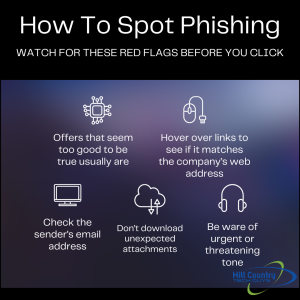
How to spot phishing in a few simple stepsPhishing attacks can be sophisticated and convincing. Here’s a step-by-step look at how they typically work:

  • The Setup: The attacker creates a fake website or email that looks just like a real one. This could be a copy of your bank’s login page or an email from a service you use, like Netflix or PayPal.
  • The Bait: The attacker sends you an email or message with a sense of urgency. It might say your account has been compromised or that you need to update your information immediately.
  • The Hook: When you click the link or open the attachment, you’re taken to the fake site or a malicious file is downloaded. The site will often ask you to log in or provide sensitive information.
  • The Catch: Once you enter your information, it’s sent directly to the attacker. They now have access to your accounts and can cause serious harm, like stealing your identity or making unauthorized transactions.

How to Spot Phishing

Phishing attempts can be tricky to spot, but there are usually some telltale signs:

Check the Sender’s Email Address

Often, phishing emails will come from addresses that look like a legitimate company but have slight differences, like a missing letter or an added number. Always double-check the sender’s email address.

Look for Poor Grammar or Spelling

Legitimate companies usually proofread their communications, so emails or messages with lots of errors can be a red flag.

Watch for Urgency and Threats

Phishing emails often try to create a sense of urgency or fear. They might say your account will be locked or that you’ll lose access to something important if you don’t act quickly.

Hover Over Links

Before clicking any link, hover your mouse over it to see where it leads. If the URL looks suspicious or doesn’t match the company’s official website, don’t click it.

What to Do If You Think It’s Phishing

If you suspect you’ve received a phishing email or message, here’s what you should do:

Do Not Click on Links or Download Attachments

This is the most important step. Avoid clicking on any links or downloading attachments from suspicious emails or messages.

Verify the Source

Contact the company directly using a phone number or email address you know is legitimate. Do not use the contact information provided in the suspicious message.

Report the Phishing Attempt

Most email services have options to report phishing. Reporting these attempts helps prevent future attacks and keeps others safe.

Change Your Passwords

If you’ve clicked on a suspicious link or provided information, change your passwords immediately. Use strong, unique passwords for each of your accounts.

Monitor Your Accounts

Keep a close eye on your bank statements, credit card accounts, and any other accounts you suspect might be affected. Look for unauthorized transactions or changes.

Why Phishing Awareness is Important

Understanding phishing and being able to recognize it is crucial in today’s digital world. Phishing attacks are becoming more common and more sophisticated, making it essential for everyone to be aware and cautious.

Protecting Your Identity

Identity theft is a serious consequence of phishing. Once criminals have your personal information, they can open accounts in your name, rack up debt, and cause long-term damage to your credit.

Ensuring Financial Security

Phishing can lead to unauthorized access to your financial accounts, resulting in stolen funds and financial loss. Being aware of phishing tactics can help you protect your money and financial information.

Consequences for Businesses When Employees Get Phished

When employees fall victim to phishing attacks, the repercussions can be significant, impacting both the individual and the organization as a whole. For Texas businesses, these incidents often collide with insurance requirements, compliance obligations, and customer trust expectations. Here are some of the key consequences businesses may face:

1. Financial Loss

Phishing attacks can lead to direct financial losses for companies, especially if sensitive banking information is compromised. Cybercriminals can gain access to company accounts, resulting in unauthorized transactions, fraud, and financial theft. Additionally, the costs associated with rectifying breaches, such as hiring cybersecurity experts and recovering lost funds, can be substantial.

2. Data Breach

A successful phishing attempt often leads to data breaches, exposing sensitive company information, employee data, and customer records. This can have serious implications, including legal consequences, regulatory fines, and damage to reputation. Companies may be required to notify affected individuals, which can further damage trust.

3. Operational Disruption

Phishing attacks can disrupt everyday business operations. If malware is introduced into the network through a phishing link, it can infect systems and require extensive downtime for remediation. This disruption can hinder productivity and lead to lost revenue.

4. Damage to Business Reputation

Trust is crucial in business, and a successful phishing attack can severely damage a company’s reputation. Clients, customers, and partners may lose confidence in a business that fails to protect its information. This loss of trust can lead to decreased customer retention and difficulty attracting new clients.

5. Increased Security Costs

In the wake of a phishing attack, businesses often need to invest heavily in improving security measures. This may include upgraded technology, enhanced security protocols, and employee training programs to prevent future incidents. While these investments are necessary for safeguarding the company, they can strain budgets.

6. Legal Liabilities

Depending on the nature of the data compromised, organizations may face legal liabilities. Clients or customers whose information has been breached could pursue legal action, resulting in costly lawsuits. Moreover, regulations like GDPR or HIPAA can impose hefty fines for failure to protect sensitive data.

7. Employee Morale

Experiencing a phishing attack can diminish employee morale. Employees may feel vulnerable if their information was compromised, leading to anxiety and decreased productivity. Furthermore, if personnel turnover increases as a result of decreased morale, companies can face additional training costs for new hires.

Real-World Example: When Phishing Gets Personal (and Costly)

Phishing isn’t just a theoretical threat, it’s something businesses have faced firsthand. Last summer, a business coaching and growth company reached out to Hill Country Tech Guys after their CEO was phished.

The attacker gained access through a convincing email and used that breach to further target the team. Just a few months later, another employee was phished. The result?

  • Financial loss
  • Wasted hours in response and damage control
  • Anxiety and stress across the entire team

For a company built on reputation and trust, the stakes were especially high. Their business depended on client confidence, and this incident threatened to erode it.

After onboarding with Hill Country Tech Guys, they implemented a standard security stack and began security awareness training. Training included simulated phishing attacks to prepare their staff for future threats. Their systems and confidence are stronger now.

Phishing Hits Close to Home: The Texas Toll Scam
phishing quotePhishing is not something that only happens to “other people” or large corporations; it’s a real threat that affects people right here in Texas.

In 2024 and 2025, Texas drivers found themselves the targets of a widespread phishing scheme that posed as TxDOT’s TxTag toll service. Victims received urgent text messages claiming they owed money for tolls, complete with a link to “pay now.” The catch? These messages were entirely fake, and the links directed unsuspecting individuals to scam websites crafted to steal sensitive personal and financial information.

This type of scam, commonly referred to as “smishing” (phishing via SMS), relies on tactics like urgency, threats of fines, and spoofed phone numbers to look legitimate. Many Texans clicked on these deceptive links before realizing they had fallen victim to a fraud.

Important Tip: TxDOT does not send text messages regarding final toll notices or outstanding balances. Any legitimate TxTag communications will come exclusively from the number 22498.

What This Teaches Us

  • Phishing can occur through text messages and phone calls, not just emails.
  • Scammers often impersonate trusted entities, including local governments and utility providers.
  • Staying informed about current phishing tactics is crucial for safeguarding your personal information, your business, and your overall peace of mind.

By being aware of these scams and their tactics, you can better protect yourself and your loved ones from falling prey to phishing attempts.

The Takeaway

Whether you’re a 10-person business or a national corporation, phishing is a threat that’s all too real. The good news? With the right tools, training, and strategy, you can reduce your risk and bounce back stronger.

At Hill Country Tech Guys, we help businesses of all sizes build real, defensible layers from technical defenses to employee awareness. Because cybersecurity isn’t just about technology, it’s about people.

From Chaos to Control: When It’s Time to Graduate from Break-Fix IT

IT services are a reality for pretty much any business these days, especially for growing organizations across Texas that rely on always-on systems to keep operations moving. We live in an always-online world, and technology needs constant care. But how do you know when it’s time to graduate from a pay-as-you-go model to a trusted, strategic IT partner?

In late 2023, Hill Country Tech Guys onboarded a large Texas-based property management company with more than 40 properties. They were growing fast, but their IT support wasn’t keeping pace. What resulted was frustration fueled by chaos.

Their former IT provider operated on a break-fix model: no proactive monitoring, no patching, no strategic guidance. Their network was outdated, unsupported, and physically a mess. They had clearly outgrown the break-fix model; it was costing them more than it was helping them. Maybe your business has outgrown this model, too.

What is Break-Fix IT and When Does it Fall Short?

Break-fix generally refers to a pay-as-you-go model. This model is ideal for smaller or newer companies, as you only pay for what you need. When things are running smoothly, you won’t hear from your break-fix IT company. When a device stops working, a printer stops printing, or a network stops functioning, you reach out and are charged either a per-incident or (usually) an hourly rate.

It worked at first, but as their business scaled, so did the complexity of their network and the risks of downtime. They needed more than a bandage, and you might too.

Top Signs Your Business Has Outgrown Break-Fix IT Services

You’re constantly putting out fires:

The property management staff was frustrated with slow computers, printers that didn’t print, and spotty Wi-Fi. While these problems can be unavoidable, they shouldn’t be part of your day-to-day. You have bigger things to worry about than printers.

You’re operating blind:

There was no reporting, no visibility into system help, and no guidance on what needed to be replaced or upgraded. They didn’t have a partner; they had a reactive service that only did the troubleshooting. You should be able to clearly see and understand the value that your IT partner brings to your company. Without clear reporting, delivered on a scheduled basis, how can you truly know what’s happening?

Your infrastructure is outdated or out of warranty:

Their network closets were disorganized; their hardware was unsupported. No one had touched the patching schedule in who knows how long. They weren’t just flying blind they were unsecured. A growing business needs up-to-date infrastructure. You also need a partner who can install and maintain that hardware so you can remain secure and compliant.

You’re growing but your IT can’t keep up:

Managing 40+ properties across Texas takes coordination, uptime, and systems that can scale without friction. Their IT setup was slowing them down tremendously. You need a partner that can keep up with you, help you see and reach the next steps on your journey.

The Managed IT Difference: What They Got with Hill Country Tech Guys

break fix vs managed ITManaged IT means you have an ongoing relationship, usually with a managed service provider, like Hill Country Tech Guys, that supports organizations across Texas with proactive monitoring, maintenance, and strategic guidance.

Hands-On Onboarding

We spent weeks in their network closets and business offices organizing cables, standardizing hardware and equipment, updating firmware, and cleaning up the chaos. We also spent time talking to people, getting to know them, and finding out how their business runs best so we could tailor our support to meet their needs.

Quarterly Business Reviews (QBRs)

Their account manager with Hill Country Tech Guys meets with them quarterly to review:

  • Ticket trends
  • Common issues that may be costing them time or money
  • Budget planning for hardware lifecycle
  • Strategic improvements

Now, their leadership has a clear picture of where their technology is and how it will support taking their business to new heights.

24/7 Monitoring and Proactive Maintenance

Issues are identified and resolved before they become problems. Their team can focus on tenants and property management, not tech headaches.

The Results: Less Stress, More Productivity

Today, their systems are up to date, documented, and running smoothly. Their team no longer loses time on avoidable issues. They’re equipped to grow, and their IT strategy grows with them.

In fact, since they’ve onboarded with us, they’ve added an additional six properties. All of which Hill Country Tech Guys has standardized and reorganized to help them keep growing, securely.

Break-Fix Got You Started, But It Won’t Get You to the Next Level

If your business is facing similar frustrations, it might be time to level up from break-fix IT. Managed services give you more than tech support. They give you peace of mind, predictability, and the freedom to focus on your business.

Ready to graduate from break-fix IT? Let Hill Country Tech Guys help your Texas-based organization move from reactive support to predictable, strategic IT.

What is Single Sign-On (SSO)?

If you’ve ever logged into one app and suddenly had access to several others without entering your password again, you’ve used single sign-on. You just might not have realized it.

Single sign-on, or SSO, is a way to log in once and access multiple systems, platforms, or tools. Instead of remembering a dozen passwords, you just need one. It’s a simple concept with big benefits and a few key precautions.

What is Single Sign-On, Exactly?

Single sign-on allows users to authenticate with one set of credentials, usually through a central identity provider like Microsoft or Google, and access multiple connected applications.

Think of it like a secure front door that opens into a hallway with many rooms. Once you’ve passed the security check at the main entrance, you don’t need to stop and unlock every single room.

Common Examples of SSO in Action:

  1. Logging into Google Workspace and getting access to Gmail, Google Drive, and Google Calendar automatically
  2. Using your Microsoft 365 login to access Outlook, Teams, OneDrive, and SharePoint
  3. Employees sign into a work dashboard and are granted access to third-party tools like Slack, Salesforce, or HubSpot without extra logins.

Is SSO Safe?

single sign-on quote "when implemented correctly, SSO can actually improve your security posture."Yes, when implemented correctly, SSO can actually improve your security posture.
By centralizing authentication:

  • IT teams can enforce strong password policies in one place
  • It’s easier to apply multi-factor authentication (MFA)
  • User access can be revoked quickly when someone leaves the company

But there’s a trade-off. If your SSO login is compromised, all the doors it unlocks are compromised too. That’s why the security of your main credentials matters more than ever.

How to Make SSO More Secure

SSO is only as safe as the practices around it. Here are a few smart ways to strengthen it:

  1. Use Multi-Factor Authentication (MFA)
    SSO should always be paired with MFA. That way, even if your main password is stolen, a second layer, like a phone prompt or code, blocks the threat.
  2. Require Strong, Unique Passwords
    Since SSO puts so much power behind one login, your master credentials need to be tough to crack. Avoid reused or simple passwords. Use a password manager to create and store something long, complex, and unique.
  3. Limit SSO Access to Approved Apps
    Not every service should be connected. Only allow SSO access to apps that are monitored and approved by your IT team or provider.
  4. Monitor for Suspicious Activity
    Look for failed login attempts, unusual locations, or unauthorized device access. A good SSO setup will include some level of monitoring or alerting.

Who Should Set Up SSO?

While some platforms make it easy to connect apps on your own, setting up SSO securely takes more than a few clicks.

You want someone who understands identity and access management, network segmentation, application permissions, and compliance and audit logging.

In other words: your IT partner should handle this. Ideally, a team that’s already managing your security stack and can make sure your SSO doesn’t create more risk than it reduces.

Hill Country Tech Guys helps businesses roll out SSO with the right mix of convenience and control. We connect the right tools, apply the right policies, and ensure your teams get a seamless login experience without sacrificing security.

Because logging in shouldn’t be a daily frustration or a hidden risk, but it should be secure.

Ready to simplify logins and strengthen security at the same time? Let’s talk about SSO and how it fits into your broader cybersecurity strategy. Please call us at (830) 386-4234.

Comprehensive IT Support for Healthcare: Enhancing Patient Care, Data Security, and Operational Efficiency

In the healthcare industry, reliable IT support is essential. Facilities must ensure the smooth operation of medical facilities, protecting sensitive patient data, and complying with stringent regulations. Choosing the right managed service provider (MSP) to support you or supplement your inhouse team is key.

The Importance of IT Support in Healthcare

  • Enhanced Patient Care Improved Access to Patient Records A doctor needs to quickly access a patient’s medical history to make a critical decision. With IT support, Electronic Health Records (EHR) systems are properly implemented and maintained. This provides a centralized platform for storing and managing patient records. Healthcare providers can access and update patient information with just a few clicks. Quick access to comprehensive patient data allows healthcare professionals to make more informed decisions, leading to better patient outcomes.
  • Telehealth Services Telehealth has become increasingly important, especially in remote or underserved areas. IT support ensures that telehealth platforms are secure, reliable, and integrated with existing EHR systems. This enables healthcare providers to offer remote consultations and monitor patients from a distance, improving access to care and convenience for patients. A patient living in a rural area who needs a consultation with a specialist located in a different city. With telehealth services, the patient can have a video consultation without having to travel long distances. This improves patient outcomes in harder to reach areas.

Improved Data Security

In the healthcare industry, safeguarding sensitive patient information is crucial. IT support plays a vital role in implementing and maintaining robust security measures to protect against cyber threats and ensure compliance with regulations like HIPAA.

  • Advanced Encryption: Encryption ensures that patient data is unreadable to unauthorized users, providing a critical layer of security. This means that even if data is intercepted, it remains protected and confidential.
  • Firewall Protection: Firewalls act as a barrier between your internal network and external threats, preventing unauthorized access and protecting sensitive information from cyberattacks
  • Secure Access Controls: Implementing secure access controls ensures that only authorized personnel can access sensitive patient data. This includes multi-factor authentication and role-based access, which restricts data access based on user roles and responsibilities.
  • Regular Security Audits: Conducting regular security audits helps identify potential vulnerabilities and ensures that security measures are up-to-date and effective. These audits are essential for maintaining compliance with healthcare regulations and protecting patient data.
  • Incident Response Planning: Having a robust incident response plan in place ensures that your organization is prepared to respond quickly and effectively to any security breaches. This minimizes the impact of cyberattacks and helps maintain the trust of patients and stakeholders.

By implementing these comprehensive security measures, healthcare providers can protect sensitive patient information, build trust, and focus on delivering quality care without the constant worry of cyber threats.


Safeguarding sensitive patient information 1

Streamlined Operations


Automating Administrative Tasks IT support can help automate various administrative tasks, such as appointment scheduling, billing, and patient check-ins. Automation reduces the workload on healthcare staff, allowing them to focus more on patient care. For example, automated appointment scheduling systems can handle booking, rescheduling, and reminders, reducing the time staff spend on these tasks. This not only improves efficiency but also enhances the patient experience by reducing wait times and minimizing scheduling errors. IT support also helps maintain and troubleshoot these systems. When they go down, having 24/7 support a phone call away means less frustration for providers and patients.


Improving Workflow Efficiency Integrated IT systems streamline the process of updating patient records, ordering tests, and managing prescriptions. For instance, when a doctor orders a lab test, the results can be automatically updated in the patient’s EHR, and the doctor can be notified as soon as the results are available. This seamless integration ensures that healthcare providers have real-time access to critical information, enabling them to make timely and informed decisions. Additionally, IT support can help optimize workflows by identifying bottlenecks and implementing solutions to improve overall efficiency.


Reducing Paperwork By digitizing patient records and other documents, IT support helps reduce the reliance on paper-based processes. Electronic records are easier to store, retrieve, and share, reducing the time and effort required to manage paperwork. This not only saves physical space but also minimizes the risk of lost or misplaced documents. Furthermore, digital records can be easily backed up, ensuring that important information is not lost in case of a disaster.


Compliance with Regulations


Ensuring Data Privacy and Security Compliance with regulations such as HIPAA is critical for healthcare providers. They must ensure patient privacy and data security. IT support helps implement and maintain systems that meet regulatory requirements, such as encryption, secure access controls, and regular security audits. Encryption ensures that patient data is unreadable to unauthorized users, while secure access controls restrict access to sensitive information based on user roles. Regular security audits help identify and address potential vulnerabilities, ensuring that healthcare providers remain compliant with regulations.


Conducting Regular Audits Regular audits are essential for maintaining compliance with healthcare regulations. IT support conducts security audits to assess the effectiveness of existing security measures and identify areas for improvement. These audits help healthcare providers ensure that their systems are secure and compliant with regulations. Additionally, managed service providers (MSPs) assist in preparing for external audits by providing necessary documentation and addressing any findings or recommendations.


Providing Necessary Documentation Healthcare providers must maintain detailed documentation to demonstrate compliance with regulations. IT support helps generate and manage this documentation, ensuring that all necessary records are accurate and up-to-date. MSPs provide logs of access to patient records, records of security audits, and documentation of security measures implemented. This documentation is essential for demonstrating compliance during audits and inspections.


Training and Awareness IT support provides training and awareness programs to educate healthcare staff about regulatory requirements and best practices for data security. Regular training sessions help staff stay informed about the latest threats and how to respond to them. Training programs cover topics such as recognizing phishing attempts, using strong passwords, and following secure data handling practices. By promoting a culture of security and compliance, healthcare providers reduce the risk of data breaches and ensure that patient information is protected.


How to Choose the Right MSP for Your Healthcare Practice


Assess Your Practice’s IT Needs Before choosing an MSP, assess your practice’s IT needs. Identify areas where you need support, such as data security, EHR systems, or telehealth platforms. Understanding your needs will help you find a provider that offers the right solutions.


Check Provider Experience in Healthcare Experience in the healthcare industry is crucial for an IT support provider. Look for providers with a proven track record of working with healthcare practices. They should understand the unique challenges and regulatory requirements of the healthcare industry.


Evaluate Service Offerings Evaluate the services offered by potential MSPs. Ensure they offer comprehensive solutions that cover all your IT needs, from data security to system maintenance. Look for providers that offer proactive support, regular system updates, and 24/7 monitoring.


Consider Compliance and Security Measures Compliance and security are critical in healthcare IT support. Ensure that the provider you choose has robust security measures in place and is knowledgeable about healthcare regulations. They should conduct regular security audits and provide documentation to demonstrate compliance.


Conclusion


Reliable IT support is essential for healthcare providers to enhance patient care, improve data security, streamline operations, and ensure compliance with regulations. By choosing the right IT support provider, healthcare practices can leverage technology to improve their services and achieve better patient outcomes. Hill Country Tech Guys offers 24/7 support, security awareness training, 15+ years of HIPAA compliance, and a deep understanding of how to support medical practices of all sizes. Call us today to see how your practice can evolve with the right support.

Managed Endpoint Detection and Response Services for Businesses

Managed Endpoint Detection and Response (EDR) services are becoming increasingly popular among organizations looking to secure their digital assets against cyber threats. Organizations need a comprehensive security strategy to effectively protect endpoints, including monitoring, detection, and response capabilities. One of the key components of this strategy is Endpoint Detection and Response (EDR), which provides real-time visibility into endpoint activities and helps identify potential threats. However, managing EDR can be complex and time-consuming, which is where Managed Detection and Response (MDR) services come in. Managed Endpoint Detection and Response (MEDR) combines EDR and MDR. Together, they help organizations improve their security posture.

Why Your Business Needs EDR

Endpoint Detection and Response (EDR) is an increasingly essential cybersecurity technology for businesses of all sizes. EDR is a security solution that monitors endpoints such as desktops, laptops, servers, and mobile devices for signs of malicious activity and provides an immediate response to contain and remediate any potential threats.

EDR provides a crucial layer of protection that traditional antivirus software cannot offer. Here are some of the reasons why your business needs EDR:managed service provider: EDR is a security solution that monitors endpoints such as desktops, laptops, servers, and mobile devices for signs of malicious activity

  1. Detects Advanced Threats:
    EDR is designed to detect sophisticated threats that can bypass traditional security measures like firewalls and antivirus software. It detects malware, ransomware, and other malicious activity that traditional security solutions miss.
  2. Quick Response to Threats:
    When EDR detects a threat, it provides immediate response and remediation to contain the threat and minimize any damage. This quick response can help prevent the spread of the threat and limit the potential impact on your business.
  3. Increased Visibility:
    EDR provides businesses with increased visibility into their network, allowing them to monitor endpoints and track suspicious activity. This visibility helps businesses identify potential vulnerabilities and implement security measures to prevent future attacks.
  4. Compliance:
    EDR can help businesses meet regulatory compliance requirements by providing an audit trail of security events and measures to remediate threats.

How EDR Works

EDR collects data from endpoints and analyzes it to detect any signs of malicious activity. It uses machine learning algorithms and behavioral analytics to identify patterns of activity that may indicate a threat.  EDR works to contain threats and remediate damage immediately.

Optimized EDR Implementation

To get the most out of EDR, it is important to implement it effectively. Here are some tips for optimizing your EDR implementation:

  1. Choose the Right EDR Solution:
    With so many EDR solutions available, choosing one tailored to your business needs is important. Look for a solution that provides comprehensive endpoint coverage, is easy to use, and offers quick response times.
  2. Monitor and Analyze Data:
    EDR collects vast data; monitoring and analyzing it to identify potential threats is important. Ensure that your team is trained to use the EDR solution effectively and knows how to interpret the data collected.
  3. Implement Best Practices:
    EDR does not replace traditional security measures like firewalls and antivirus software. Implementing best practices for cybersecurity is important, such as keeping software up-to-date, using strong passwords, and educating employees about cybersecurity risks.

The Key Components of MDR

Managed Detection and Response (MDR) is a cybersecurity service that helps businesses to detect, investigate, and respond to cyber threats. MDR service providers use advanced technology, human expertise, and automation to provide an effective and proactive approach to cybersecurity.

MDR services have become essential for businesses due to the ever-evolving threat landscape. Cybercriminals are becoming more sophisticated, and traditional security measures are no longer enough to protect businesses from these attacks. Managed Detection and Response services provide a comprehensive and proactive approach to cybersecurity, enabling businesses to detect and respond to threats before they cause damage.

The key components of MDR services include threat detection, incident response, and continuous monitoring. MDR service providers use advanced security tools and technologies to detect and respond to threats in real time. They monitor network traffic, endpoint devices, and cloud infrastructure to identify suspicious activity. In the event of an incident, MDR service providers conduct investigations to determine the extent of the attack and provide a response plan to mitigate the impact of the attack.

MDR Services Provide Businesses With a Range of Benefits

  1. managed endpoint detection and response quote: a comprehensive solution that combines edr with mdrImproved threat detection:
    MDR services use advanced threat detection technologies to identify and respond to threats in real time. This proactive approach to cybersecurity helps businesses prevent attacks before they cause damage.
  2. Faster incident response:
    MDR service providers offer quick response times to security incidents. They have the expertise and resources to investigate security incidents, contain them, and restore normal operations.
  3. Reduced security risks:
    MDR services help to reduce the risk of security breaches and data loss. They provide businesses with a proactive and comprehensive approach to cybersecurity, ensuring that all aspects of their infrastructure are monitored and protected.

Managed Endpoint Detection and Response is the Best of Both Worlds

Managed Endpoint Detection and Response (MEDR) is a critical cybersecurity service for businesses of all sizes. In today’s world, where cybercrime is becoming increasingly sophisticated, it’s essential to have a proactive approach to security. MEDR provides a comprehensive solution combining endpoint detection and response (EDR) with managed detection and response (MDR) to enhance your business’s protection.

MEDR helps to detect and respond to advanced cyber threats by continuously monitoring your endpoints, such as laptops, desktops, and mobile devices. It uses sophisticated algorithms and machine learning to identify unusual patterns of behavior and detect potential attacks. The MEDR team takes immediate action to isolate infected devices, prevent the spread of malware, and minimize damage to your network.

MEDR is a Crucial Cybersecurity Service

Here are some real-world examples of how MEDR protects your business:

  1. Ransomware Attack:
    A company’s employee clicked on a phishing link, which led to a ransomware attack. The MEDR team was quickly alerted to the unusual activity on the employee’s device and immediately quarantined it. The MEDR team then initiated a recovery process to restore the encrypted data from the company’s backups.
  2. Insider Threat:
    A disgruntled employee attempted to steal confidential company data and sell it to a competitor. The MEDR team detected the unusual behavior and immediately blocked the employee’s access to the company network, preventing the exfiltration of sensitive data.
  3. Malware Infection:
    A company’s endpoint was infected with malware attempting to spread throughout the network. The MEDR team quickly isolated the infected device and took steps to ensure the malware could not spread, preventing further damage to the network.

MEDR is an essential cybersecurity service that can help protect your business from cyber threats. It provides a comprehensive solution that combines EDR with MDR. This protects from the initial stages of an attack to the remediation of the damage caused. By implementing MEDR, you can rest assured that your business is secure and that your sensitive data is protected from cyber threats. If you have questions about MEDR or are ready to implement it within your organization, Hill Country Tech Guys is ready to guide you.

Securing Your Patients’ Privacy While Using Telehealth

[vc_row][vc_column][vc_column_text]Telehealth has become a buzzword in the healthcare industry, and for a good reason. With the advancement of technology, healthcare providers can now connect with patients from the comfort of their homes.

This has opened doors for those with limited access to health care. For example, individuals living in rural areas or with disabilities that make it difficult for them to travel to medical appointments can now receive care through telehealth.

With the potential to revolutionize the healthcare industry, it’s no surprise that telehealth has gained so much attention in recent years. But every coin has two sides. 

While telehealth provides convenience and flexibility for patients and practitioners, it also raises concerns about data privacy and security. [/vc_column_text][vc_column_text]

Main Security Concerns With Telehealth

One of the most significant telehealth concerns involves transmitting sensitive medical information, also referred to as protected health information (PHI), over the internet or other networks. This increases the risk of data being intercepted or accessed by unauthorized individuals. Telehealth systems are also vulnerable to cyberattacks such as malware, phishing scams, and denial-of-service attacks.

What happens when there is a patient data breach and an unauthorized person gains access to the information? Let’s take a look.

  • Loss of Trust: Patients may feel violated and lose trust in the health care provider or the telehealth system, damaging the provider’s reputation.
  • Identity Theft: Cybercriminals can use patient data for identity theft, which can have serious consequences. When personal information, such as social security numbers or financial information, is compromised, patients may face financial losses, credit issues, or other problems.
  • Misuse of Information: Unauthorized access to patient data can result in the misuse of information. For example, the information could be used to discriminate against the patient in employment or insurance decisions or to blackmail or extort the patient.

Unintentional HIPAA Violations 

The Health Insurance Portability and Accountability Act (HIPAA) provides guidelines for healthcare organizations to protect patient’s privacy and security while handling their data. The digitalization of healthcare information and services has raised many concerns about maintaining patient privacy.

Failure to comply with HIPAA regulations comes in different forms, including accidental. For example, many practitioners use various online methods of communication to connect with clients. A common oversight is providing contact forms that are not secure or HIPAA compliant. This is how many accidental HIPAA violations can occur. 

Why Telehealth Security Is Essential

Healthcare security breach statistics ring the alarm bell. From 2009 to 2022, 342 million patient records were stolen or illegally accessed. As the threat increases, so does the financial burden. The average cost of a healthcare data breach reached $10.1 million in 2022, an $870,000 increase from the previous year.

The COVID-19 pandemic has further exacerbated the situation, with an increase in telehealth usage and the prevalence of remote work. Recent Microsoft statistics provide insight into this heightened risk, revealing that 67% of IT leaders using Microsoft 365 experienced increased data breaches due to remote work.

Meanwhile, a 2021 Kaspersky telehealth survey found that 52% of telehealth providers encountered patients who refused to utilize telehealth services. This decision resulted from patients not trusting the technology to safeguard their data security and privacy.

The breach of PHI can have severe consequences for patients and healthcare providers alike. Therefore, it is crucial to prioritize data privacy and security while using telehealth services.[/vc_column_text][vc_row_inner][vc_column_inner width=”2/3″][vc_column_text]

Best Practices for Securing Your Patients’ Privacy While Using Telehealth

Here are five best practices for securing your patients’ privacy while using telehealth:

1. Use Secure Telehealth Platforms

If the telehealth platform is not secure, no matter how well-trained or careful the provider is – a data breach might find its way. The platforms should be HIPAA compliant, have end-to-end encryption, and use multi-factor authentication to prevent unauthorized access. 

Secure telehealth platforms also provide a safe and protected environment for online consultations, making it difficult for hackers to intercept the communication. Healthcare providers should also always use secure networks and avoid public Wi-Fi networks, which are more susceptible to hacking.

2. Conduct Regular Penetration Testing

Penetration testing is the practice of simulating a cyberattack on a system to identify vulnerabilities. Healthcare providers should conduct regular checkups through penetration testing tools to find potential security risks in their telehealth systems. After all, don’t we all agree that prevention is better than cure?

[/vc_column_text][/vc_column_inner][vc_column_inner width=”1/3″][vc_single_image image=”5977″ img_size=”full”][/vc_column_inner][vc_column_inner][vc_column_text]

3. Train Employees on Data Privacy and Security

Just like with any other system, employee training is a critical component of securing patients’ privacy while using telehealth services. Cybersecurity training can educate staff on how to recognize scams and threats, practice network safety, respond to data breaches, and use technology appropriately. 

Since telehealth is a fast-paced system heavily affected by technological advancements, the training should be updated regularly.

4. Use Strong Passwords

Using a weak password is equivalent to leaving your front door unlocked. A strong password can be a game-changer in preventing unauthorized access to patient data. 

The passwords should be unique and complex. Use a different password for every account and change them regularly. Two-factor authentication (2FA) should also be used where possible. 

5. Update Devices and Networks

While a strong password may keep the door locked, it doesn’t prevent anyone from climbing through a window that was left open. This same idea applies to software updates, as they offer the latest security patches. Neglecting these updates leaves the system more vulnerable to cyberattacks. [/vc_column_text][/vc_column_inner][/vc_row_inner][/vc_column][/vc_row][vc_row][vc_column][vc_column_text]

Just What the Doctor Ordered

Telehealth has revolutionized how we access healthcare services, bringing medical care to our fingertips. However, as with any technological innovation, it has brought its own set of security challenges. 

One of the most significant security concerns is the transmission of sensitive medical information over the internet, which increases the risk of unauthorized access or interception. 

Following best practices for securing your patients’ privacy while using telehealth is crucial. Patients can feel confident that their data is secure by utilizing secure telehealth platforms, penetration testing, cybersecurity training, strong passwords, and regularly updated systems.[/vc_column_text][/vc_column][/vc_row]

How to Secure Home Networks

[vc_row][vc_column][vc_column_text]Home network safety probably isn’t a top-of-the-list concern for most business leaders. If your business has any remote or hybrid employees, it should be. 2020 saw a huge surge in the number of remote workers across the country. Many ill prepared businesses are now suffering the consequences. Helping employees learn how to secure home networks is a key piece of the security puzzle.

Like many small businesses, individuals in their home carry the mindset, “I’m too small for a cyberattack.” This type of thinking contributes to the steadily rising numbers of individuals and businesses impacted by cybercrime every year. It is up to the company to ensure cybersecurity policies are in place that mitigate risks. It may also be necessary to provide your workforce with information and tips on how comply with these policies. Help your employees learn how to secure home networks so their homes aren’t a threat to your business.[/vc_column_text][/vc_column][/vc_row][vc_row][vc_column][vc_column_text]

How to Secure Home Networks

  1. Install and Use a Reputable Antivirus Software

    Every computer on the network should be utilizing an AV software. There’s an old wive’s tale, maybe an old engineer’s tale, about how Macs don’t get viruses. It’s both prolific and potentially harmful when believed. Macs require AV software built for the Mac OS. Be sure you’re providing the right software to your workforce.

  2. VPNs or Virtual Desktops Help Create a Sandbox Environment

    Working from a VPN or virtual desktop creates what is known as a sandbox environment. These are not impenetrable but they are a great security layer. Provide remote employees with one of these options and limit tool access outside of the office network to VPN or virtual desktop only.

  3. Update Software Regularly

    Those pesky Windows and Mac updates bring vital patches to operating systems which help secure vulnerabilities before threat actors penetrate the weak spots. We recommend pushing updates to employees devices during non-business hours.

  4. Don’t Use Devices Past End of Service Life

    Using devices that are no longer supported and patched by their manufacturer poses a huge risk to both business and personal data. Understanding threats facing end of life devices is vital to every company’s cybersecurity efforts.

  5. Set Up a Firewall

    Many devices come with firewalls, often they’re on out of the box. We recommend ensuring that both the network and the devices on the network have firewalls enabled. Creating multiple layers of security makes networks much harder to penetrate.

  6. Use Strong, Unique Passwords

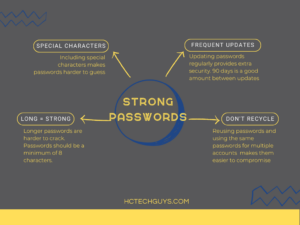
    learning how to secure a home network includes learning good password habits. Special characters, frequent updates, longer pw are stronger, don't reuse your passwordsWe talk about password hygiene a lot at Hill Country Tech Guys because it’s so important. Strong, unique, frequently updated passwords are an essential defense component for businesses and individuals alike. Passwords should not include personal details because they’re easily guessed. Ensure that your employees update passwords every 90 days and require multi-factor authentication.

  7. Secure Modems, Routers, and Their Networks

    Securing networks is a basic step that every internet service provider (ISP) both recommends and, in most cases, assists in completing. Wifi passwords should be strong and unique just like all other passwords.
    Securing modems and routers is a slightly different story. Modems and routers contain a gateway which allows access to the device by a computer. This is where users will change settings, set up network security, and maintain the interface. Ensuring the gateways are password protected creates another small layer to secure home networks. These devices often come with very generic usernames and passwords which makes them easy to gain access to. Strong, unique passwords are key!

  8. Inbox Hygiene

    Reducing the amount of spam coming to an inbox reduces the risk that an employee will click on or open something malicious. Ensure that your employees mark spam in their email clients. I.T. should set up a way to report suspicious or malicious looking messages and encourage employees to use this tool.

  9. Train Employees on Cybersecurity Best Practices and Policies

    Training your employees allows them to take an active part in defending against cyberthreats both for your business and in their personal lives. Set up regular and dynamic cybersecurity training to keep knowledge fresh.

  10. Hire a Reputable Cybersecurity Team

    Having the right people around makes all the difference. Hire a team of I.T. professionals to help you create impactful policies, train employees, and secure networks and devices. There is no governmental oversight currently on I.T. professionals or companies. Do your research, ask questions, get references. Hiring the wrong company or individual could cost you big.

[/vc_column_text][/vc_column][/vc_row][vc_row][vc_column][vc_column_text]

Convenience Should Never Take Priority Over Security

An additional item to consider for both remote and in-house employees is permissions. According to an article by The Daily Swig, cloud computing has created increased vulnerabilities for many companies.

“…improper authorization issues [rose] by 45% – largely because organizations are instituting ever-more granular permissions as they migrate to the cloud.”

Improper authorization refers to individual or organization-wide access to administrative controls. 99% of your company does not need administrative access to their computers or your network, including C level. While it may seem more practical to allow “trusted” individuals to have certain permissions, unless their job requires it, they don’t need them.[/vc_column_text][vc_column_text]The importance of working from secure environments cannot be overstated. Cybercrime is a growing threat that every company, and individual, should take seriously. Ensure you take the proper steps to educate your remote workers on how to secure a home network. Express the importance of security to staff on a regular basis, regardless of where they work. No company is completely safe from cybercrime but that doesn’t mean your company should be an easy target. Call Hill Country Tech Guys today to see how you can secure your growth.[/vc_column_text][/vc_column][/vc_row]

How to Reduce Spam: 8 Tips for a More Secure Inbox

[vc_row][vc_column][vc_column_text]Spam is an annoying feature that is deeply ingrained in electronic communication and it comes in many forms. Some are just marketing emails that aim to grab and keep your attention. Worst case, this type of spam clogs your inbox. Other types are far more nefarious aiming to gain a foothold in your system. Phishing attempts, social engineering attempts, and malicious links could be hidden in your unwanted email. Learning how to reduce spam helps keep your inbox tidy and keep your information more secure.[/vc_column_text][vc_column_text]

Why Spam Matters

Mark Jordon, Director of Cybersecurity at Hill Country Tech Guys, helps ensure that inbox hygiene is given the attention it needs, and for good reason.

“Almost 80% of all cybersecurity-related incidents are caused by someone opening or interacting with a malicious email,” Jordan said. “Threat actors know that many businesses have built the walls of their digital castle higher and stronger, and instead of assaulting the front gate they trick unsuspecting employees to open a side door by way of seemingly legitimate-looking emails.”

Jordan goes on to talk more about the potential risks associated with spam. “These emails are good. Really good. What may convincingly appear as an email from your bank, or even another person you actually know, may in truth be a ploy to trick you into opening a link or downloading an attachment which essentially gives an attacker free rein to your computer, and eventually your entire business.”

Jordon also states that using MFA and good password hygiene in tandem with training employees is an excellent defense.[/vc_column_text][vc_column_text]

How to Reduce Spam

Use the 8 tips to reduce the number of spam messages hitting your inbox:[/vc_column_text][vc_row_inner][vc_column_inner width=”2/3″][vc_column_text]

1.     Be thoughtful about giving out your email address

We live our lives online these days which means your email address is highly valuable information. Companies collect email addresses like your grandfather collected stamps, so be mindful of who you trust with your information. This also means being aware of where your email address is posted. Social media sites allow you to pick and choose what is and what is not shared publicly and with your friends and followers.

2.     Use your spam report feature

When you report a message as spam, it helps tune the algorithm to better process your mail in the future. It also helps identify potential sources of malicious intent.

3.     Check out the company’s privacy policy before submitting your email address

Most companies will have a privacy policy on their site when you sign up for their newsletters, marketing collateral, or create accounts. These policies list how user information is used and shared. If you can’t find one, you might not want to provide your information.

4.     Don’t forward chain letters

Part of learning how to reduce spam is learning not to contribute to spam. When you forward chain letters, you’re contributing to spam in the inboxes of people who have trusted you with their email addresses. Chain letters don’t just clog up your inbox. Adding senders also risks exposing other email addresses to potential spammers.

5.     Check preselected options before submitting

Often you will find that there are preselected options for marketing collateral when signing up for a “free” account. Be sure you uncheck any message types you do not want to receive. If you forget to uncheck marketing options, you should be able to unsubscribe once the messages start coming in. Check the bottom of your messages for the “unsubscribe” option.

6.     Don’t click links in emails from untrusted senders

Spotting an untrustworthy source in an email message is difficult so be sure you trust the sender before clicking that link. Often, phishing attempts will look like they come from a trusted sender. Check the sender’s address, logos, and other information in the email before you click that link. At best, clicking a link lets a user on the other end know that they have a good email address to continue to send messages to. Sometimes links are far more dangerous. By clicking a link, you could be downloading malicious software on your computer or into your company’s network.

7.     Make a free secondary account

This is the best solution to tip #1. There will be times when you must submit info to get something. Rather than filling up your regular use personal inbox or worse yet your work inbox, consider signing up for a free secondary email address used for marketing signups. Gmail offers free accounts with free (limited) cloud storage and is a trusted provider.

8.     Don’t reply to spam messages

Much like clicking the link in an email or answering a scam call, the only thing this does is confirm to the entity on the other end that they have a good working email that a live user is monitoring and responding to. You could open yourself up to additional emails and potential threats.[/vc_column_text][/vc_column_inner][vc_column_inner width=”1/3″][vc_raw_html]JTNDZGl2JTIwc3R5bGUlM0QlMjJwb3NpdGlvbiUzQSUyMHJlbGF0aXZlJTNCJTIwd2lkdGglM0ElMjAxMDAlMjUlM0IlMjBoZWlnaHQlM0ElMjAwJTNCJTIwcGFkZGluZy10b3AlM0ElMjAyNTAuMDAwMCUyNSUzQiUwQSUyMHBhZGRpbmctYm90dG9tJTNBJTIwMCUzQiUyMGJveC1zaGFkb3clM0ElMjAwJTIwMnB4JTIwOHB4JTIwMCUyMHJnYmElMjg2MyUyQzY5JTJDODElMkMwLjE2JTI5JTNCJTIwbWFyZ2luLXRvcCUzQSUyMDEuNmVtJTNCJTIwbWFyZ2luLWJvdHRvbSUzQSUyMDAuOWVtJTNCJTIwb3ZlcmZsb3clM0ElMjBoaWRkZW4lM0IlMEElMjBib3JkZXItcmFkaXVzJTNBJTIwOHB4JTNCJTIwd2lsbC1jaGFuZ2UlM0ElMjB0cmFuc2Zvcm0lM0IlMjIlM0UlMEElMjAlMjAlM0NpZnJhbWUlMjBsb2FkaW5nJTNEJTIybGF6eSUyMiUyMHN0eWxlJTNEJTIycG9zaXRpb24lM0ElMjBhYnNvbHV0ZSUzQiUyMHdpZHRoJTNBJTIwMTAwJTI1JTNCJTIwaGVpZ2h0JTNBJTIwMTAwJTI1JTNCJTIwdG9wJTNBJTIwMCUzQiUyMGxlZnQlM0ElMjAwJTNCJTIwYm9yZGVyJTNBJTIwbm9uZSUzQiUyMHBhZGRpbmclM0ElMjAwJTNCbWFyZ2luJTNBJTIwMCUzQiUyMiUwQSUyMCUyMCUyMCUyMHNyYyUzRCUyMmh0dHBzJTNBJTI2JTIzeDJGJTNCJTI2JTIzeDJGJTNCd3d3LmNhbnZhLmNvbSUyNiUyM3gyRiUzQmRlc2lnbiUyNiUyM3gyRiUzQkRBRldEbDBjRlRBJTI2JTIzeDJGJTNCdmlldyUzRmVtYmVkJTIyJTIwYWxsb3dmdWxsc2NyZWVuJTNEJTIyYWxsb3dmdWxsc2NyZWVuJTIyJTIwYWxsb3clM0QlMjJmdWxsc2NyZWVuJTIyJTNFJTBBJTIwJTIwJTNDJTJGaWZyYW1lJTNFJTBBJTNDJTJGZGl2JTNFJTBB[/vc_raw_html][/vc_column_inner][/vc_row_inner][/vc_column][/vc_row][vc_row][vc_column][vc_column_text]

Reducing Spam Reduces Risk

The number one vulnerability of any company is the end user. The more end users, the more weak spots your company has. New employees may be a target as they are unfamiliar with policies which makes them more likely to click. Training your employees on the fundamentals of cybersecurity best practices, including dealing with spam, will help make your company more secure. The earlier and more often you train, the better. If you’d like to talk to an industry leader about IT solutions tailored to your company, give us a call today.[/vc_column_text][/vc_column][/vc_row]

What You Need to Know About Microsoft End-of-Life

Every device has an end-of-life date, just like the products you buy at the supermarket. Microsoft end-of-life dates are easy to find, but it’s vital to understand what they mean for your business. Computers and servers are the biggest spends associated with Microsoft’s end-of-life. While these two systems are very different, the impact of the end of service life is very similar. Generally, a computer comes with one of two operating systems. You’ll either get a Mac running Apple’s operating systems or you’ll get a PC running Windows. Both operating systems get updates regularly.

You’re Taking on Water

We’ve all seen the pop-ups warning of impending updates. The device will give you the option to install and restart now, set a time for later, or snooze. These updates contain security patches and bug fixes for your operating system. This helps keep your device and in turn your network more secure. A security patch is rolled out when a weak point is found within a system, sort of like welding a leak on a ship. If that leak isn’t fixed it will cause problems later. When a Windows device reaches, one of Microsoft’s end-of-life dates it means the company is no longer patching those weak points.
It’s easy to look at this and go “it’s a small leak, no big deal.” Plugging the leak (think antivirus and firewall) won’t be enough. When an OS reaches the end of service life, a whole army of threat actors is waiting to find and exploit these weaknesses. Suddenly you’re cruising around in a vehicle known to have a weak spot. By not updating the OS, you’re leaving yourself and your company vulnerable to attacks.

It Can’t be that Easy

microsoft end of life end of server life quote every company should consider itself a target for threat actors because data is valuable

Once a known weak spot is found, threat actors immediately seek out as many machines still running this OS as they can. Since they already know exactly how to exploit this weakness, they make quick work of gaining access.

Servers are no different. Just like a computer, servers have both a physical housing with accompanying hardware and software that makes them function. The operation system, or software, within the server has an end-of-service life date that looms on the horizon. Currently, Microsoft server life is about five years of regular support with an additional five years of optional extended support, which can be very pricey. After this support comes to an end, your company’s out-of-date server becomes a huge target full of private data.

Remote workers present additional weaknesses to your organization too. Companies with BYOD policies should track the operating system of every device being used to access any part of the business and require those machines to be within their support life.

My Company is Too Small to be a Target

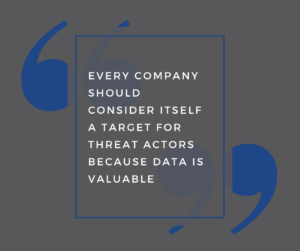
You’re wrong. There’s no sugarcoating this. You’re wrong. Every company should consider itself a target for threat actors because data is valuable. If you can’t see the value in your company’s data, it’s because you are the value. Say you have a data set that is truly lacking in value to the general public. It’s still valuable to you, making it a great ransomware target. Your data is valuable, and your company is not too small to be a target.
Outside of becoming an even bigger target than you already are, failure to update end-of-service life devices will hamper your productivity. Programs work with certain operating systems. Let’s say you buy new accounting software for your tax firm. You’ve replaced several machines recently, and the software works great on your Windows 10 machines, as it was designed to do. However, you’ve got five employees working off Windows 7. They’re struggling because the software isn’t designed for that operating system. You’ve drastically reduced the productivity of 5 of your employees. If one of their devices crashes while they’re working, you’re less likely to recover everything that was on the machine.

Microsoft End-of-Life Costs

microsoft end of life end of service life vector graphic of office lifeAs mentioned above, there is regular support and extended support. Extended support is expensive. For an EOL 2012 server, the extended support cost by year goes as follows: one year = 75% of the initial license cost, two years = 100 %, and three years = 125%. The kicker is after three years you still must purchase a new server. It makes far more sense to purchase the new server. It’s important to note EOL 2012 servers are already past extended support and should be replaced asap.
Let’s say you choose not to update, still believing your company isn’t a target. Your company suffers a cybersecurity incident. We’ll say ransomware. A threat actor has gained access to your system and had some time to do some digging around. Now, they know exactly how much cash on hand your company has. They would then attempt to ransom your data for that exact amount of money. Here’s the real kicker, they’re a criminal so you pay that money, who’s to say they return your data? How do you know they didn’t install a foothold in your system to do this again? How do you know the software they’re using will even work? It’s not like hacking software is regulated.

End of Service Life: The Bigger Picture

Another huge cost to consider is your company’s reputation. Both your customers and vendors now have to analyze the risk of doing business with you. “But we have Cybersecurity insurance.” Cybersecurity insurance doesn’t cover relationships and reputation. It also doesn’t insure your data.

Yet another cost: compliance. That’s right; your compliance depends on supported computer and server operating systems. HIPAA Journal gives detailed look at the cost of a HIPAA violation. If you’re keeping track, we’ve now spent the cost of data recovery, the downtime, and loss of productivity, the loss of trust with both vendors and clients and the fines. Don’t forget the hacker knew how much cash you had and leveraged it against you. This is a potentially business-ending incident.

Products You Need to Prepare For and Steps to Take

Microsoft has a well-established End-of-Life policy that outlines the lifecycle of its products. The policy provides businesses ample time to prepare for product retirement and migrate to newer versions or alternatives.

The Microsoft End-of-Life policy affects a wide range of products, including operating systems, servers, software applications, and cloud services. Some of the most popular products that have reached or are nearing End-of-Life include:

  • Windows 7
  • Windows Server 2008 R2
  • Microsoft Office 2010
  • Exchange Server 2010
  • SharePoint Server 2010

If your business relies on any of these products, it’s crucial to take action to ensure that your systems and data remain secure. Here are some steps you can take:

  1. Identify the products that are nearing End-of-Life or have already reached it. Microsoft provides a comprehensive list of its products and their lifecycle on its website.
  2. Develop a migration plan. This plan should include a timeline for transitioning to newer versions or alternative solutions. It’s essential to consider compatibility, training, and budget factors.
  3. Prioritize security. End-of-Life products are vulnerable to security threats and cyber attacks, as they no longer receive updates and patches. Make sure to implement robust security measures, such as firewalls, antivirus software, and intrusion detection systems.
  4. Consider the cloud. Many businesses are migrating to cloud-based solutions like Microsoft 365 to address End-of-Life concerns. Cloud solutions offer several advantages, including scalability, accessibility, and automatic updates.
  5. Get professional help. Migrating to new systems and solutions can be a complex and time-consuming process. Consider partnering with an IT provider that specializes in Microsoft products to ensure a smooth transition.

Microsoft End-of-Life is an essential consideration for any business that uses its products. By understanding the policy, identifying affected products, and taking proactive steps to migrate and secure your systems, you can avoid potential risks and ensure your business continues running smoothly. With the right planning and support, you can make the most of Microsoft’s products and services for years to come.