
IT for Multiple Office Locations: What to Decide Before You Open the Second One
The lease on the second location is signed and the build-out has a date. Somewhere on the punch list, between the furniture order and the signage, there’s a line that just says IT. That line is where the expensive decisions live, and it’s usually the last one anyone looks at. By the time it gets attention, the internet has been ordered, the space is framed, and the options that were cheap during planning have quietly become costly.
None of these decisions are hard on their own. Planning IT support for multiple locations comes down to a handful of choices that are simple to make early and painful to unwind later, and the difference is almost always timing.
What IT do you need when you open a second office?
A new location needs five things decided before move-in, not during it:
- Internet service at the site
- Connectivity back to your applications and the people at headquarters
- Identity and access, so staff sign in the same way they always have
- Configured devices and phones for the people working there
- A support plan for when something breaks
The order matters. The connectivity choice drives the internet you order, and business internet has a lead time measured in weeks, not days. Decide it last and the build-out waits on it. Decide it first and everything else falls into place around it.
How do you connect two office locations?
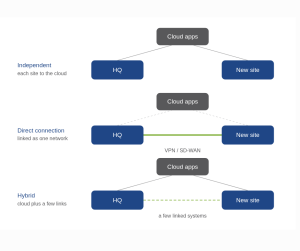 There are three common approaches.
- Keep each office independent. Each site has its own internet connection, and the applications everyone shares live in the cloud. This is the simplest model, and it fits firms whose core tools are already cloud-based.
- Connect the sites directly. Using a site-to-site VPN or SD-WAN, the two offices behave like a single business network across both locations. This fits firms that still run systems on-premises at one location that staff at the other need to reach, such as a local server, a line-of-business application, or a shared drive that hasn’t moved to the cloud.
- Run a hybrid. Most work happens in the cloud, but a few specific systems are linked between the buildings.
The right answer depends entirely on where your applications live and whether people at the new site need to reach anything physically located at the old one. Decide it before the internet is ordered. Changing it afterward means re-provisioning, and sometimes re-cabling, which is work you already paid to do once.
How do staff sign in across multiple locations?
The goal is that signing in feels identical no matter which building someone walks into. That happens when identity lives in the cloud rather than on a server in one office. With a platform like Microsoft Entra or Google Workspace, an employee’s account and the apps they’re allowed to open follow them to any location, and a new site doesn’t need its own login setup.
The work is deciding the rules once. Access is granted by role, so a front-desk hire at the new clinic gets exactly what every other front-desk hire gets, no more and no less. Multi-factor authentication and conditional access apply the same way everywhere, instead of being tightened at one office and overlooked at another. When the model is set centrally, opening a location is a matter of adding people to groups that already exist, not building access from scratch.
How do you support a location with no IT staff on site?
For a company between 20 and 250 people, the realistic answer is that no single location has a full-time technician sitting in it. Support has to be remote and centralized, which comes down to three things in practice:
- Standardized hardware, so every site runs the same equipment instead of a different mix in each building
- Remote management on every device, so problems can be seen and resolved without someone driving up the corridor
- One team with a single view of all locations, rather than a separate arrangement for each office
If you already have an internal IT person or team, this doesn’t replace them. In a co-managed setup, they keep owning what they own, and the multi-site rollout, the standardization, and the after-hours coverage come off their plate, so a new location isn’t one more thing they have to absorb alone.
The slow failure here is letting each location accumulate its own setup, its own vendors, and its own quirks. Every difference between offices becomes one more thing a person has to remember, and the cost of that shows up gradually, as the newer office becomes harder to support than the original ever was.
How do security and compliance carry across multiple locations?
The work here is consistency, not constant alarm. A second location extends the scope of everything you already hold to a standard. For a medical practice, the new office sits inside the same HIPAA obligations as the first. For a law firm, the same client-confidentiality expectations. For a financial services firm, the same controls your clients and examiners already expect to see.
Firms that handle this well decide the standard once, how access is granted, how devices are configured, how data is backed up, and apply it identically at every site. That’s far cheaper, and far easier to stand behind, than building each office its own way and then reconciling three different setups when someone asks how the second location is protected. The discipline is straightforward: set the rule first, then open the door, rather than opening the door and writing the rule afterward.
What does multi-location IT cost, and when should you budget for it?
The cost falls into two buckets. There’s one-time setup, which covers network equipment, cabling, devices, and configuration, and there’s ongoing management, usually priced per user or per site. The setup is a knowable number once the connectivity model is chosen. The ongoing cost scales with people, not square footage, so a larger but lightly staffed location often costs less to run than a smaller, busier one.
The common mistake is treating IT as a move-in expense rather than a line in the expansion plan. The number is far easier to control when it’s decided alongside the lease, while you still have choices, than after the space is built and the deadline is making the decisions for you.
What this looks like once it’s standardized
 Hill Country Tech Guys supports a medical practice that now runs more than 60 locations. When they came to us, they had a handful of clinics and the IT behind them was scattered, a different setup in each building and no single way anything was done.
The first work was organizing what already existed and setting the standards: how the network gets built, how hardware is specified, how access is granted, how each site connects back to the rest. Once that was in place, opening a location stopped being a project and became a process.
Today they open two to three new clinics a year, and the routine is the same every time. They send us the building plans. We map the network to the floor plan, install it, standardize the hardware, and set up access before move-in. By opening day, the staff just show up and work, the same way they do at every other site, inside the same HIPAA standard that applies everywhere else.
That repeatability is the point. The standard was decided once, early, so every new location inherits it instead of inventing its own.
The pattern is timing
The connectivity model, the access plan, the support structure, the security standard, and the budget all share one trait. Each is straightforward when it’s decided during planning and expensive when it’s decided under pressure during move-in week. Opening a second location is a good problem to have, and it goes well when IT is part of the expansion conversation from the start rather than a punch-list item discovered at the end.
Frequently asked questions
Can you plan the IT before the lease is signed?
Yes, and it’s the best time to do it. Before signing, you can confirm what internet service is available at the address, which isn’t guaranteed and occasionally changes which space is workable. You can size the network to the floor plan, and you can build the cost into the expansion budget instead of absorbing it as a surprise later. Planning early doesn’t commit you to spending early. It means the decisions get made while you still have options.
How long does it take to set up IT at a new location?
The work itself is usually a few days to a couple of weeks once equipment is on site. The long pole is almost always the internet circuit, which can take several weeks to provision depending on the address and the service type. That single lead time is the reason connectivity should be the first decision, not the last. Everything else can move quickly once it’s in motion.
How do phone systems work across two office locations?
On a modern cloud platform, both offices operate as one phone system. A call can ring at both locations, an employee keeps the same extension whether they’re in either building, and calls route or transfer between sites without anyone thinking about where the other person is sitting. This runs on UCaaS rather than a separate phone system installed in each office, which is the older and more expensive way to do it.
What is UCaaS?
UCaaS stands for unified communications as a service. It’s a cloud platform that brings your phone calls, video meetings, messaging, and team chat together into one subscription service, rather than a phone system that lives on a physical box in a closet. Most modern business phone systems are UCaaS, even when people still call them VoIP. The difference is worth knowing: VoIP is the underlying technology that carries a call over the internet, while UCaaS is the full service built on top of it. For a second location, that distinction matters, because a UCaaS platform treats both offices as a single system instead of two phone systems that have to be stitched together.
Do both locations need the same internet speed?
Not necessarily. The right speed is driven by what happens at each site, the number of people, and the kind of work they do. A location running video calls, cloud applications, and a busy front desk needs more capacity than a small satellite office with a few staff. Reliability matters more than raw speed, which is why a second connection or a cellular backup is often worth more at a location that can’t afford to go dark.
What changes if the two offices are in different cities?
Less than people expect. Distance doesn’t change the core decisions, since the systems are managed remotely either way. It does mean each location will have its own internet provider, and if the sites are linked directly rather than through the cloud, the connection between them has to account for the distance. The support model stays the same. One team manages both locations from a single view, whether they’re ten minutes apart or two hours apart.
Who supports the new location day to day?
The same way the original office is supported, through remote monitoring and management, with on-site help dispatched when something physically needs hands on it. The goal is that staff at the new location get the same experience asking for help as everyone at headquarters, without a separate process or a different number to call.
Plan the second location before you sign
If a second location is on your roadmap, Hill Country Tech Guys can map the IT plan for it before you sign the lease, so the network, the access, the phone system, the support model, and the cost are decided alongside the space instead of after it. Tell us where and when you’re expanding, and we’ll lay out exactly what the new site needs.