Cybersecurity Compliance for 2026: A Q4 Readiness Guide for Growing Businesses

As 2025 winds down, most companies are finalizing budgets, wrapping up projects, and planning for the year ahead. For growing organizations across Texas, one area that can’t wait until January is cybersecurity compliance.

Regulatory pressure is increasing, insurance requirements are tightening, and clients are asking tougher questions about how their vendors protect data. Compliance used to be a box you checked at renewal time. Today, it’s a continuous process that defines whether your business is secure, insurable, and trustworthy.

If 2025 was the year of catching up, 2026 is the year of proving it. And Q4 is the time to start preparing.

What Cybersecurity Compliance Means in 2026

Cybersecurity compliance refers to the policies, processes, and technical controls you put in place to meet security and privacy requirements, both legal and contractual.

That includes frameworks such as HIPAA, FTC Safeguards, NIST 800-53, and CMMC, depending on your industry and client base. Even if you’re not in a regulated sector, your cyber insurance policy likely requires documented protections and regular reviews.

The key shift going into 2026 is accountability.

Regulators, insurers, and clients are no longer satisfied with a signed policy. They expect proof that you actively maintain compliance through documented training, audits, and measurable outcomes.

In other words, compliance is no longer paperwork. It’s evidence.

Why Compliance Is Changing and Why 2026 Matters

Over the past year, new regulations have begun to shape what cybersecurity readiness means for small and midsize businesses, especially for organizations operating across Texas and in compliance-heavy industries.:

  • FTC Safeguards Rule: Now applies to many non-financial businesses that collect customer data, requiring risk assessments, encryption, and incident response plans.
  • HIPAA Modernization Efforts: Healthcare providers and partners are expected to strengthen business associate agreements and records.
  • Cyber Insurance Underwriting: Providers are tightening requirements for MFA, endpoint detection, and staff training logs.

By 2026, these expectations will not just be best practices. They will be the minimum standard for doing business securely.

Companies that wait to address compliance until they renew insurance or face an audit risk finding out too late that their processes don’t hold up.

Q4 is your window to get ahead of that curve.

The Cost of Waiting Until 2026

Graphic quote reading ‘The cost of waiting isn’t just financial — it’s credibility, time, and trust,’ from Hill Country Tech Guys’ 2026 cybersecurity compliance readiness guide, shown over a blue and gray background with a half globe made of connected network lines and dots.Most businesses don’t skip compliance because they don’t care. They skip it because they are busy. For many Texas businesses, that busyness collides with tightening insurance requirements and vendor security reviews late in the year.

But the cost of waiting is often higher than the cost of planning.

Here is what we have seen across industries:

  • Delayed contracts: Clients increasingly require proof of security measures before signing or renewing agreements.
  • Insurance denials: Missing controls, such as MFA or documentation, can result in rejected claims or higher premiums.
  • Regulatory fines: Non-compliance with FTC, HIPAA, or data privacy laws can cost thousands per incident.
  • Operational stress: Scrambling to document everything during an audit or renewal pulls teams off core work.

Planning now prevents the January scramble later and builds confidence with every vendor, insurer, and customer you work with.

How to Start Preparing in Q4 2025

You don’t need to rebuild your entire cybersecurity program this quarter, but you do need a plan.

Here are the first steps every business should take before the year ends:

1. Conduct a Compliance Gap Assessment

Start with an honest look at your policies, systems, and documentation.

  • Are all your employees completing cybersecurity training annually?
  • Do you have a written information security plan (WISP)?
  • Are backups tested and verified?
  • Can you show records of updates, permissions, and incident response testing?

2. Review Vendor and Partner Security

Compliance doesn’t stop at your network. Check who can access your systems. This includes vendors, contractors, and third-party applications. Make sure they meet your security standards.

3. Refresh Incident Response and Recovery Plans

If your incident response plan has not been tested in 12 months, schedule a tabletop exercise before year-end. These dry runs uncover process gaps long before a real event.

4. Document, Don’t Just Do

2026 will be the year of proof. Keep training logs, policy updates, and access control reviews in a central repository. Your MSP can help manage this. The more you can show your compliance story, the less you will have to explain it later.

Building Your 2026 Compliance Roadmap

Once you have identified gaps, you can build a quarterly plan that turns compliance from a project into a process.

2026 Cybersecurity Compliance Roadmap

  1. Q4 2025 · Assess

    Identify gaps, update WISP, plan budgets.

  2. Q1 2026 · Remediate

    Implement missing controls and document fixes.

  3. Q2 2026 · Verify

    Run audit simulations and collect reports.

  4. Q3 2026 · Optimize

    Review outcomes, refine training and reporting.

By the end of 2026, you should have a clear, defensible record of your security posture. Not just a stack of policies, but an ongoing practice of risk management.

This approach also makes annual insurance renewals and audits far easier because you’re never starting from scratch.

The Role of Your MSP in Compliance Readiness

Most compliance frameworks require the same foundational elements:

  • Regular patching and system updates
  • Secure backups
  • Access control and MFA
  • Endpoint protection and monitoring
  • Documentation and reporting

Your managed service provider (MSP) can serve as your technology compliance partner, not just a helpdesk.

At Hill Country Tech Guys, we integrate compliance into daily IT operations for organizations across Texas, from monitoring and maintenance to documentation and reporting.

That means:

  • You can prove what you’re already doing right.
  • You can fix gaps proactively instead of reactively.
  • You have a partner who understands both the technical and strategic sides of compliance.

Compliance isn’t about adding work. It’s about ensuring the work you’re already doing is documented, defensible, and aligned with business goals.

2026 Cybersecurity Compliance Checklist

Use this simplified interactive checklist to guide your year-end review:

2026 Cybersecurity Compliance Checklist

Tip: click to check items off. Progress is not saved after reload.

Each box you check off strengthens your defensible compliance posture and proves that your organization isn’t only aware of risk but actively managing it.

FAQs about Cybersecurity Compliance

What frameworks apply to SMB cybersecurity compliance in 2026?

Common frameworks include HIPAA for healthcare, the FTC Safeguards Rule for financial and consumer data, NIST 800-53 for general security controls, and CMMC for defense contractors. Even unregulated businesses should align with at least one framework for cyber-insurance eligibility.

Why does Q4 matter for compliance planning?

Q4 is when most companies set budgets and finalize technology plans. Starting compliance work now allows teams to remediate gaps, document controls, and enter 2026 ready for audits and insurance renewals.

How can a managed service provider help with cybersecurity compliance?

An MSP like Hill Country Tech Guys manages the technical side of compliance—patching, monitoring, MFA enforcement, and reporting—while guiding your organization through documentation and training so every control is both active and auditable.

Compliance as Confidence

The businesses that treat compliance as an annual audit exercise will always feel behind. Those who treat it as a living practice will build trust, qualify for better insurance rates, and avoid costly disruptions.

Q4 is your opportunity to shift from reactive to ready. 2026 will reward the companies that plan ahead, and your future clients, insurers, and auditors will thank you for it.

Start with a 2026 plan you can prove. Contact Hill Country Tech Guys to begin your compliance readiness review with a Texas-based team that understands your regulatory landscape. 

SD-WAN for Healthcare: Building Reliable Networks That Protect Patient Care

Why Healthcare Needs Reliable Network Uptime

For hospitals and clinics across Texas, where staffing shortages, rural coverage gaps, and aging infrastructure are common, network uptime is not optional. Losing access to electronic health records (EHRs), telehealth platforms, or imaging systems can delay treatment and impact patient safety. That’s why healthcare IT leaders are prioritizing network uptime as a core strategy.

For many healthcare organizations, the answer is SD-WAN. When combined with network redundancy and failover strategies, SD-WAN creates a smarter, more resilient infrastructure that keeps care moving even when the unexpected happens.


What Is SD-WAN?

At its core, SD-WAN is a smarter way to run your internet. It uses software to spread traffic across multiple connections, so if one has problems, your network automatically switches to the best option to keep everything running.

More technically, SD-WAN (Software-Defined Wide Area Networking) is a technology that uses software to manage and control how data travels across your network. Instead of relying on a single internet connection or a fixed hardware setup, SD-WAN allows you to use multiple connections (like fiber, broadband, and LTE) and route traffic intelligently across them.

Key points about SD-WAN:

  • It continuously monitors the health of all available connections.

  • It automatically chooses the best path for traffic in real time.

  • It gives IT teams visibility and control over network performance.

For hospitals and clinics across Texas, SD-WAN means you are no longer at the mercy of one unstable internet line. The system adapts instantly, keeping patient care applications running smoothly even if one connection has problems.


What Is Failover and Why Does It Matter in Healthcare

Failover works like a backup plan for your network. When the primary connection or device stops working, failover automatically switches to another one so everything keeps running.

In healthcare, that looks like:

  • The network reroutes traffic to a backup line the moment the main internet goes down.

  • A standby firewall takes over instantly if the primary one fails.

Hospitals and clinics rely on failover to give doctors, nurses, and staff uninterrupted access to the systems they need for patient care. This is especially critical for Texas healthcare organizations serving large geographic areas or operating multiple facilities with shared systems. No more delay in critical meds from the pharmacy or gaps patient information.


Network Redundancy in Healthcare IT

Redundancy makes failover possible. It gives your network more than one path to keep running when something breaks.

In healthcare IT, redundancy includes:

  • Running two internet service providers instead of one.

  • Keeping backup routers and firewalls ready to activate.

  • Using cloud storage so patient data stays safe if local servers fail.

When IT teams build redundancy and failover together, they turn fragile networks into reliable ones. For healthcare providers across Texas, this reliability also supports compliance requirements and reduces risk during audits and insurance reviews.


How SD-WAN Improves Healthcare IT Uptime

Traditional failover only activates when a connection goes completely offline. That still leaves room for issues like dropped calls, frozen telehealth sessions, or slow access to EHRs.

SD-WAN solutions in healthcare take it a step further. It constantly monitors the quality of network connections by tracking latency, jitter, and packet loss. It then automatically routes traffic along the best-performing path in real time.

For hospitals and clinics, this means:

  • Telehealth visits run without interruptions.

  • Imaging files transfer quickly and reliably.

  • Providers across departments have seamless access to records and applications.

SD-WAN is not just reactive. It is proactive, ensuring consistent healthcare IT uptime.


Case Study: A Rural Hospital’s Uptime Transformation

Before implementing SD-WAN, one rural Texas hospital dealt with daily internet problems that directly impacted patient care. Staff struggled to reliably access electronic health records, telehealth appointments often dropped mid-call, and even small outages created risks that slowed down treatment and frustrated patients. Leadership knew they needed to act quickly so they reached out to Hill Country Tech Guys for help.

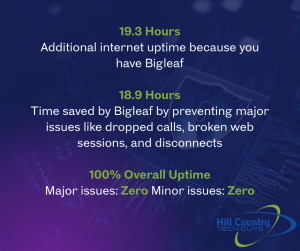
sd-wan blog image with bigleaf statistics After deploying SD-WAN with built-in failover and redundancy, tailored for healthcare, the hospital’s experience changed completely. For the past seven years, the hospital has not experienced a single outage that disrupted patient care. Providers trust their systems to work consistently, even when one internet line slows or fails. What was once fragile and unpredictable became reliable and resilient.

The results speak for themselves:

  • In August 2025, the hospital gained 19.3 additional hours of uptime.

  • SD-WAN prevented 18.9 hours of major disruptions such as dropped calls and broken web sessions.

  • The facility achieved 100% uptime for the month.

With SD-WAN, the hospital can also make changes to its internet service, like switching providers or upgrading connections, without any impact on daily operations. This flexibility gives IT staff more control and allows leadership to focus on improving patient services instead of worrying about downtime.


Why Network Uptime Is Different in Healthcare

Most businesses see downtime as lost productivity. In Texas healthcare environments, where facilities may serve rural populations or operate across wide regions, downtime carries even greater risk:

  • Missed patient records.

  • Delayed diagnoses.

  • Interrupted telehealth sessions.

  • Medication or scheduling errors.

That is why network redundancy in healthcare is not optional. It is a patient safety issue. IT leaders must design systems where uptime is nearly guaranteed, not just expected.


The Human Cost of Network Downtime in Healthcare

When healthcare networks go down, the impact reaches far beyond IT. Downtime directly affects how providers deliver care and how patients experience it.

  • Delayed treatments: If electronic health records (EHRs) are unavailable, clinicians may not have access to patient histories, lab results, or imaging when they need them.

  • Medication risks: Interruptions in pharmacy systems can delay prescriptions or cause dangerous errors.

  • Interrupted communication: Telehealth appointments and secure messaging can drop mid-session, leaving patients frustrated and providers unable to connect.

  • Patient safety concerns: Even short outages can lead to gaps in monitoring, scheduling errors, or missed updates in patient charts.

Research published in the Journal of the American Medical Informatics Association found that hospitals experience an average of 43 hours of EHR downtime per year, underscoring just how common and disruptive these events can be.

Downtime doesn’t just cost money. It costs time, trust, and in some cases, patient safety. That’s why healthcare organizations are turning to SD-WAN, redundancy, and failover strategies to ensure their systems remain available when they are needed most.


Steps to Improve Healthcare Network Uptime

If your organization is considering SD-WAN, here are key steps to build a stronger and more resilient network:

  1. Identify single points of failure. Review your current setup and find where a single outage could take down your operations.
  2. Add redundancy. Bring in backup internet connections, hardware, or cloud-based services.
  3. Test failover regularly. Run simulations so you know backups will activate when needed.
  4. Prioritize critical traffic. Ensure EHR systems and telehealth always have top priority.
  5. Monitor continuously. Use tools that give your IT team constant visibility into network health.

At Hill Country Tech Guys, we help hospitals and clinics turn this checklist into a working strategy. From design to implementation, we make sure redundancy, failover, and SD-WAN keep your systems reliable and your patient care uninterrupted.


SD-WAN for Healthcare Is About More Than IT

Network resilience comes down to two things: redundancy and failover. With SD-WAN, healthcare organizations get smarter failover strategies that deliver consistent uptime and protect patient care.

If your hospital or clinic is relying on a single internet provider or an untested backup plan, it is time to revisit your strategy. Texas healthcare organizations cannot afford network strategies that fail under pressure. Because in healthcare, downtime is not just an inconvenience. It is a risk.

📞 830-386-4234
✉️ [email protected]
🌐 hctechguys.com

SD-WAN in healthcare is a network solution that routes traffic across multiple internet connections in real time. It improves uptime and ensures critical systems like EHRs, telehealth, and imaging stay online even if one connection fails.
SD-WAN constantly monitors internet performance and moves traffic to the best available path. This prevents dropped telehealth calls, delays in accessing records, and interruptions to patient care.
SD-WAN is not a compliance requirement by itself, but it supports HIPAA, SOC 2, and NIST standards by ensuring reliable, documented access to patient data and critical systems.
Traditional failover only switches connections after a complete outage. SD-WAN detects issues like jitter or packet loss and reroutes traffic before downtime occurs, keeping systems stable and patient care uninterrupted.

Top 10 Cybersecurity Best Practices for Employees

In today’s digital world, cybersecurity is crucial for protecting sensitive information and keeping business operations running smoothly. Employees play a vital role in safeguarding their company’s data, especially for organizations operating across Texas, where remote work and digital collaboration are now the norm.

Cybersecurity Best Practices That Actually Work

1. Use Strong Passwords

Creating strong, unique passwords for each account is essential for preventing cyber attacks. A strong password is at least 12 characters long. It includes uppercase and lowercase letters, numbers, and special characters.

Avoid using easily guessable information like birthdays or common words. For example, instead of using “Password123,” try something like “T!m3T0W0rk$.” Additionally, consider using a password manager to generate and store complex passwords securely.

2. Enable Multi-Factor Authentication (MFA)

Multi-factor authentication (MFA) adds an extra layer of security to your sign-in process. This requires two or more verification methods to access an account. This could include something you know (password), something you have (a mobile device), or something you are (fingerprint).

Enabling MFA significantly reduces the risk of unauthorized access. For instance, even if someone guesses your password, they would still need your phone to log in. Many services, such as email providers and financial institutions, offer MFA options you can enable in your account settings.

3. Recognize Phishing Attempts

Phishing attacks are designed to trick you into providing sensitive information, such as login credentials or financial details. Be cautious of emails, messages, or websites that ask for personal information. Look for signs of phishing, such as suspicious email addresses, generic greetings, and urgent requests.

For example, an email that says “Your account will be locked unless you verify your password now!” is likely a phishing attempt. Always verify the sender’s email address and avoid clicking on suspicious links. If in doubt, contact the organization directly using a known, trusted method. These types of scams are increasingly common across Texas businesses of all sizes, making employee awareness one of the most effective defenses.

4. Keep Software Updated

Regularly updating your software, including operating systems, applications, and antivirus programs, is essential for protecting against threats. Enable automatic updates whenever possible to ensure you have the latest security patches. Outdated software can have vulnerabilities that cybercriminals exploit.

For example, an old version of your web browser might not protect you from the latest malware. Keeping your software up to date helps close security gaps and protect your devices from new threats.

5. Secure Personal Devices

cybersecurity best practices vector of a breachIf you use personal devices for work, make sure they are secure. This includes using strong passwords, enabling encryption, and installing security software. Avoid using public Wi-Fi networks for work-related activities. They are easily compromised.

For instance, if you must use public Wi-Fi, use a VPN to encrypt your connection and protect your data. Ensure that your devices lock automatically after a period of inactivity.

6. Use VPNs for Remote Work

A Virtual Private Network (VPN) encrypts your internet connection, making it more secure when accessing company resources remotely. Always use a VPN when working from home or other remote locations to protect sensitive data from potential eavesdroppers.

For example, a VPN can prevent hackers from intercepting your emails or accessing your company’s internal network. Many organizations provide VPN access to their employees. Use it whenever you are working outside the office.

7. Regularly Back Up Data

Back up your data regularly. Use cloud-based and physical backup solutions to protect your data from loss or corruption.

For instance, you can use an external hard drive for physical backups and a cloud service like Google Drive for online backups. Set up automatic backups to ensure your data is always up-to-date and secure.

8. Limit Access to Sensitive Information

Only access sensitive information when necessary and ensure that it is stored securely. Use access controls to restrict who can view or edit sensitive data. Regularly review permissions in your company to ensure they are up to date.

For example, if employees leave the company, revoke access to company systems immediately. Implement role-based access control (RBAC) so employees can only access the information they need to perform their jobs.

9. Report Suspicious Activity

If you notice any unusual activity on your accounts or devices, report it to your IT department immediately. Early detection of potential security threats can help prevent more significant issues down the line. For instance, if you receive an unexpected password reset email, report it even if you didn’t request a reset. Your IT team can investigate and take appropriate action to protect your accounts and data.

10. Participate in Cybersecurity Training

Regular cybersecurity training helps employees stay informed about the latest threats and best practices. Many Texas organizations now rely on ongoing training to reduce risk and meet insurance and compliance expectations. Participate in training sessions and stay updated on company policies. For example, training can teach you how to recognize phishing emails, use secure passwords, and protect your devices.

Putting Cybersecurity Best Practices into Action 

Many organizations offer ongoing cybersecurity training programs. These programs train employees how to spot potential threats. They also train employees on where to report threats.

By following these cybersecurity best practices, employees can help protect their company’s data and systems from cyber threats. Remember, cybersecurity is a shared responsibility, and every action counts. Stay vigilant and proactive in safeguarding your digital environment.

Concerned about the security of your company? Concerned about the security of your company? Hill Country Tech Guys supports Texas businesses with practical cybersecurity training and protection strategies. Give us a call at 830-386-4234.

The Power of Business Management Software

Managing various operations efficiently is crucial for success in today’s fast-paced business environment. Business management software has emerged as a powerful tool to help organizations streamline and automate their processes. They integrate multiple functionalities into a single platform, enabling businesses to operate more effectively and make informed decisions.

What is Business Management Software?

Business management software is a comprehensive suite of applications designed to streamline and AUTOMATE various business processes. This allows you to manage your business operations more efficiently and effectively.

Core Functionalities:

  • Project Management: Helps in planning, executing, and monitoring projects. Features include task assignment, progress tracking, and deadline management.
  • Customer Relationship Management (CRM): Manages interactions with customers and prospects. Features include contact management, sales tracking, and customer support.
  • Accounting: Handles financial transactions and reporting. Features include invoicing, expense tracking, and financial analysis.
  • Inventory Management: Manages stock levels and order fulfillment. Features include inventory tracking, order processing, and supplier management.
  • Collaboration Tools: Facilitates communication and teamwork. Features include messaging, file sharing, and collaborative document editing.

Popular Examples:

  • NetSuite: An integrated cloud business software suite that includes ERP, CRM, and e-commerce.
  • Zoho One: A comprehensive suite of applications for managing various business functions.
  • Jira: A project management tool primarily used for software development but adaptable to other industries.

Key Features to Look for in Business Management Software

Choosing the right business management software can be overwhelming because of the many available options. However, focusing on key features that align with your business needs can simplify the process. Here are the essential features to consider:

business management software vector of woman around calendr and hourglass User-Friendly Interface

  • Intuitive Design: Ensures easy navigation and reduces the learning curve.
  • Clean Layout: Helps users find what they need without frustration.

Data Security

  • Encryption: Protects sensitive information from cyber threats.
  • Secure Access Controls: Limits access to authorized users only.
  • Regular Security Updates: Keeps your data safe with the latest security measures.

Workflow Automation

  • Automated Data Entry: Reduces manual errors.
  • Report Generation: Saves time on creating reports.
  • Customer Follow-Ups: Automates routine customer interactions.

Agility

  • Handles Increased Workloads: Supports business growth.
  • Adapts to Evolving Needs: Ensures the software grows with your business.

Integration Capabilities

  • Email Platform Integration: Enhances communication.
  • Accounting Software Integration: Streamlines financial processes.
  • E-commerce Site Integration: Improves sales and inventory management.

Benefits of Business Management Software

Implementing business management software can bring a multitude of benefits to your organization. Here are some key advantages:

Improved Efficiency and Productivity

Automation of Routine Tasks:

Business management software automates repetitive tasks such as data entry, scheduling, and reporting. This allows your team to focus on more strategic activities that drive growth and innovation.

Streamlined Processes:

The software integrates various business functions into a single platform, reducing the time and effort required to complete tasks. This leads to faster turnaround times and increased productivity.

Better Decision-Making with Real-Time Data

Access to Up-to-date Information:

The software provides real-time data on various aspects of your business, including sales, inventory, and financial performance. This ensures that you always have the most current information at your fingertips.

Data-Driven Decisions:

You can make informed decisions that enhance your business strategy and operations with accurate and timely data. This helps you identify opportunities, mitigate risks, and optimize resources.

Enhanced Customer Satisfaction

Integrated CRM Features:

Business management software often includes CRM functionalities that help you manage customer relationships more effectively. You can track customer interactions, preferences, and feedback, allowing you to provide personalized service and support.

Personalized Service and Support:

By understanding your customers’ needs and preferences, you can tailor your offerings and communication to enhance their experience. This leads to higher customer satisfaction and loyalty.

Automation of Manual Processes:

Manual processes are prone to errors, which can be costly and time-consuming to rectify. Business management software automates these processes, reducing the likelihood of errors and ensuring that operations run smoothly.

Smooth Operations:

The software ensures accurate data and better compliance through automated workflows and integrated systems. This leads to more efficient operations and improved overall performance.

How to Choose the Right Software

Selecting the right business management software involves careful consideration of your specific needs and preferences. Here are some steps to guide you:

Identify Your Business Needs

Start by assessing your business requirements. Determine which processes need improvement and what features are essential for your operations. This will help you narrow down your options and focus on software that meets your specific needs.

Compare Different Software Options

Research and compare various business management software solutions. Look at the features, pricing, and user reviews to get a sense of what each option offers. Create a shortlist of software that aligns with your business needs and budget.

Consider Factors Like Growth, Ease of Use, and Cost

Evaluate the software’s agility to ensure it can grow with your business. Consider the ease of use, as a user-friendly interface will reduce your team’s learning curve. Additionally, factor in the cost, including any hidden fees or long-term expenses, to ensure it fits your budget.

Read User Reviews and Case Studies

User reviews and case studies can provide valuable insights into the software’s performance and reliability. Look for feedback from businesses similar to yours to understand how the software has benefited them. This can help you make a more informed decision.

By following these steps, you can pick the right business management software. This will help improve your operations, boost efficiency, and support your business growth.

Implementation Tips for Business Management Software

Successfully implementing business management software requires careful planning and execution. Here are some tips to ensure a smooth transition:

business management software vector of man and woman doing business plannningPlan the Implementation Process

Create a Detailed Plan: 

Start by outlining the steps involved in the implementation process. Set realistic timelines and assign responsibilities to team members. A well-structured plan helps ensure that everyone is on the same page and that the implementation progresses smoothly.

Conduct a Pilot Test:

Before rolling out the software across the entire organization, conduct a pilot test with a small group of users. This helps identify potential issues and allows you to make necessary adjustments before full-scale implementation. A pilot test can also provide valuable feedback on the software’s usability and effectiveness.

Train Your Team

Organize Training Sessions: Proper training is essential for maximizing the benefits of your new software. Schedule training sessions to familiarize your team with the software’s features and functionalities. Hands-on training can help users feel more confident and competent in using the software.

Provide Comprehensive Materials: Support ongoing learning by providing comprehensive training materials, such as user manuals, video tutorials, and FAQs. These resources can help your team. They can use them to fix problems and learn more about the software.

Monitor and Evaluate the Software’s Performance

Track KPIs: Continuously monitor the software’s performance by tracking key performance indicators (KPIs). These metrics can include productivity levels, efficiency gains, and user satisfaction. Regularly reviewing KPIs helps you assess the software’s impact and identify areas for improvement.

Regular Reviews: Schedule regular reviews to evaluate the software’s performance and gather feedback from users. These reviews can help you make data-driven decisions and ensure that the software continues to meet your business needs.

Adjust Settings and Workflows as Needed

Customize the Software: As your team becomes more comfortable with the software, you may need to customize settings and workflows to optimize its use. Tailor the software to align with your specific business processes and preferences, ensuring it supports your operational goals.

Feedback and Adjustments: Encourage your team to provide feedback on the software’s performance and usability. Be open to making necessary adjustments based on this feedback to enhance the software’s effectiveness and user experience.

Following these implementation tips ensures a successful transition to your new business management software, leading to improved efficiency and productivity across your organization.

Embrace the Power of Business Management Software

Business management software is an invaluable asset for any organization looking to enhance efficiency, improve decision-making, and boost customer satisfaction. This software automates routine tasks and gives real-time data insights. It helps businesses improve their operations and cut down on manual errors.

Consider your specific needs, compare different options, and evaluate factors like growth, ease of use, and cost. With careful planning and execution, implementing business management software can significantly improve productivity and overall business performance. Embrace the power of business management software and take your organization to new heights.

Are you ready to take your business to the next level? Hill Country Tech Guys offers strategic IT solutions and support to help you achieve your business goals. We provide comprehensive services tailored to your unique needs. Contact Hill Country Tech Guys today to learn how their expertise can drive your business forward.